
There is a unique new Dock in town, and that is Circle Dock for Windows 7. This tool lets you launch your programs from a circular dock that sits on your Windows desktop. Circle Dock allows you to launch your programs from a circular dock.
The idea behind Circle Dock is that the dock should appear where your mouse is instead of you having to move your mouse to the dock like with other programs. It is accomplished by making the dock a circular or spiral shape so that it can be placed anywhere, even near the edge of the screen. The off-screen portions of the dock are easily reached by just scrolling with your mouse wheel or arrow keys.
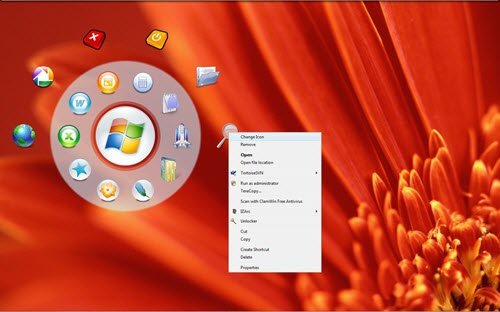
Circle Dock for Windows 7
Once you have downloaded and installed Circle Dock, you will find that it appears where your mouse is by merely pressing the default F1 hotkey or the middle mouse button. It lets you drag and drop your files, folders, and shortcuts onto a circular dock that you can resize. You can rotate the dock with either your mouse wheel or the keyboard arrow keys.
If you open the settings panel, you will be able to see many customization options. You can also change the image displayed for the icons and change the skins. Just set the program to “Icon Replacement Mode” in the right-click menu of the center icon, and you can switch all the icon images.
Circle Dock for Windows also lets you toggle the visibility of the dock by moving your mouse to any edge of your screen, or rotate the dock with your mouse wheel or change sensitivity of the dock.
Circle Dock Features
- Drag and drop your files, folders, and shortcuts onto a circular dock that you can resize.
- Rotate the dock with either your mouse wheel or the keyboard arrow keys.
- Change the image shown for the icons and change the skins
- Rotate the dock with your mouse wheel or arrow keys (customizable).
- Run dockets, live synchronization of the dock icons.
There are many program launchers out there, but Circle Dock appears to be unique in terms of its good looks. You can download it from here.
