
There is no end to customizing Windows, and this is exactly what enthused our 14-year old TWC Forum member in creating this small app AeroTile. It is therefore with great pleasure that we are releasing it today.
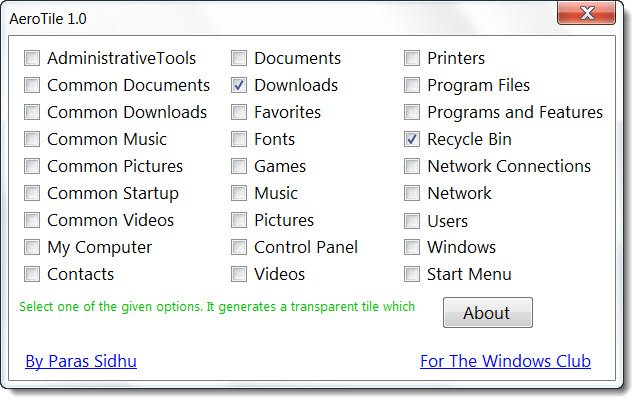
AeroTile for Windows desktop
AeroTile is a portable freeware app that adds glassy backgrounds to system folders and places them on your Windows desktop to give you ready access to these folders.
If you are looking for a change of scene, this app will give your desktop a new look and feel.
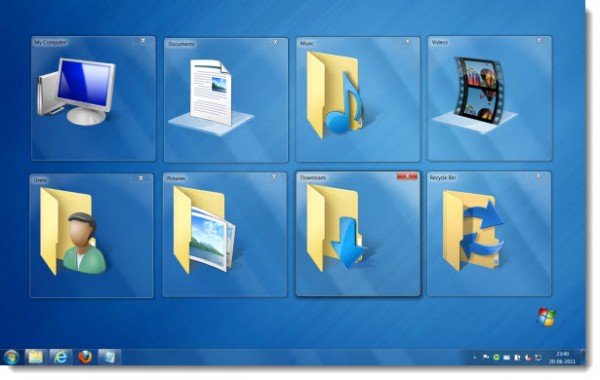
The only short-coming I see is that you have to add the folders all over again when you restart the PC, but you may want to use it as it looks cool.
Paras Sidhu, age 14, studies in the 10th grade and stays in a small town in the Indian state of Haryana. He loves experimenting and tweaking with Windows, and when he gets time from his studies, he makes apps or blogs at Download Informer.

AeroTile v 1.0 has been tested on Windows 7, but I have tested it on Windows 10, and it worked. Just make sure that you right-click on it and select Run as Administrator. Some security software may report it as being suspect. This is because the tweaker changes Windows system setting. Rest assured that it is a false-positive. If your antivirus software flags it as suspect, you may need to add it to its Ignore, Exclusions or safe list.
