
Taskbar Color Effects is another app, we are delighted to release today. This app can add various color effects to your Windows 7 taskbar.
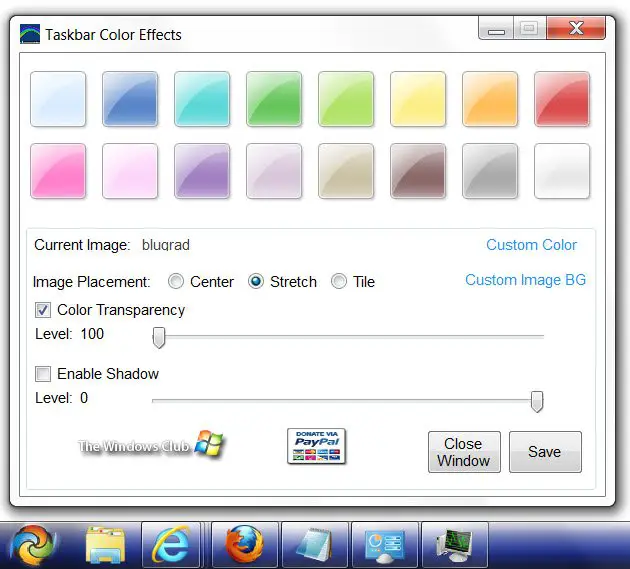
Taskbar Color Effects
With Taskbar Color Effects, you can add Color, Background and Shadow Effects to the Windows 7 Taskbar.
Once you run this portable freeware, it will add a Notification Icon to the Taskbar, which will allows you to change and load Settings or exit the application.
Features:
- Custom Colors with Transparency
- Custom Images with Transparency
- Shadow with Transparency
- Location aware for Taskbar and adjusts colors, background images and shadow.
The application uses embedded images which are sized within the application then extracted to be used as the Shadow.
You can also create your own images, shadows and effects. To create your own Shadow, according to where your Taskbar is located you can replace the following images: bottom.png, top.png, left.png and right.png.
Take note of each images size before replacing them as your images will need to be the same to display correctly.
To give the effect of a shadow you will need to create a transparent image that sort of fades away the same way the existing images do. Solid edges will result in the Shadow having solid edges.

Taskbar Color Effects v1 has been developed by Lee Whittington for The Windows Club.
Hope you enjoy customizing your Windows 7 taskbar!
Go here if you want to change Windows 7 Start Button or want more cool Windows freeware!
