
Not many may know, but there are different ways to uninstall a program in Windows 11/10/8/7. You can uninstall programs using the Control Panel and navigating to the Programs & Features applet, you can use Windows Settings or you can use the Program’s own uninstaller, which you can find in the Program folder, should the need to do so, ever arise. But if the program’s entry is missing in the Control Panel, Settings or the Uninstaller is not available, or these ways do not work for some reason, you can also use the Windows Registry.
Uninstall programs using Registry
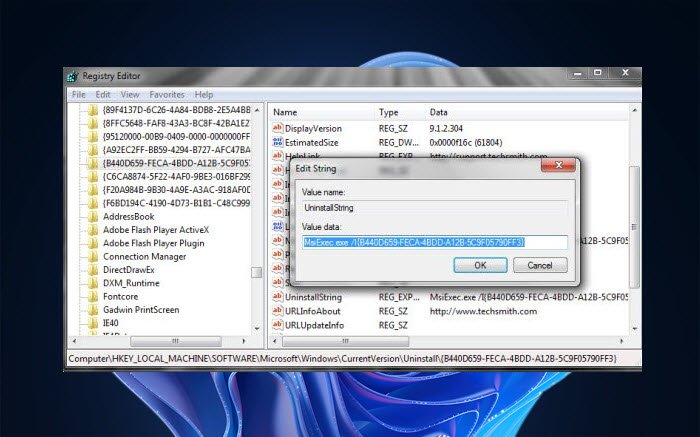
To uninstall a program via the Windows Registry, open regedit and navigate to the following key:
HKEY_LOCAL_MACHINE\SOFTWARE\Microsoft\Windows\CurrentVersion\Uninstall
You will see many keys there. These represent the installed programs. They may have long numbers or names.
In case they have names, they would be easy to identify, and in most cases, its UninstallString would point to its un-installers path.
In case they have long numbers, click on each of them till you are able to find the program which you want to uninstall.
Having done that, in the right pane, search for a string value called UninstallString.
Double-click on it. From the dialog box which opens, copy its value.
It will look something like this :
MsiExec.exe /I{B440D659-FECA-4BDD-A12B-5C9F05790FF3}
Next, open command prompt (cmd), paste the value, and hit Enter.
If you see a Value data like say –
"C:\Program Files\Software Name\uninstall.exe"
You may also open the Run box, copy-paste this value, and hit Enter.
The program will commence uninstallation.
If this does not help, you may also try one of these free Uninstallers for Windows.
UPDATE: Bill Pytlovany adds in the comments.
If you have a 64-bit version of Windows, 32 bits apps may be redirected here:
HKLM\SOFTWARE\Wow6432Node\Microsoft\Windows\CurrentVersion\Uninstall
Hope this helps.

