
Every Windows user serious about entertainment should be familiar with Winamp. If you’re an entertainment buff but lack the knowledge of this impressive media player, then we find that surprising. OK, so there’s a new version of Winamp known as Webamp, and as the name suggests, it’s internet-based. We decided to give Webamp a test drive to see if it’s worth your time, as having a web-based player is somewhat unusual.
Webamp online music player
The first thing you’ll realize about Webamp is the fact that the user interface looks similar to the classic Winamp interface. We’re happy the developers went with this option because it’s not flashy, which means, the player loads quickly no matter your internet connection speed.
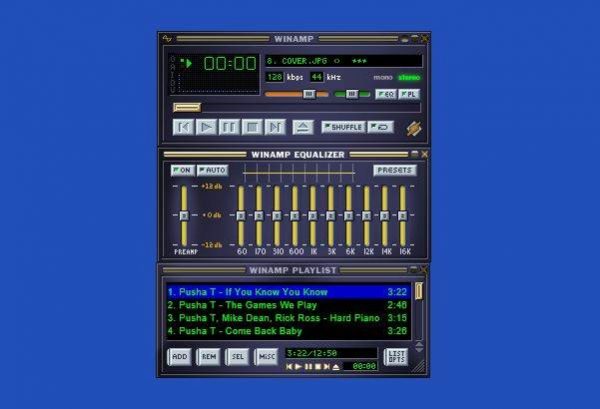
Also, the Webamp player comes with a bunch of default music. You can remove them by clicking REM > REM ALL, but bear in mind that each time the page is reloaded, the songs will return.
Additionally, you can add your own music by clicking on ADD > ADD DIR or ADD URL. Choosing the ADD DIR option means you’ll be adding music from your Windows 10 computer directory. That’s the easy way, so find where the tunes are located, then click on upload.
Above, you can see that we have the equalizer, as well as buttons for play, pause, skip, etc. Everything needed for a pleasant music experience is located here, which is great.
We should point out that it is possible to playback tracks from Dropbox, which is not possible with Winamp.
Is it worth using Webamp
Here’s the thing; in terms of basic features, both are the same. It’s easy to get your music up and playing without a hitch, and that’s great. However, the problem we have with Webamp is that it makes no sense for home use.
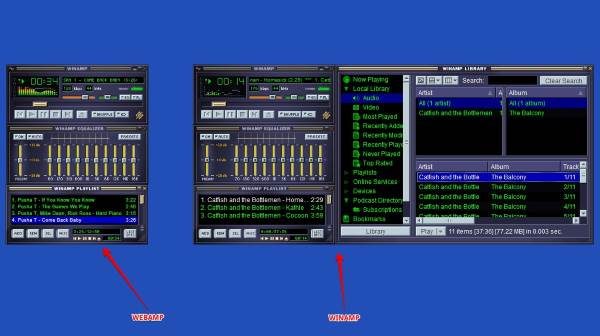
The time it would take a person to fire up Webamp through their web browser, then add music, and play the tracks through the Windows program would be significantly reduced. Not to mention, every time the Webamp page is reloaded, your tracks are lost.
Therefore, you’ll be required to re-add your favorite music every time, and that’s a pain to deal with all the time.
From our point of view, Webamp is better suited as a tool on websites with administrator tracks. Using it for personal use doesn’t make sense to us; therefore, we suggest giving it a try, but don’t expect it to replace your regular music player. Play around with Webamp right here on webamp.org.
