
The hottest thing in the gaming world is playing Xbox One games on a Windows PC. By that we mean streaming Xbox One games to a Windows 11/10 PC, so yes, you will need to have an Xbox One. This is great for those who share a TV or monitor in their home. So if the little sister wants to watch Barbie Adventures, or little brother wants to watch Pokemon, you can simply get up and stream any Xbox One game to your Windows computer.
How to stream Xbox One games to Windows PC
Bear in mind that this feature only works over a local network, so you cannot bring your laptop to your friend 10 blocks away and expect to stream your games unless it is possible to connect to your local network from such a long distance.
Ensure your computer is updated to Windows 11 or Windows 10. Also, make sure your Xbox One is connected to Wi-Fi or a wired connection. We suggest a wired connection at all times. Furthermore, make sure your Windows 11/10 computer has the latest update installed, and that your Xbox One is also updated to the latest software version.
Connect your Xbox One controller to your Windows 11/10 computer via USB. Wait patiently for Windows to install the drivers, and then launch the Xbox app. Create an Xbox Live account if you haven’t already done so, then log in.
On the left side, there should be something that says “Connect,” make sure to click on it. Now, choose to add your Xbox One from the list of devices that are available to connect. After that, click on “Test Streaming“, this is where Microsoft will go through the speed test to ensure that your Internet speed is fast enough.
Finally, click on “Stream” and watch as your Xbox One is connected to your computer. You are now ready to stream all your favorite games.
It’s that easy, but keep in mind that your keyboard and mouse will not work, at least, not right now. Microsoft should release an update for the Xbox One in the future that supports this, but it is not yet certain if it will be only designed for menu navigation, or if playing games will be included in the feature set.
Read: What is a VR ready PC? How to check if your laptop is VR ready?
Stream Xbox One games to your Windows PC with Oculus Rift
There’s good news for Oculus Rift owners. Xbox One game streaming is now available for the Oculus Rift on Windows. This newly added functionality to Xbox will make it possible for gamers to experience their games in a virtual reality environment via a free app. The Xbox One streaming to Oculus Rift app for Oculus Rift appears very much similar to Windows 11/10 version of Xbox streaming. It, however, allows users to control the orientation of games in a more life-like virtual environment.
Rift works natively with Windows 11/10. This makes it easier to set up and have an incredible VR gaming experience. Moreover, you get the fastest frame rates and enhanced gaming performance owing to DirectX 12 technology that unlocks the full capabilities of new Windows graphics hardware, made-for-VR games on Windows 11/10.
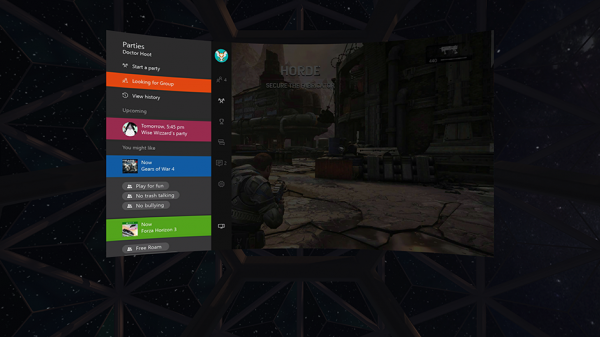
To get started, you need two things. First, is an Oculus Rift running on a Windows PC. Second an Xbox One gaming console. Both should be running on the same network.
With the above in place, download the Xbox One Streaming to Oculus Rift app in the Oculus Store and launch it. You can download it here.
Once the app loads for you, select your Xbox One from the list.
As soon as you get connected to your Xbox One, you’ll notice a streaming image right from your console.
In a few minutes, the new Xbox One Streaming to Oculus Rift app will get connected to your Xbox One via your home network.
When connected, your console’s video output will be streamed to your Rift headset and projected onto a wall or screen of your choice, offering immersive VR environments in 3 modes:
- Citadel
- Retreat
- Dome
Select the one, as desired and you’re all set to go. As you know, Xbox Wireless Controller is included with every Rift purchase. If you are not sure about your PC’s capability to drive VR experiences, visit here.
Related: How to Play any Xbox Game on Windows PC
Xbox One Streaming to Oculus Rift app requirements
- Xbox One
- Free Xbox Live account
- Network connection
Please note that the streaming experience utilizes your home network to its full advantage. It’s always beneficial to have both a PC running Oculus Rift and an Xbox One, using a wired Ethernet connection, to achieve the best virtual experience, according to Microsoft.
