
Microsoft Edge runs on the Chromium web engine delivering a better performance and web compatibility. The new Chromium-based Edge comes in with better productivity and some fun feature and also gets a new extension button on the toolbar. This button resembles a puzzle piece and sits directly on your toolbar. This new button is, however, added to give you a better web performance but you can remove it if you don’t want it on the toolbar.
How to remove Extensions menu button from Microsoft Edge
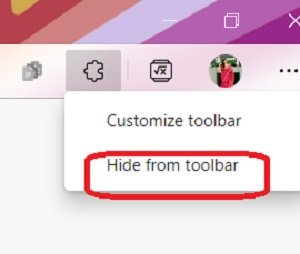
If you are not using too many extensions and don’t really want the Extension menu button in your toolbar, you can remove it with a single click.
- Go to the Extension menu button
- Right-click and select, Hide from toolbar.
Extensions are added to enhance your browsing experience, and this extension button is a nice, simple utility that keeps your toolbar clean.
The best part is that you can easily add or remove the button at your convenience with just a few clicks.
How to add the Extensions menu button in Microsoft Edge
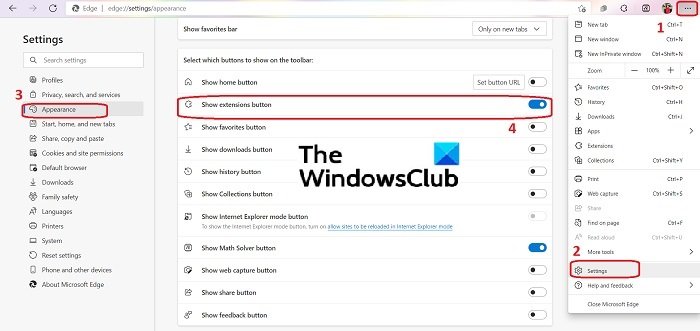
- To add the Extensions menu button in your Edge toolbar, click on the three dots on the top right corner of your browser.
- Go to Settings and then click on the Appearance tab in the left panel.
- Scroll down and go to the tab, “Select which buttons to show on the toolbar”
- Turn on the tab, “Show extensions button”.
How to use the Extension button on Edge Toolbar
Microsoft’s idea behind adding this extension button is to make your toolbar look clutter-free. Instead of pinning all your extensions in the toolbar, you can simply keep this button. When you click on this extension button, you can access the entire list of extensions installed on your browser.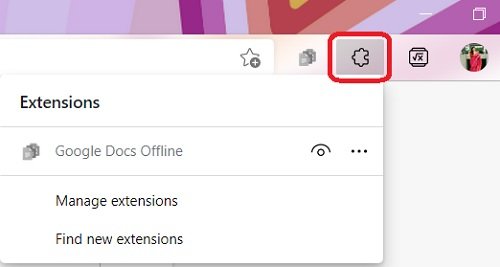
If you can’t see this extension button in your toolbar, you need to enable it from the Settings options.
How do you remove Edge extensions?
Removing the extensions is as easy as adding them.
- To remove an extension from Microsoft Edge, click on the three dots on the top right corner of the browser and go to Extensions.
- Go to the extension you want to remove and click on Remove.
Do Chrome extensions work on Edge?
Since Microsoft Edge is now Chromium-based, it supports all extensions that Google Chrome supports. Update your Edge browser to the latest version available to use the Chrome extensions.
