
We all can admit that Microsoft Excel is the best tool in its class, but there are ways to improve it with some cool and free Excel add-ins from the store. Some of these add-ins do basic things, while others are more advanced. At the end of the day, though, we are confident the add-ins we list here will make Microsoft Excel easier in certain situations.
Add-ins are everywhere on the web, but we will focus only on those in the Office Add-ins store. We chose this route to ensure potential users get tools free of viruses and other issues.
Best free Microsoft Excel Add-ins
Here are some of the best Excel Add-ins. Data Analysis, Financial Modeling, etc. Professionals, Students, and Beginners will find them useful:
- iGlobe CRM Excel Reporting Tool
- Publisheet – Publish your sheets as web pages
- Symbols and Characters – Fast Symbol Lookup
- Functions Translator, a Microsoft Garage project
- Cryptosheets
- Excel Colorizer Add-in
- Random Sorter
- Microsoft Visio Data Visualizer
- Stock Quotes by ISIN.
1] iGlobe CRM Excel Reporting Tool
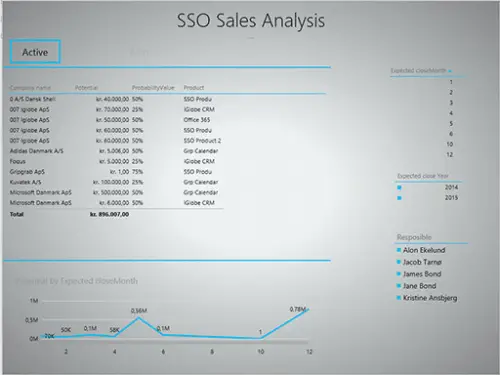
OK, so what we have here is an add-in for every person who handles CRM data. We envision many CEOs using the iGlobe CRM Excel Reporting Tool, but there’s a small catch. You’ll need iGlobe CRM Office 365, and once that’s in place, you can move forward.
With this add-on, then, users can get a simple, better, and more accurate overview of your CRM data.
2] Publisheet – Publish your sheets as web pages
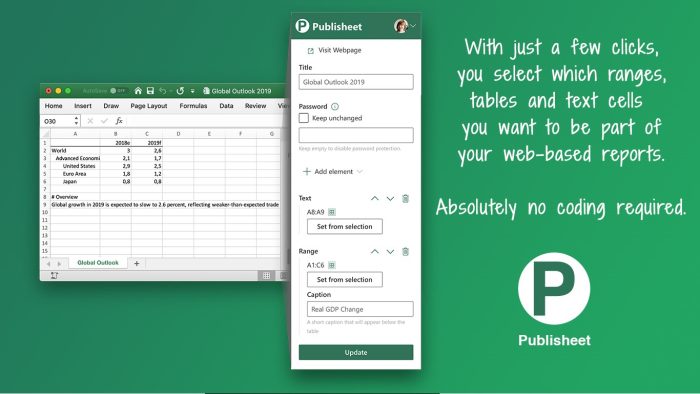
If you want to publish your Excel spreadsheet on the web, you can use Publisheet to do it with relative ease. Now, you will need to create a Publisheet account via the company’s website. Worry not because you can make use of the free plan, but it comes with a small caveat. The free plan doesn’t let you password-protect your pages.
3] Symbols and Characters – Fast Symbol Lookup
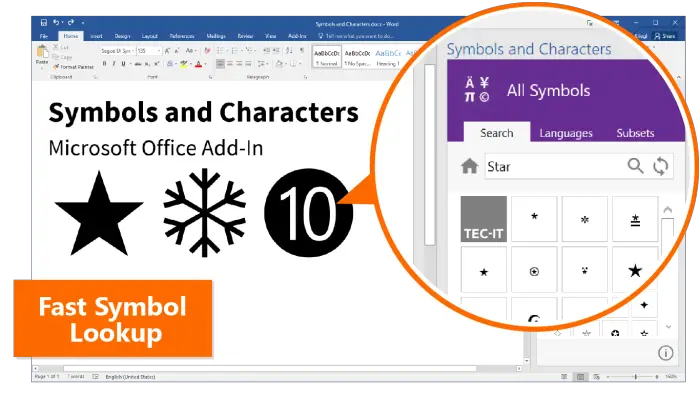
There may come a time when you want to add special characters and symbols to your Excel spreadsheet. When that day comes, you will need the Symbols and Characters add-ins ready to go.
This add-in can suggest symbols based on your selection, or you can manually search for what you want.
4] Functions Translator, a Microsoft Garage project
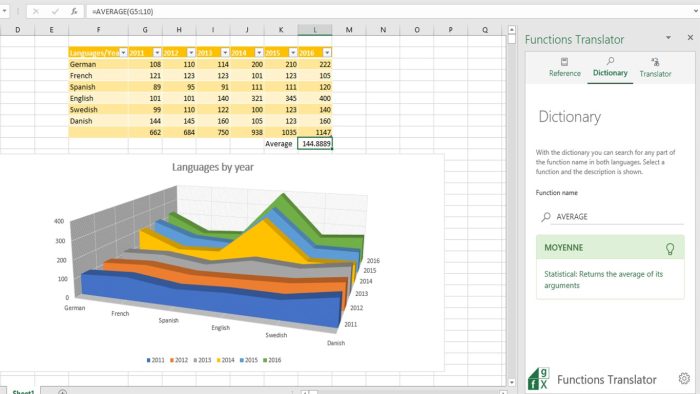
Users who want to translate functions into another language may struggle if they can’t speak the required language. But that’s not a problem anymore with Functions Translator from Microsoft.
According to the software giant, Functions Translator can do the following:
- Enables you to translate all functions between all supported languages
- Enables you to translate complex formulas between all supported languages
- Provides you with bi-lingual dictionaries with function definitions (in English) for function lookup
- Enables you to give feedback on translations
To find out how well it works, try the add-in for yourself.
5] Cryptosheets
Want to track your cryptocurrency portfolio but are unwilling to do it manually? You may want to try Cryptosheets. This Microsoft Excel add-in can collect and display real-time historical data from hundreds of web sources.
The tool does all the hard work, which means the user doesn’t need to have programming skills in any shape or form.
6] Excel Colorizer Add-in
Adding color to a spreadsheet is a popular way to beautify a workbook. Now, we must admit Excel has a built-in color feature, but the Colorizer add-in makes beautification much easier than before, especially if you’re not an expert.
7] Random Sorter
Have you ever needed to shuffle cells and columns without losing data integrity? Well, you’re in the right place, because we would like to recommend a Microsoft Excel add-in called Random Sorter.
When needed, users can easily shuffle cells within rows or columns. Folks can also choose to put all selected cells at random if they want to.
Here are some of the things you can do with Random Sorter right now if you choose to download it to your computer:
- Shuffle values within the selected rows or columns
- Randomly mix entire rows
- Place entire columns at random
- Simply shuffle all cells within the selected range
When this add-in is in use, please consider that any formula within your range will be forcefully overwritten with values.
8] Microsoft Visio Data Visualizer
With the Visio Data Visualizer add-in for Excel, users can create quality Visio flowcharts, organization charts, and cross-functional flow charts directly from their Excel data. Select a diagram, edit the linked data, and refresh the add-in to view your visualized data in a polished Visio diagram.
9] Stock Quotes by ISIN
If you want to get stock prices from international stock markets from within Microsoft Excel, then you should consider downloading the Stock Quotes by ISIN add-in. The developer says you can embed the quotes anywhere in a workbook. Furthermore, it updates each time the file is opened.
Read: How to collapse the Ribbon automatically in Word, Excel, PowerPoint
What is Microsoft Excel Add-ins?
An Excel add-in is very similar to a browser extension. You download and add it to the program to give Excel additional functionality. Once you’ve installed the add-in, you can access its features in any workbook.
Where to find the Excel add-ins Store?
To find the Excel add-ins section, you must click on the Insert tab. From there, look for the Add-ins section and select Get Add-ins. A small window will appear showcasing the Store and a list of add-ins to choose from.
