
Adobe created both Illustrator and Photoshop, both are used for graphics and sometimes they can do some of what each can do. However, both Illustrator and Photoshop are best suited for different things. Photoshop is a raster graphics software and is best suited for editing, photo restoration, and other things that have to do with images that are already created. Illustrator is best used for creating new work and artwork for large projects.
When should I use Photoshop vs Illustrator?
Adobe Photoshop has to do with images that are made up of individual pixels. These images will become pixelated if stretched too much. Photoshop images can be made large by increasing the resolution or dpi when working on them. However, the bigger the image, the larger the file size and the more space it will take up on the computer.
Adobe Illustrator is a vector graphics software that is best for the creation of images and other designs. Vector graphics are made up of points, lines, curves, and shapes based on mathematical formulas. These images will not lose quality whether you stretch or shrink them. Illustrator files can be smaller because they are mathematically calculated by the computer so they can have smaller file sizes.
Illustrator vs Photoshop – Difference & Similarities
Both Illustrator and Photoshop are powerful graphic design programs. Photoshop is much easier to learn and simpler to use once you know the basics. Photoshop is mainly used for tasks that are easier to do and feel familiar in everyday use. Illustrator, on the other hand, is mainly used for more technical things and is a little harder to learn since it operates differently from what we are used to in everyday use.
When to use Illustrator
Illustrator is vector graphics software best for creating images and other designs. Vector graphics are made up of points, lines, curves, and shapes based on mathematical formulas. These images do not lose quality when stretched or shrunk. Illustrator files can be smaller because they are mathematically calculated by the computer so they can have smaller file sizes.
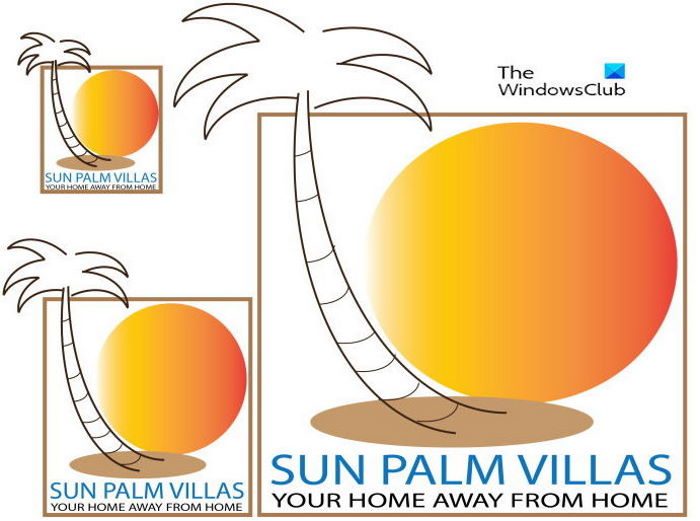
Illustrator is best for artwork like logos and anything that needs to be scaled up or down. Illustrator artwork can be made as small as a logo or as large as a building wrap and anything in between. Vector images can fit any size, large or small, without losing any detail or quality. Illustrator is best for logos because a company’s logo is used in many ways, including letterheads, business cards, billboards, and vehicle wraps for the company’s fleet of trucks. All of these require the logo to be scaled up or down while staying clear and readable to the public. Illustrator is best used for artwork that will be printed.
The picture above shows a vector logo created in Illustrator. The logo has been resized three times yet it still looks clear.
Read: Adobe Illustrator Tips and Tricks for Beginners
When to use Photoshop
Photoshop is best for editing images that have already been created. Photoshop can be used for photo retouching, enhancing photos, removing blemishes and unwanted items, and repairing damaged photos. Photoshop can also be used to create art from photos and make beautiful photo collages.
Photoshop images are raster images, and they handle precise edits better than vector images. Raster images are pixel-based and tend to have more detailed colors. This makes Photoshop better suited for images displayed on a screen. This is so because screens have more vibrant colors and will display the colors better.
The above image is a raster image created with Photoshop. It has vibrant colors. However, if you stretch it, it will easily become pixelated.
Read: Photoshop Tips and Tricks for Beginners
Using both Illustrator and Photoshop together
Yes, you read the heading right; there are cases when you can use both Illustrator and Photoshop. together. First, you can turn a raster image into a vector image. You may have had a raster image like a logo or other image that you want to keep and use in a much larger format. You can use Illustrator to convert the raster image to a vector. Note that when you convert a raster image to a vector, it will no longer have that detailed color; however, it can stretch or shrink without looking pixelated.
Another way to use Illustrator and Photoshop together is to use them in different parts of a project. You can use Photoshop and Illustrator files in each other’s software. You may need a logo or other artwork to be placed on a Photoshop image.
Read: How to convert Image to Vector in Illustrator
How is Illustrator different from Photoshop?
Both Illustrator and Photoshop are well-known graphic software; however, they differ greatly. Illustrator is best for vector-based art, artwork that can be resized while keeping its quality. Photoshop is best for raster images, images made up of pixels that look more colorful but can get pixelated if stretched too much. Illustrator is best for artwork that will be printed, while Photoshop is best for artwork that will be displayed on a screen. This doesn’t mean they cannot both be used for screen and print.
Read: Illustrator vs InDesign: When to use each one?
Can both Illustrator and Photoshop Artwork be used with each other?
Illustrator and Photoshop are designed so their artwork works together. You can open an Illustrator file in Photoshop and a Photoshop file in Illustrator. There are cases where you will need to create artwork in one program to use in the other because it may be easier to do in one than the other. For example, you may have to create a logo in Illustrator to use in a Photoshop project, or you may need to use a text effect or design text in Photoshop to use in an Illustrator project.
