
A jarring drop or a physical impact can cause irreversible damage to the mechanical components of the hard drive. Worst, it may result in permanent hard drive failure. HP 3D DriveGuard is designed to protect your hard drive from such unfortunate events. The freeware guards your HP computer hard drive against external shocks and other accidents.
Protect Hard Drive from damage
HP 3D DriveGuard is a feature designed to protect a laptop’s hard drive from damage caused by sudden movements or impacts.
The tool relies on a three-axis digital accelerometer designed to work as a motion sensor. As such, whenever the software senses a shock, it instantly parks the hard drive heads and alerts the system software of any sudden activity initiated. This timely action helps in protecting user data from any serious impacts or minor drops.
HP 3D DriveGuard receives notifications from the integrated accelerometer and protects the HDD by automatically parking the heads to reduce the risk of damage if the device is accidentally dropped or is abruptly impacted by another object.
Once you have downloaded it, run the setup file. HP 3D DriveGuard will install itself but not be displayed. Also, it will not have a noticeable impact for desktop and SSD users. As known, SSDs or Solid State Drives have no moving parts and so do not require any additional protection from external shocks.
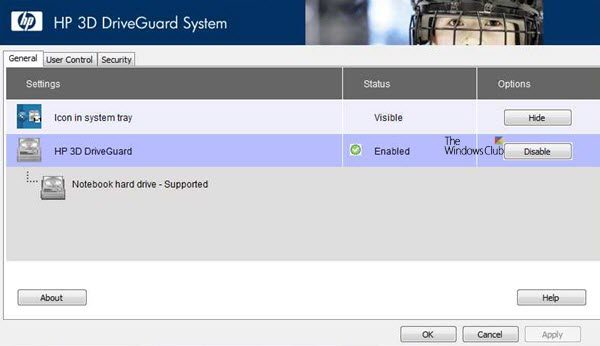
You can find its setting under ‘Windows Mobility Center’. From there, you can choose to enable or disable HP 3D DriveGuard or hide it under the System Tray.
The interface of the app allows you to access different settings and options. For instance, you can view the connected HDDs alongside their status. All in all, it is a good utility that helps you monitor your device’s health regularly and take timely action when required.
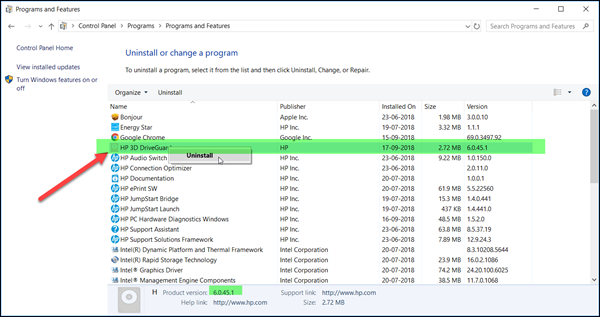
If you already installed HP 3D DriveGuard on a desktop or computer with an SSD drive, you can uninstall it from the Control Panel if you wish.
HP 3D DriveGuard Download
You can download this driver for your HP computer from HP.com. It is around 46MB in size. Do note that it supports HP hardware only.
What happens to data on a hard drive if it is physically shocked?
Physical shock to a hard drive can damage its read head or magnetic platters, leading to data loss. This risk is heightened if the shock occurs during the operation. Voltage fluctuations can also contribute to hard disk failure.
Are hard drives shock resistant?
Yes, traditional hard drives have some shock resistance, but they are more vulnerable compared to solid-state drives. They can generally withstand up to 250 Gs of shock when powered off.
Will airport Xray ruin hard drive?
Airport X-ray scanners will not ruin a laptop’s hard drive. These scanners use light wavelengths that do not affect the magnetic storage on hard drives.
How to protect a hard drive physically?
Keep it on a stable surface to prevent it from falling. Keep it near your computer to minimize cable strain. Use a well-padded case during travel to guard against impact and damage. You should also avoid placing the drive where cables can be pulled and cause falls.
