
When you upload an image or video to your Instagram account, everyone can view it without following you. However, if you want to make your Instagram profile private so that only followers can view your content, this step-by-step guide is for you. Also, if you want to make your profile public from private so that everybody can view all your posts, you can follow the same guide.

Instagram is one of the best places to showcase your graphic design work. Not only images and videos, but you can also create reels, which is pretty popular these days. When you upload a media file on Facebook, it gives an option to share the content with friends, friends of friends, etc. However, the same thing is not available on Instagram. In other words, if you upload an image to your profile, everybody can view it by visiting your profile. It is fine when you want to share party pictures, wedding photos and small clips with your friends. However, if you want to do the same thing exclusively, it might be a problem.
You cannot share the file with a specific group of people. Having said that, even if someone doesn’t follow you, he/she can view the content without any restriction. In that case, you cannot make anything special only for your followers. However, the solution is to make your profile private.
How to make Instagram profile Private or Public
To make Instagram profile Private or Public, follow these steps:
- Log in to your Instagram account.
- Click on the profile picture and select Settings.
- Switch to the Privacy and security tab.
- Tick the Private account checkbox.
To learn more about these steps, continue reading.
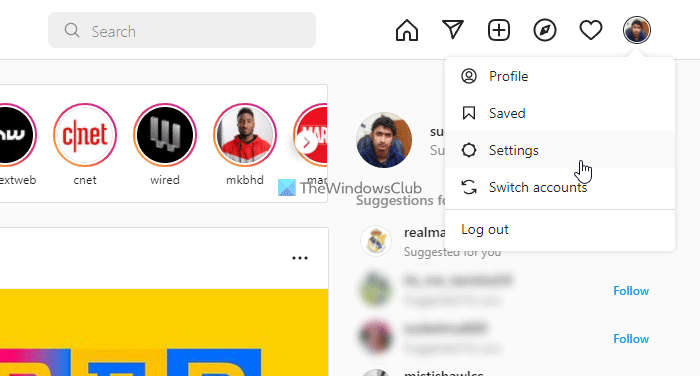
First, you need to open the Instagram website on your browser and log into your account. Then, click on the profile picture visible in the top-right corner and select the Settings from the menu.
After that, switch to the Privacy and security tab on the left-hand side and tick the Private account checkbox.
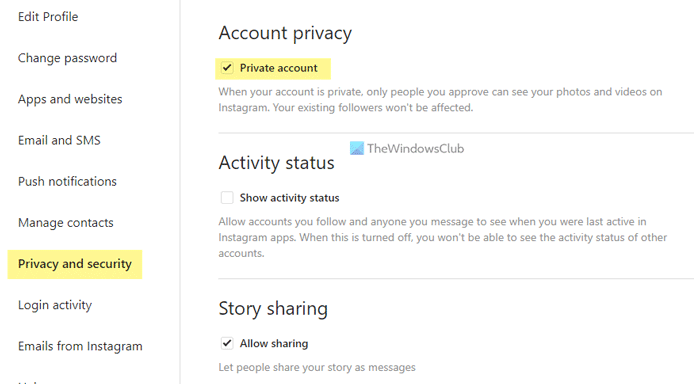
However, if you want to make your profile public, you need to remove the tick from the corresponding checkbox and click the OK button.
Read: Instagram Tips & Tricks
How to make Instagram profile Private or Public on mobile
To make Instagram profile Private or Public on mobile, follow these steps:
- Open the Instagram app and tap on your profile picture.
- Tap the hamburger menu and select Settings.
- Tap on the Privacy option.
- Toggle the Private account button to turn it on.
Let’s check out these steps in detail.
To get started, open the Instagram app on your mobile and tap the profile picture in the bottom-right corner. Then, expand the hamburger menu and select Settings.
Following that, select the Privacy option and toggle the Private account button.
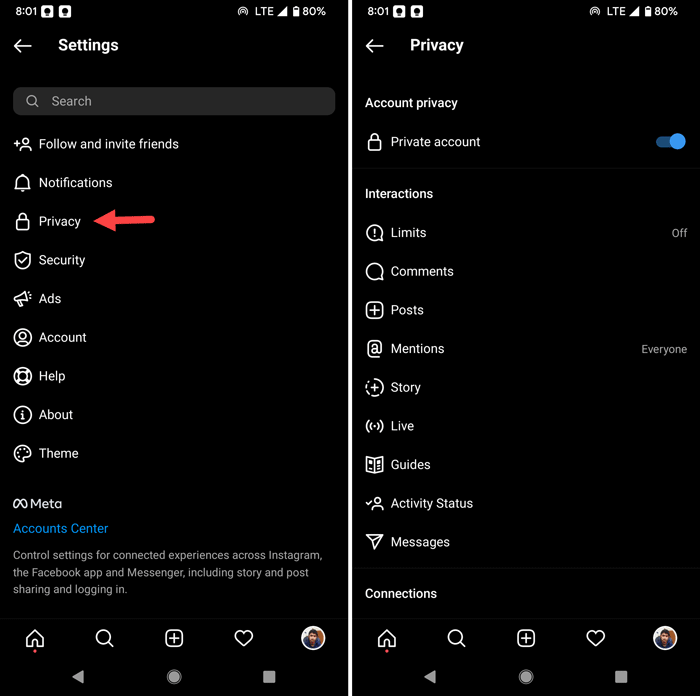
Alternatively, if you want to make the profile public, toggle the same button to turn it off.
That’s all! Hope it helped.
Read: Best Quora tips and tricks.
What happens if I make my public Instagram private?
When you make your public Instagram account private, only your followers can view your uploaded content. If someone doesn’t follow your account, he/she will not be able to view any picture, video, or reel. To make your Instagram profile private, you can follow the methods outlined above.
Read: How to check if someone Blocked you on Instagram?
Is it better to have your Instagram private or public?
It depends on your usage and purpose. If you want to create exclusive content for your followers, you can set your profile to private. On the other hand, if you’re going to maintain a regular profile with birthday pictures, travel photos, etc., there is no need to make the profile private.
