
When it comes down to storing messages, Telegram is similar to WhatsApp in more ways than one. The developer behind Telegram speaks of privacy, but by default, the app automatically stores your messages in the cloud, just like WhatsApp, but not 100 percent the same. The big question is, then, how does one remove their messages and chat history from Telegram for good? Well, we are going to do our best to explain how things work with this article.
How to delete Messages and History in Telegram
Deleting messages on Telegram is quite simple, so keep reading below to learn how.
Open the Telegram app
To begin, please open Telegram on your computer. You can locate the icon either on your desktop or in the Start Menu. If you’ve added the icon to your Taskbar.
Navigate to the preferred chat
OK, so the next step is to go to the chat where you want the messages removed. You should see the chat in the left section of the Telegram app. Click on it, and your messages will appear on the right side.
Delete a single message
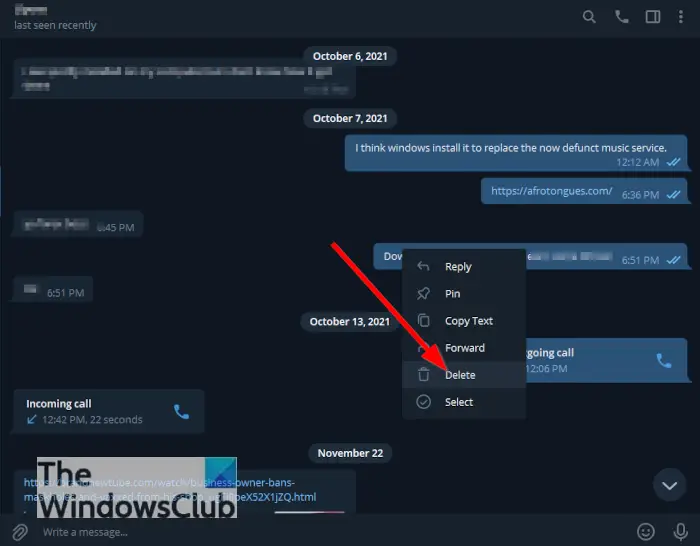
When it comes down to deleting your messages, you can do so one by one. Simply right-click on the message, then click on Delete. Now, depending on the settings of the chat, you may see the option to delete the message for yourself or for everyone.
Delete multiple messages
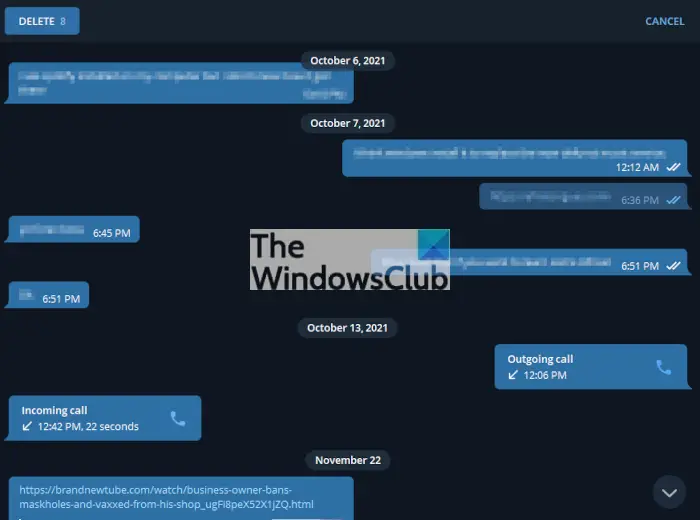
Now, you may want to remove more than a single message, so what to do? Well, simply right-click on a message, then click on Select. From there, click on all the messages you want to delete, then complete the task by clicking on the Delete button at the top of the window.
Delete all messages from your account
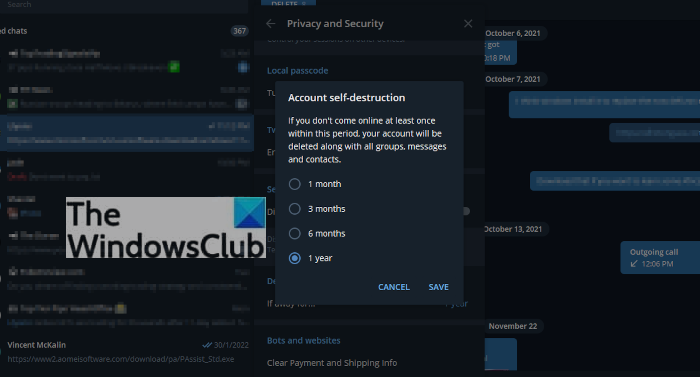
The best way to get all of your messages to disappear for good, even from the servers, is to cut your losses and get rid of your account entirely.
To do this, click on the hamburger button at the top-left corner of the app, then select Settings from the dropdown menu. After that, click on Privacy and Security > Delete My Account. For faster deletion, select the one-month period then hit Save.
Uninstall the Telegram app from your computer and other devices and ensure you never install it again until a month has passed, for all your messages to disappear for good.
NOTE: Cloud chats with more than one participant work differently. The ability to delete messages from everyone’s device is restricted to the first 48-hours. After that, you can only delete messages for yourself.
Read: How to create Telegram bot with no coding knowledge.
Is Telegram a harmful app?
Most users agree that Telegram is safe to use, so if you want to move your chats to that platform, then so be it. However, they made it clear that, when it comes to out-of-the-box privacy, Signal is the better choice.
Can Telegram be hacked?
Telegram has multi-device support, which means you can access a single Telegram account from multiple devices at the same time. Because of this, if anyone has access to one of your many devices connected to your Telegram account, they could take advantage and cause havoc. It is best to ensure that only the devices you use regularly are still connected.
Is Telegram a Chinese app?
No, Telegram is not a Chinese app, but Russian. It was launched back in 2013 by Russian entrepreneurs Pavel and Nikolai Durov, and since then, it has amassed a large following.
How do Telegram and WhatsApp differ with storing content in the cloud?
As we’ve laid out above, Telegram automatically stores all of your messages in the cloud by default. The moment you press Enter to send, the messages and some media files are uploaded to the cloud. The same cannot be said for WhatsApp as Meta do things differently.
You see, with WhatsApp, you have to decide whether you want your content stored in the cloud via Google’s service or Apple’s equivalent if you’re using an iPhone. From there, the app will upload messages at a specific time, not immediately.
Was it always possible to delete Telegram messages?
Yes, but it wasn’t until Version 5.5 of the app that anyone could delete a message in a one-on-one chat, regardless of device. This means you can delete messages you’ve sent and messages received. Not only will the messages be removed from all devices, but also from the Telegram servers.
