
Email Insights for Windows is a convenient, faster way to search the inboxes of Outlook and Gmail for instant results in the mail client’s window. Made primarily to solve the issue of not being able to find the right email quickly, Email Insights provides an “Intent pane” that shows the top three most relevant results highlighted and grouped first in the results to cut down on the tedious scrolling and make the search more like what people do every day on engines like Google.
Email Insights for Windows
Email Insights is a lightweight email client for Windows from Microsoft Garage that offers you a faster way of searching your Outlook & Gmail Inbox.
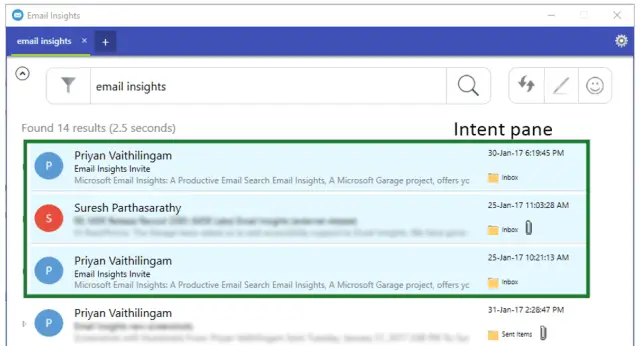
“Web search has evolved over the years. We wanted to make email searches like web searches. It is not just about the algorithms, but about the user experience. We present a novel browser-like email experience that feels lightweight and works just like web search.” said Suresh Parthasarathy, a senior research developer on Microsoft Research India’s Applied Sciences team.
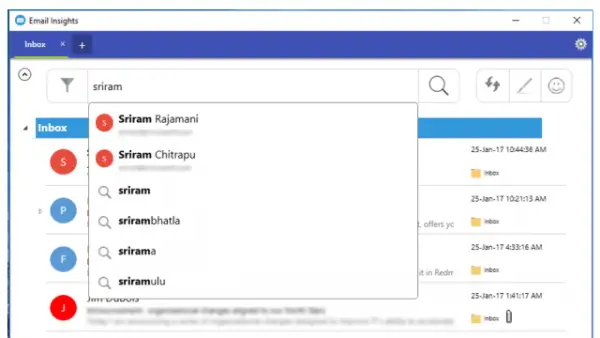
The app also has some additional smart features, including contextual autocorrect, spelling correction and “fuzzy” name search. Contextual name search eliminates the need to remember spellings of peoples’ names. For instance, ‘Chris’ gets corrected to ‘Kris’ and ‘Philip’ gets corrected to ‘Philippe,’ depending on your inbox and the contacts that you have saved. Email Insights automatically remembers all of them and puts your searches in context later.
The program was initially developed as part of a hackathon project, but its true potential was realized when the idea of transforming it into a search companion for Gmail and Outlook emerged. The idea was to develop a tool that could quickly and effectively search emails, increasing productivity and decreasing frustration.
Email Insights is a program that can be used by everyone, from developers to basic users. For developers, it can come in handy when they are busy coding and want to quickly perform email-related tasks. For users, it can apply a command interface over emails, which is useful for anyone who wants better search results and who may prefer the Linux-like shell.
“The Garage team provides us a splendid outlet to experiment with innovative ideas, refine them and release to real-world users quickly. The Garage team helped us at various stages of development. Based on their feedback, we incorporated telemetry into our application. We also went through a rigorous review process and multiple testing cycles which helped in understanding user requirements better.” Parthasarathy says.
Microsoft Garage is an exciting venture from Microsoft that helps promising apps and programs get exposure on the big screen. Email Insights, Video Breakdown, Clip Layer, Kaizala, Sprightly, News Pro 3.0, and Color Binoculars are some examples of the experimental apps that made it big through Microsoft Garage.
Those interested can download Email Insights from the Microsoft Store. Do read its User Guide for tips on using it.
