
If you are a Mac user and occasionally work on Windows, you will find that macOS offers a beautiful collection of fonts that are not available on Windows. Professional users like artists and web designers mostly switch between macOS and Windows for their work and appreciate how macOS renders fonts.
MacOS has a good collection of fonts that are nicer, smoother, easier, and optimized for reading than the ones available in Windows. But unfortunately, you cannot use the Mac font in Windows as both Windows and Mac use different font rendering technology. However, Windows font is of True Type format (.ttf) which is supported in Mac. But vice versa is not true.
The Mac font is of .dfont type and Windows cannot directly read Mac True Type fonts like .dfonts. Windows can only read Windows Open Type and Windows TrueType fonts. To copy Mac font (.dfont) to Windows and use them in Windows, you have to use a third-party application to convert Mac fonts (.dfont) into Windows TrueType format(.ttf).
In this article, we explain how to convert Mac Font (.dfont) to Windows-compatible Font (.ttf) using an open-source application program called DfontSplitter.
Convert Mac font to Windows compatible font
DfontSplitter is free software suitable for Windows 11/10. The software provides a simple interface that lets users convert Mac-formatted fonts (.dfont) to Windows-compatible fonts (.ttf).
Convert Mac formatted font into Windows-compatible font
Download and install the DfontSplitter font converter software. Open it to see the following interface.
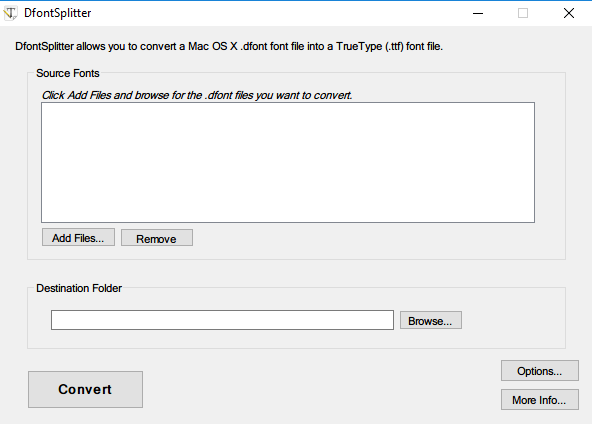
Click Add files and then browse for Mac formatted font (.dfont) files that you want to convert into a Windows-compatible TrueType(.ttf) font file.
Choose the destination folder where you want to save the converted file.
Click the Convert button.
Once done, you will see the converted files in the destination folder.
DfontSplitter free download
You can download the freeware DfontSplitter from its homepage.
Can you convert OTF fonts to TTF?
Yes, you can convert OTF fonts to TTF. To do this, you need font-conversion software. Many free online font converters let you convert OTF to TTF. Visit the OTF to TTF converter website(s), upload the OTF font file, and hit the Convert button.
Does Apple use OTF or TTF?
Apple comes with many built-in fonts. However, if you require more fonts, you can install them on your Mac. Mac supports a variety of font formats, including TrueType (.ttf), Variable TrueType (.ttf), TrueType Collection (.ttc), OpenType (.otf), and OpenType Collection (.ttc) fonts.
Related read: How to get Mac-like smooth fonts on Windows 11.
