
In today’s digital age, email is the most efficient way to reach out to people. It is the most sought-after way of communication to foster business, promote sales, and publicize products for advertising purposes. In simple words, email takes up a significant chunk of your work time.
That being said, while most of our time at work is spent writing an email and responding to email messages, we try to churn out a maximum number of emails without giving a thought about what is written to work faster. However, working faster doesn’t mean that we can neglect the art of writing an email.
Effective email writing plays a crucial role in establishing a strong reputation. Bad email etiquette can have serious consequences on how people judge you or your company. It can deliberately damage you both professionally as well as personally.
Browser extensions, add-ons & Tools to help write better emails
Email takes a significant role in building business communications. When you compose an email, it is important to make sure that your email is clear and doesn’t contain any silly grammatical errors or misspelled words. A sloppy email can have a negative impact on your career, and you may be perceived as careless. Fortunately, some apps will help you to neatly formulate an email and avoid common mistakes so that you get ahead professionally. These apps are specifically designed to enhance your writing quality and ensure that your message is eloquent and effective.
In this article, we round up some of the best Browser extensions & add-ons that help you craft effective emails so that you can easily get your audience to act on your messages.
- Writefull
- Markdown Here
- Just not sorry
- Grammarly
- Typely
These free extensions help you to improve the overall quality of an email and reach your targets faster.
1. Writefull
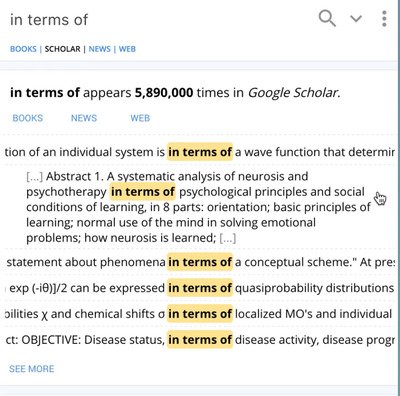
Writefull enables you to check your writings against a database of languages. It can be used in any writing tool from Gmail to MS Word and helps you craft better emails. To use it all you need to do is activate Writefull popover and select a chunk of text to request the information you need. Writefull then uses a large database like Google Books, Google News, Google Web, and Google Scholar on the internet to search for the frequency of chunks of text. Additionally, Writefull can be used to translate other languages into English and allows you to find which words can be filled in a gap in your selected text.
This amazing tool is compatible with Windows, Linux, and MacOS. It can also be added as a Chrome extension. Get this tool here.
2. Markdown Here
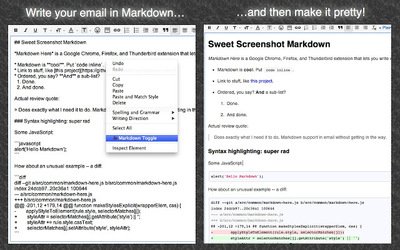
Markdown Here is a powerful tool that enables you to write emails effortlessly. They are mainly used by programmers which allow them to easily write HTML in emails. They can also be used to style your daily emails. To use this tool simply compose your message in your email writing tool and select the Markdown Toggle from the menu. The Markdown renders it in proper formatting, which you specified in the Markdown syntax. The tool is so powerful that it allows you to add source codes, tables, and formulas to your email, which is almost impossible to add to an email editor.
Get this tool here. Markdown Here is available for Firefox, Safari, Open, and Chrome web browsers. It can also be used with Thunderbird and Postbox email applications.
3. Just not sorry
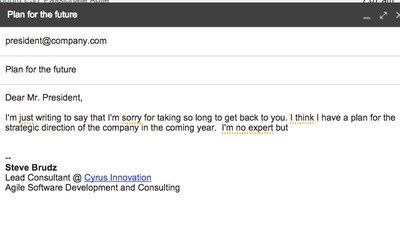 Just Not Sorry is a free Gmail Plug-in that helps you write clear and successful emails by warning you when you use phrases that can cripple your message. The tool guides you throughout your writing and underlines the commonly used qualifying words for you to choose how you want to use them. Give it a try if you want to bid adieu to too many exclamations and imbibe overall confidence in your writings.
Get this Chrome extension here.
4. Grammarly
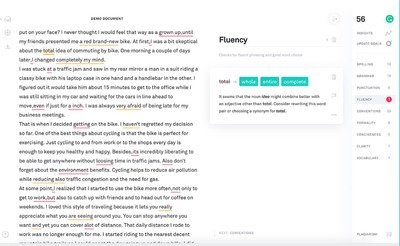
Grammarly is a popular writing assistant tool that helps you to craft an efficient, confident, and successful email. It finds out misspelled words, silly grammar mistakes, punctuation errors, wrong writing styles, and mistakes in word choices. It flags the error and suggests corrections based on the context. They even flag corrections for plagiarism. This grammar-checking tool is AI-powered and helps you to write effective messages.
The editor is a free browser extension available for Google Chrome, Firefox, Microsoft Edge and Safari. Get this too here.
5. Typely
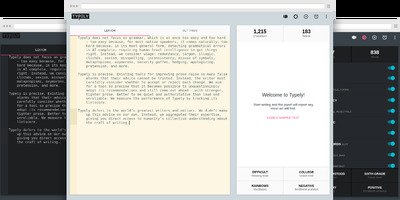
Typely is a free online proofreading tool for writing. The tool alarms whenever there are spelling errors, grammar mistakes, and mistakes in writing style. It also offers a distraction-free writing environment to help you remain focused in writing your story. This tool helps your craft a precise and reliable email. Get this tool here.
Which are your favorite tools for writing better emails? Please write to us in the comments below.
