
Winter White Windows 7 Theme, including screensaver, cursor set, wintry wallpapers released

Speed Up My PC

With Winter and Christmas approaching, it’s as good a time as any to get into the Holiday Spirit! TWC Author Lee, spent an entire morning putting up this beautiful wintry theme for Windows 7.
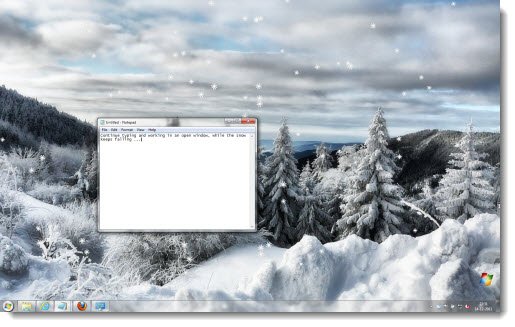
winter theme Winter White Windows 7 Theme, including screensaver, cursor set, wintry wallpapers released

The Winter White Theme includes:

  • 6 wintry Desktop Wallpapers
  • White Aero Cursor Set
  • Falling Snow Screensaver

How to install:

  1. Once you have downloaded the theme, unzip it and then run the Winter White.themepack first.
  2. Next open the folder Cursors and Screensaver. Right-click Install.inf and choose Install. If you do not notice a change in the cursors or screen saver, you may need to select it manually.
  3. Next on the far right, choose the text menu option Change Mouse Pointers and select Winter White from the drop down.
  4. Now, right-Click desktop, choose Personalization. To the far right choose Screensaver. Here from the drop-down menu select FallingSnow screensaver.

You can change the settings of the falling Snow screen saver to different types of flakes as well as speed with which they fall. To stop this screensaver, you have to move the mouse within the snow. So in short, you could have the snow falling on your desktop when you continue to work in an open window – since to stop the screensaver, you have to move the mouse to touch the snow flakes. Try it out! It looks beautiful – you working in an open window, and snow flakes falling behind on the desktop.

The credits for the beautiful images go to Katanaz-Stock, vivstock, steppelandstock, ClickStock, F3rd4 and night-fate-stock on DeviantArt.

download1 Winter White Windows 7 Theme, including screensaver, cursor set, wintry wallpapers released

Try the Winter White Theme – it’s a great way to customize Windows 7 this winter!

Go here if you are looking for some beautiful Windows 7 Christmas Themes.

softpedia Winter White Windows 7 Theme, including screensaver, cursor set, wintry wallpapers released

Happy Holidays from the entire TheWindowsClub team! icon smile Winter White Windows 7 Theme, including screensaver, cursor set, wintry wallpapers released

Posted by on , in Category Downloads with Tags
Anand aka HappyAndyK is an end-user Windows enthusiast, a Microsoft MVP in Windows Desktop Experience since 2007, and the Admin of TheWindowsClub.com, TheGeeksClub.com & WinVistaClub.com. Creating a System Restore Point before trying out a new software or a tweak is always recommended.
  • Jsg

    All in all this isn’t a bad theme however the mouse pointers, for what ever reason, fail to install. There is no “Winter White” in the dropdown in the “Change Mouse Pointers” dialogue.

    For the screensaver, would have liked having the snow ‘pileup’ on things and build up, fall off in chunks etc (like real snow). What is strange with the saver is it doesn’t stop right away, actually kinda nice and interesting. I find the flake size to be a bit to large and doesn’t look quite ‘right’. Still beats whats out there for Windows 7.

    Don’t know if this is needed but I tried this on Windows 7 64bit HP.

  • Leewhittington

    Thanks for the feedback JSG. I’m not sure about the cursors not applying but if you look in the list, it is listed as White Aero. The snowflakes, I tried different scenarios to try to make them as realistic as I could but alas the result is the best I could come up with. To stop the screensaver, you have to move your mouse within the snow. I tried other options to shut down the screensaver and this was the most reliable.

  • Robert Twigg

    Flagged as containing malware.

  • Leewhittington

    Robert: More than likely because it uses a *.inf file to install cursors. I didn’t want to use it but it was the most effecient way to do so.

  • http://www.icu-india.com http://www.icu-india.com

    awesome

  • Leewhittington

    Thanks :)

  • Jasoncollege24

    The theme installed fine, and applied right away, but when I right-clicked the .inf file to install the cursors, I got a message during install that the files could not be copied to the destination directory. I had to manually add each cursor. screensaver installed fine. Not a bad theme.

  • http://www.jsoftj.com/