
We are pleased to release Windows Themes Installer. Windows Themes Installer is a freeware portable utility which allows you to install a theme, remove a theme, and restore defaults easily in Windows 7 & Vista.
UPDATE: 22.03.10. Windows Theme Installer has been updated to v 1.1. This new version will automatically patch the system files without the need of a 3rd party system file patcher.
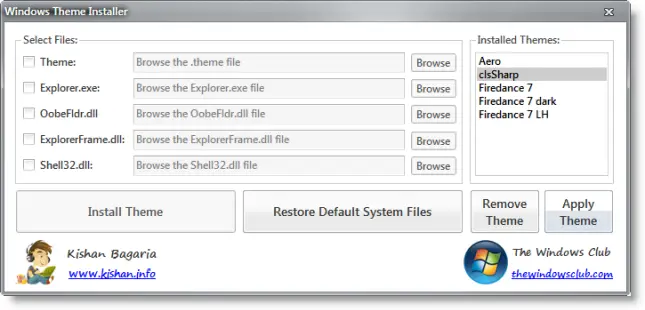
Windows Themes Installer
Windows does not allow you to install 3rd party themes. You have to patch some system files to be able to do so. This new version 1.1 will automatically patch the system files without the need of a 3rd party system file patcher. If the system files are already patched then it does nothing. To restore the patched files yo,u will need to use Universal Theme Patcher.
How to use Windows Themes Installer:
INSTALL A THEME AND CHANGE SYSTEM FILES:
1. Run the tool as Administrator.
2. Select the options which you want to install:
- Theme
- Explorer.exe
- OobeFldr.dll
- ExplorerFrame.dll
- Shell32.dll.
3. Once you have selected the options, click on the “Browse” button, and browse for the file of the desired option.
4. Now click on “Install Theme” button to install the theme and replace the system files.
RESTORE DEFAULT SYSTEM FILES:
To restore the default system files click on the “Restore Default System Files” button.
REMOVE A THEME:
To remove a theme select the theme which you want to remove from the list and click on the “Remove Theme” button.
APPLY A THEME:
To apply a theme select the theme which you want to apply from the list and click on the “Apply Theme” button.
It is always a good idea to create a system restore point first before making any changes to your system. Should the need arise, the System File Checker Utility will help you replace your system files with ‘good original’ Windows system files.

Windows Themes Installer v 1.1 has been developed for TWC, by our TWCF member Kishan. Some security software may report it as being suspect. This is because the tweaker changes the Windows system setting. Rest assured that it is a false-positive. If your antivirus software flags it as suspect, you may need to add it to its Ignore, Exclusions or safe list. If you wish to customize your Start Orb, you can use Windows 7 Start Button Changer.
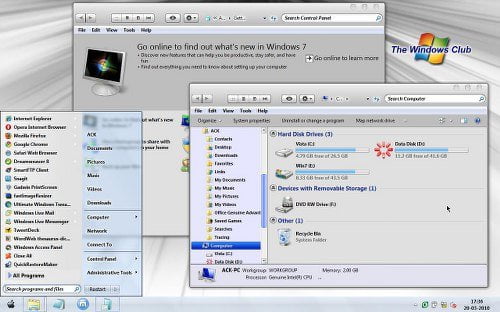
Here is a theme I installed easily using Windows Theme Installer. You can check out for some good Windows 7 themes at DeviantArt. A downloaded theme may or may not contain all the specified files, but should definitely contain the .theme file.
Check out Ultimate Windows Customizer, which allows you to customize your Windows installation, including changing the Start Button, Logon Screen, Thumbnails, Taskbar, Explorer look, Windows Media Player, and more!
You may want to check out our other freeware releases here.
