
The next wave of malware to infect you may well be from social networking sites. Already Facebook users are facing so many security issues and so this is a good time as any to check up on your Facebook Privacy settings and see if your Facebook account is secure.
Protect, secure, harden Facebook account
There are a few basic things which you can follow to keep your Facebook account safe:
- Use a strong password.
- Enable HTTPS login on Facebook. This is now there by default.
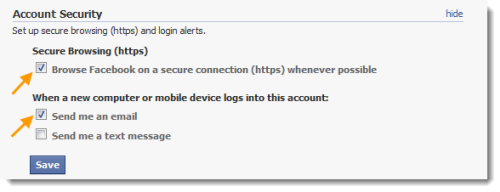
- Enable Device detection. To do so, go to your Account Settings > Account security and enable the feature which says “When a new computer or mobile device logs into this account”. Check on Send me an email.
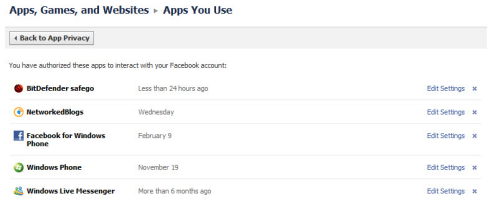
- Periodically check up on the apps you have allowed access to, to your Facebook account and remove those you no longer require or have doubts about. You can do so through Privacy Settings > Apps and websites > Edit your settings.
- Take care before you allow access to any new apps or accept new friend requests. A simple rule to follow: If in doubt; don’t!
- If you are accessing Facebook from a public computer, you can request a one-time password.
- Also, have a look at these Facebook Sign In Tips.
You can also secure your Facebook accounts and harden your Facebook security settings by using any of these Security Applications like Norton Safe Web, BitDefender Safego, Defensio for Facebook or ReclaimPrivacy.
1] Norton Safe Web
Norton Safe Web for Facebook helps protect you and your computer. Norton Safe Web is a website rating service from Symantec. Every day Norton Safe Web analyzes several million URLs to look for those containing security risks. The results from Norton’s site rating analysis are used to warn users against sites that might infect their PCs or compromise their personal information.
You can now take advantage of the new Auto-Scan feature. This will have Safe Web check your News Feed for malicious links every hour and notify you if unsafe links are found.
2] BitDefender Safego
Using in-the-cloud scanning, BitDefender Safego keeps your social networking account safe so that you and your PC don’t get into e-trouble. An efficient BitDefender spam repellent also helps keep your message flow free from spam.
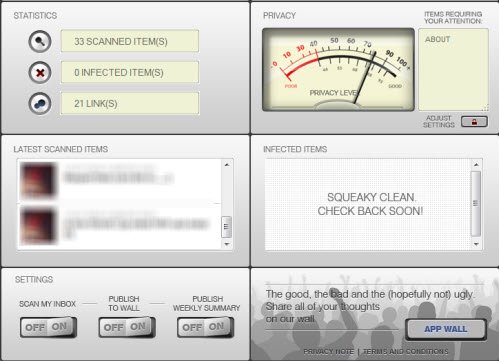
And that’s not all. With BitDefender Safego you get a privacy rating that tells you whether you’re easy prey on the personal data theft front as well.
Once you enable Safego you will be protected at all times. The posts, comments, feeds are scanned in the cloud, in real-time using BitDefender’s engines and if anything suspicious is found, you will be notified immediately.
3] ESET Social Media Scanner
Eset has made available for free, to all Facebook users, an app that will scan your Facebook settings, wall posts, etc. and check your Facebook profile for infected or suspicious content – even when you are not logged in.
You can also check your friends‘ walls for potentially dangerous links – and receive a notification when a suspicious object is found so that no one in your circle of friends falls victim.
4] Defensio for Facebook
Defensio protects your personal or corporate Facebook profiles from spam and malicious content. In order to offer you the best possible protection against unwanted user-generated content, Defensio has teamed up with the leader in Web security, Websense. Defensio can now detect malware and viruses posted to your Facebook profile or website. Defensio is free for personal use.
5] ReclaimPrivacy
ReclaimPrivacy provides an independent and open tool for scanning your Facebook privacy settings. However this scanner is not fully compatible with the latest Facebook privacy settings, so please be sure you check your privacy settings manually yourself.
6] Norton Satellite app for Windows
Norton Satellite app for Windows will scan all your Facebook, Twitter feeds as well as your files on Dropbox, SkyDrive for malware or malicious links.
7] F-Secure Safe Profile
F-Secure Safe Profile is another Facebook app that can scan your Facebook profile for security & privacy issues.
These tips to stay safe from the prying eyes of Facebook Search Graph may also interest you.
Have anything more to add? Know of any more such Facebook security apps? Please do share below in the comments section.
These links will also interest you:
