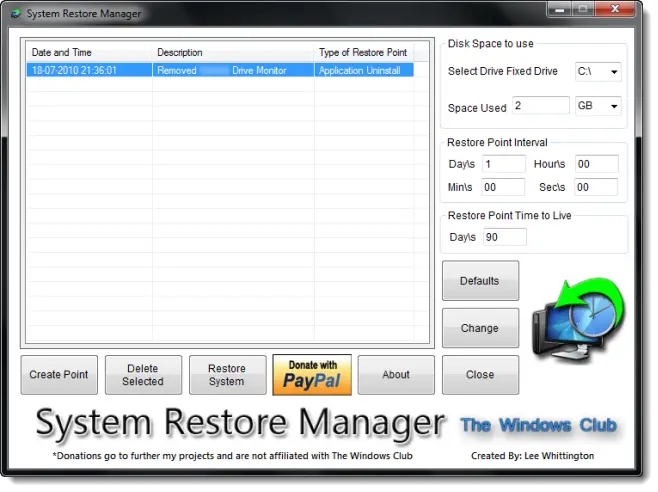
System Restore Manager is a freeware portable utility which allows you to completely manage your Windows system restore points and customize its options.
UPDATE 18.02.2011: System Restore manage v2.0 has been released. Change log here.

Using this utility, you can:
- Create a Restore Point on the fly, by clicking the Create Button
- Restore your Windows PC to a prior restore point. Just select a Restore Point from the list and click the Restore Button. This will Restart your computer and launch the Restore Process
- See all the available restore points
- Selectively remove Restore Points you don’t want and save the one’s you want. Just select a Restore Point from the list and click the Delete Button
- Select a Drive and change the maximum amount of disk space to use, System Restore can use. On Windows 7, the default is 5% of available disk space.
- Change the System Restore Point Creation Interval. On Windows 7, the default is 24 Hours
- Change the Restore Point Time to Live. The default is 90 days,on Windows 7.
System Restore Manager has been developed by me for the Windows Club and has been tested on Windows 7. If you wish to give feedback please visit TWCF.
Download links: For French version | For German version.
The application has a Donate button and if you feel that this application is worth supporting, just click the Donate Button. The donations go to the developer and no part of this donation will come to The Windows Club.
These links may also interest you:
Troubleshooting System Restore In Windows 7 & Vista
Guide : Customize Windows Vista System Restore Options.

Pingback: System Restore Manager : un logiciel gratuit pour gérer les points de restauration système | Mes postits
Pingback: System Restore Manager, crea puntos de restauración automáticos
Pingback: In der registry die anzahl der verbleibenden wiederherstellungspunkte bestimmen
Pingback: System Restore Manager - Best Restore Point Manager For Windows
Pingback: Ripristino configurazione di sistema di Windows | Doctordigit
Pingback: 4 Free Tools To Create, Manage And Mount Restore Points
Pingback: 4 Free Tools To Create, Manage, And Mount Restore Points | The Software Central - Freebies, Giveaway, Promos, Technology, Freewares, Gadgets, Coupons, Tips and Tricks
Pingback: Fully Customize Windows Restore Points With System Restore Manager
Pingback: System Restore Manager, personalizzare i punti di ripristino di Windows | IdeaGeek.it
Pingback: Cánh tay ph?i cho System Restore | EXZZ.NET
Pingback: System Restore Manager: gestire punti di ripristino in Windows | Spazio Software
Pingback: System Restore Manager for Windows Released « Free Online tools and other stuff…
Pingback: Anonymous
Pingback: Computer Tips
Pingback: In Depth: 10 best free lightweight troubleshooting tools - Latest Technology - News & Articles
Pingback: In Depth: 10 best free lightweight troubleshooting tools | Butingtech Technology Buzz
Pingback: Fully Customize Windows Restore Points With System Restore Manager | betaSir - We love software
Pingback: System Restore Manager, Manage Windows System Restore Points, Settings « OMG-Gurubootcamp!! Microsoft
Pingback: ???-??????? ????????? ??????????? ?? ?????????? ??????????? | digitalbg