
The System Maintenance Troubleshooter will help you run Windows computer maintenance tasks automatically. It will allow you to automatically detect and fix common maintenance problems such as broken desktop shortcuts, unused icons, disk volume errors, and incorrect system time display.
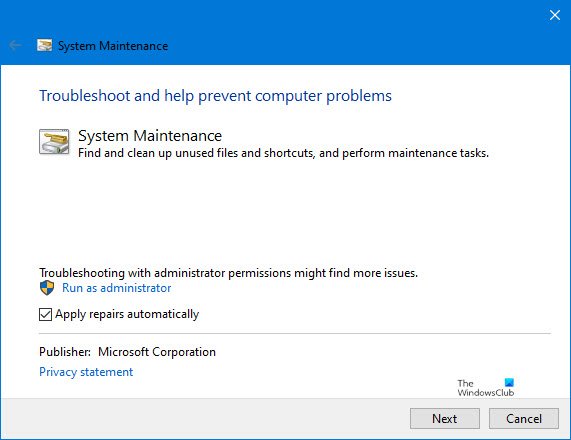
System Maintenance Troubleshooter in Windows 11/10
The System Maintenance Troubleshooter fixes the following:
Problems with desktop shortcuts and icons
- Shortcuts on the desktop don’t work or are broken
- Desktop icons are broken or have not been used in 3 months
- Startup items don’t work or are broken
System maintenance tasks
- Free up disk space by repairing disk volume errors such as bad sectors, lost clusters, cross-linked files and directory errors
- Free up disk space by removing error reports and troubleshooting history older than one month
- Troubleshooting history & logs taking up disk space
- Error reports taking up disk space
- Set the correct system time and synchronize the system clock with the time server
Windows 10 offers this built-in System Maintenance troubleshooter that helps find and clean up problems that cause the problem on the computer.
To open it:
- Type System Maintenance in the Start Menu, and click Perform recommended tasks automatically.
- Click on Advance and click on Run as Administrator.
- Click on the Next button and follow the on-screen instructions to complete the troubleshooting process.
Alternatively, in Windows 11/10, to run the System Maintenance Troubleshooter. Open Run, type the following and hit Enter:
%systemroot%\system32\msdt.exe -id MaintenanceDiagnostic
Hope this helps.

