
Are you looking out for a free screen capture software? Well, you just might want to check out PicPick, an all-in-one software for software developers, graphic designers, and home user. It has an intuitive interface and simple, elegant operation. After starting the software, you simply select one of the tools from the PicPick Tools tray icon menu when you want. It includes a full-featured screen capture tool, Intuitive image editor, color picker, color palette, pixel ruler, protractor, crosshair, whiteboard, and more.
PicPick Screen capture tool for Windows 11/10
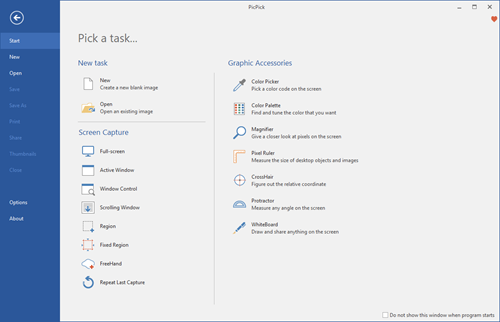
PicPick Tools features a powerful screen capture tool, image editor, color picker, color palette, pixel ruler, protractor, crosshair, whiteboard, etc. You can use all these tools freely.
Using PicPick for Windows PC, you can:
- Take screenshots of an entire screen, an active window, the scrolling windows and any specific region of your desktop, etc.
- Annotate and highlight your images: text, arrows, shapes, and more with the built-in image editor that includes the latest Ribbon style menu.
- Easily add effects to your images: drop shadows, frames, watermarks, mosaic, motion blur, brightness control, and more.
- Save, share, or send your images via Web, email, FTP, Dropbox, Google Drive, SkyDrive, Box, Evernote, Facebook, Twitter, and more.
- Variety of graphic design accessories including a color picker, color palette, pixel ruler, protractor, crosshair, magnifier, whiteboard.
- With highly advanced settings, you can customize hotkeys, file naming, image quality, and many other options that fit your needs.
Features:
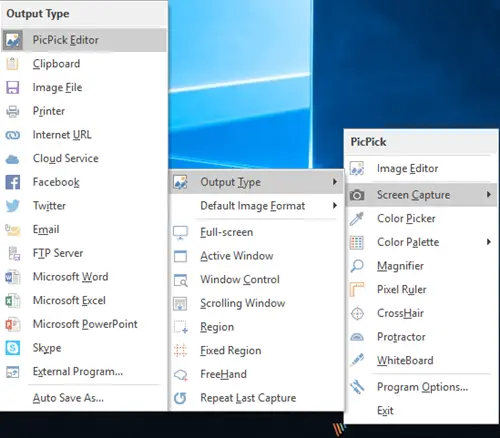
Screen Captures.
- Full Screen (Support for Dual Monitors)
- Active Window
- Window Control (Scroll a page automatically)
- Region, Fixed Region
- FreeHand
- Repeat Last Capture.
Image Editor.
- It’s very similar to Microsoft Paint, but you can do more.
- It provides an effect like selection opacity, blur, sharpen, brightness, contrast, hue, saturation, flip, rotate, etc.
It also includes the following:
- Color Picker
- Color Palette
- Magnifier
- Pixel Ruler
- Protractor
- Crosshair
- Whiteboard.
PicPick is free for personal use, and you can download it here from its homepage. A portable version is also offered. Please note that this free version may only be used for personal use in non-commercial environments.


