
This article describes how to change the listening port that Remote Desktop listens on. You can use the Remote Desktop feature in Microsoft Windows to connect to your computer from another remote computer. RDP stands for Remote Desktop Protocol. It is a Microsoft propriety protocol that establishes a remote connection to the other computers over an encrypted channel. In most cases, the RDP port number is 3389. It is the default RDP port number used by Remote Desktop connections.
How to change Remote Desktop Port in Windows
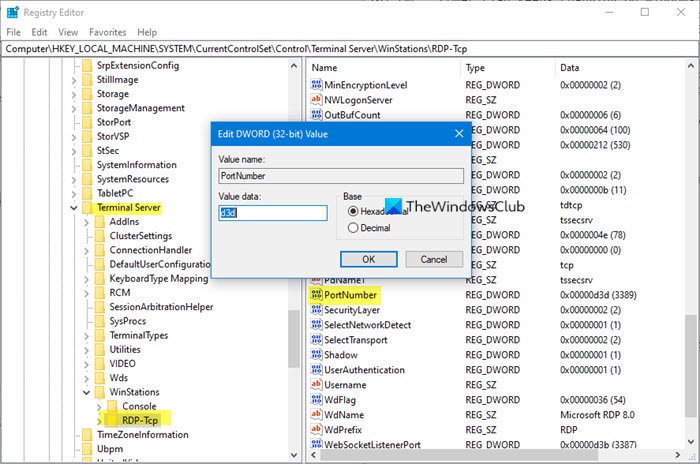
Change RDP Listening Port in Windows 11/10
- To change the Remote Desktop Port, open Registry Editor.
- Locate and then click the following registry subkey:
HKEY_LOCAL_MACHINE\System\CurrentControlSet\Control\TerminalServer\WinStations\RDP-Tcp\PortNumber
- On the Edit menu, click Modify, and then click Decimal.
- Type the new port number, and then click OK.
- Quit Registry Editor.
- Restart the computer.
This should work for all Windows, but remember to create a system restore point first.
Do note that the Remote Assistance feature in Microsoft Windows may not work correctly if you change the listening port.
Does Windows 11 Home allow RDP?
Windows 11 Home edition does not support Remote Desktop Connections. If you want to use RDP on Windows 11, you have to upgrade your license from Windows 11 Home to Windows 11 Pro. You can also check this in Windows 11 Settings. Open Windows 11 Settings and go to “System > Remote Desktop.” You will see the following message:
Your Home edition of WIndows 11 doesn’t support Remote Desktop.
Read next: How to Remove History entries from Remote Desktop Connection.

