
Undoubtedly, the California-based social networking site LinkedIn is handy for people who want to hire or get hired. If you have been using LinkedIn for a long time and you want to download your profile data, here is what you need to do. Like other social networking sites, such as Facebook, LinkedIn offers a similar option to download your Data using the LinkedIn Data Export Tool.

What to expect when you download LinkedIn profile data
LinkedIn doesn’t gather Call or SMS metadata as Facebook does. Therefore, when you download the profile data from LinkedIn, you can find details about your uploaded media files to connections – you would get everything in the downloaded file. To be more specific, you can find the following things-
- Media files: Your files alongside shared files.
- Connections: All the connections you have, including their first name, last name, their email address, the company they are currently posted in, current position, connection date, website, messages, etc.
- Education: The education you mentioned in your profile.
- Email address: All the email addresses that you used to create any company profile or personal profile on LinkedIn.
- Imported contacts: All the contacts imported from Facebook and other places, including their first name, last name, profile’s email address and date & time.
- Invitations: All incoming invitations, along with dates & times and messages.
- Languages: This will contain all the languages you have included in your profile along with the proficiency.
- Messages: All the messages you have got and sent on LinkedIn.
- Positions: All the places you have worked before.
- Profile: Your profile data with the first name, last name, date of birth, headline, summary, industry, country, ZIP code, Geolocation, X handle, websites, instant messages, etc.
- Receipts: If you have LinkedIn Premium subscription, you can find a receipt as well.
- Registration: The registration date when you created the LinkedIn account.
- Skills: All the skills you have included in your profile.
- Videos: If you have ever posted a video, you can find it here.
How to download LinkedIn data
This is very easy and not very time-consuming at all since LinkedIn has an official tool to do that. To get started, sign into your LinkedIn account. Click your profile picture on the top menu bar and select Settings & Privacy.
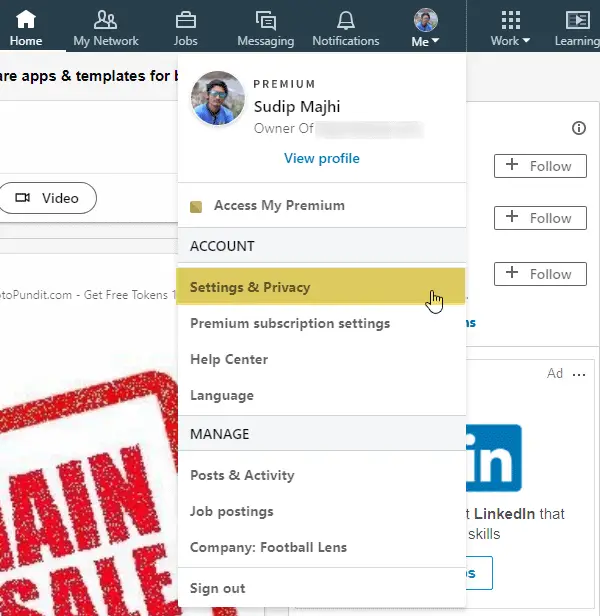
Now switch from Account tab to Privacy tab. Scroll down until you get How LinkedIn uses your data heading. Under this heading, you can find Download your data option. Click on it.
LinkedIn Data Export Tool
Alternatively, you can directly visit this page to download your Linked In data.
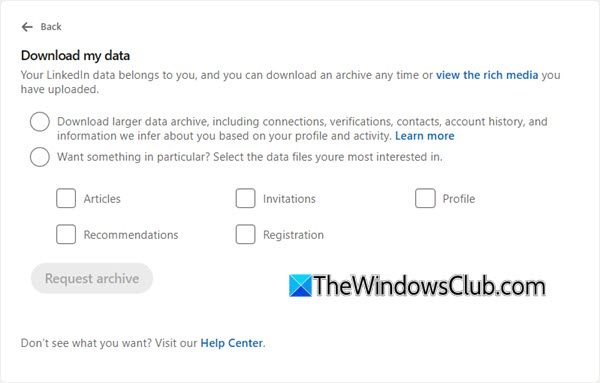
Now you have two options. You can download either complete profile data or choose any data like Articles, Imported Contacts, Connections, etc. Select your options and click the Request archive button. After that, you may have to enter your profile password.
Within a few moments, you should get an email with the following subject line: The first installment of your LinkedIn data archive is ready.
In that email, you will find a download link. Alternatively, you can head to the same Privacy tab where you have requested the data archive. Here you would get Download archive option.
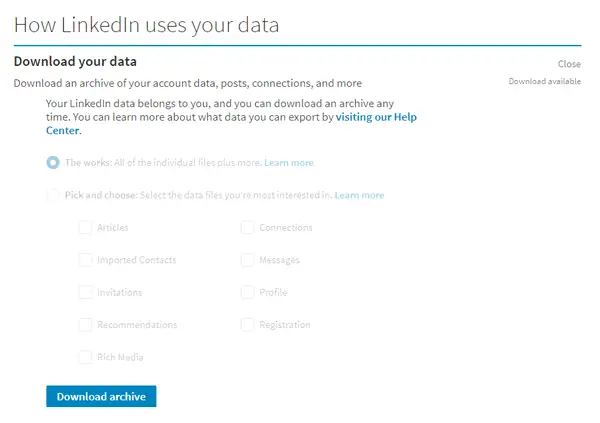
After downloading, you can find all the files in CSV format. You can open them and check everything.
I hope you find this information useful.
Can you export LinkedIn data?
Yes, you can easily export LinkedIn data to your computer. LinkedIn allows users to download data using the LinkedIn Data Export Tool, an in-built tool for this purpose only. It is possible to export media files, connections, email addresses, positions, languages, messages and more using the LinkedIn Data Export Tool.
How do I export data from LinkedIn to Excel?
To export data from LinkedIn to Excel format, you do not need to do anything other than follow the aforementioned guide. LinkedIn allows users to download everything in the CSV format. In other words, you can open all the downloaded files in Excel without any third-party program.
Related reads:
