
Windows XP Mode is specifically designed to help small businesses move to Windows 7. Windows XP Mode provides you with the flexibility to run many older productivity applications on a Windows 7 based PC. But will your PC support the XP Mode?
Does my CPU support Windows 7 XP Mode & and Virtualization
SecurAble
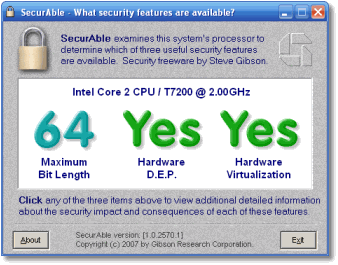
SecurAble probes the system’s processor to determine the presence, absence and operational status of three modern processor features:
- 64-bit instruction extensions,
- Hardware support for detecting and preventingm the execution of code in program data areas, … and
- Hardware support for system resource “virtualization.”
Download and then run SecurAble. It is a portable app which does not require an install.
If there’s a YES in the Hardware Virtualization section, your CPU will support the XP Mode feature of Windows 7.
Do also note that you will need at least a 1 GHz 32-bit / 64-bit processor, 1.25 GB of RAM (2GB recommended), 15 GB hard disk space per virtual Windows environment (recommended); and that Windows XP Mode is available only in Windows 7 Enterprise, Windows 7 Professional, and Windows 7 Ultimate editions.
Securable Home Page. | Microsoft XP Mode and Virtual PC Home Page.
Also see Hardware Assisted Virtualization Detection Tool from Microsoft.
