
In Windows 11/10/8/7, you see, Personal Documents, Personal Downloads, Personal Photos, Personal Videos and Personal Music. You will also see a change in naming in the Public User Profile: Public Documents, Public Downloads, Public Photos, Public Videos, and Public Music. These folder structure changes were made to accommodate an Explorer feature called Windows Libraries.

What are Windows Libraries?
Libraries are where you go to manage your documents, music, pictures, and other files. You can browse your files the same way you would in a folder, or you can view your files arranged by properties like date, type, and author.
In some ways, a library is similar to a folder. For example, when you open a library, you’ll see one or more files. However, unlike a folder, a library gathers files that are stored in several locations. This is a subtle but important difference. Libraries don’t actually store your items. They monitor folders that contain your items and let you access and arrange the items in different ways. For instance, if you have music files in folders on your hard disk and an external drive, you can access all of your music files at once using the Music Library. Only folders can be included in libraries. Other items on your computer (such as saved searches and search connectors) can’t be included.
How do I create or change a Windows Library?
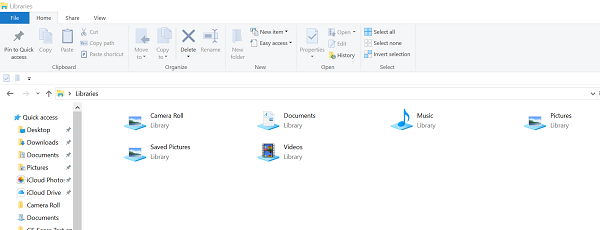
Windows has four default libraries: Documents, Music, Pictures, and Videos. You can also create new libraries.
Here are some ways you can modify an existing library:
Include or remove a folder. Libraries gather content from included folders or library locations. You can include up to 50 folders in one library.
Change the default save location. The default save location determines where an item is stored when it’s copied, moved, or saved to the library.
Change the type of file a library is optimized for. Each library can be optimized for a certain file type (such as music or pictures). Optimizing a library for a certain file type changes the available options for arranging your files.
What happens if I delete a Library or the items in a Windows Libraries?
If you delete a library, the library itself is moved to the Recycle Bin. The files and folders that were accessible in the library are stored elsewhere and therefore aren’t deleted. If you accidentally delete one of the four default libraries (Documents, Music, Pictures, or Videos), you can restore it to its original state in the navigation pane by right-clicking Libraries and then click Restore default libraries.
If you delete files or folders from within a library, they are also deleted from their original locations. If you want to remove an item from a library but not delete it from the location it’s stored in; you should remove the folder containing the item.
Similarly, if you include a folder in a library and then delete the folder from its original location, the folder is no longer accessible in the library.
Read: How to change Library folder template
Why can’t I search or arrange files from a folder that I recently included in a Library?
If a folder from a non-indexed location (such as an external hard drive or a network) was recently included in a library and it contains a large number of files, it might take some time for the library to add those files to the index. During the indexing process, searches and file arrangements might appear incomplete.]
What types of locations are supported in Windows Libraries?
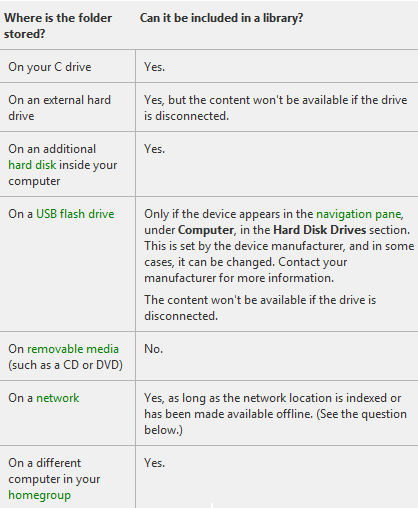
You can include folders in a library from many different locations, such as your computer’s C drive, an external hard drive, or a network.
Folders than can be added to Windows Library
If the local location that is being added to the library is not already an indexed location, it will be added to the list of indexed locations.
It may take some time for this content to appear in the library after being added because it must first be indexed for it to appear.
- If your folder is stored on your C (System) drive; Yes – it can be included in a library!
- If the folder is situated on an external hard/USB drive, then it will be available only as long as the drive is connected and the device appears in the navigation pane.
- Folders located on removable media like a CD or DVD, cannot be added.
- If the folder is situated in a network, it can be added as long as the network location is indexed or has been made available offline. If the network folder is not indexed, an easy way to index it is to make the folder available offline. You can then include it in a library.
- If the folder is situated on a different computer in your HomeGroup; Yes – it can be included in a library!
UPDATE: HomeGroup has been removed from Windows 10 version 1803 and later.
Where is the folder stored? Can it be included in a Windows Library?
- On your C drive. Yes.
- On an external hard drive. Yes, but the content won’t be available if the drive is disconnected.
- On an additional hard disk inside your computer. Yes.
- On a USB flash drive. Only if the device appears in the navigation pane, under Computer, in the Hard Disk Drives section. This is set by the device manufacturer, and in some cases, it can be changed.
- The content won’t be available if the drive is disconnected.
- On removable media (such as a CD or DVD). No.
- On a network. Yes, as long as the network location is indexed or has been made available offline.
- On a different computer in your Homegroup. Yes.
Read: How to use Libraries effectively in Windows 11
Can I include a folder that isn’t always available on my computer or isn’t indexed?
If the folder is on a device that is compatible with libraries (such as an external hard drive), it can be included. However, the content of the folder will only be available when the device is connected to your computer.
If the folder is on a computer that is part of your Homegroup, it can be included.
If the folder is on a network device that is not part of your Homegroup, it can be included as long as the content of the folder is indexed. If the folder is already indexed on the device where it is stored, you should be able to include it directly in the library.
If the network folder is not indexed, an easy way to index it is to make the folder available offline. This will create offline versions of the files in the folder, and add these files to the index on your computer. Once you make a folder available offline, you can include it in a library.
When you make a network folder available offline, copies of all the files in that folder will be stored on your computer’s hard disk. Take this into consideration if the network folder contains a large number of files.
Make a folder available offline
While connected to the network, locate the network folder that you want to make available offline.
Right-click the folder, and then click Always available offline. If you don’t see the Always available offline command, you might be using an edition of Windows that doesn’t support offline files.
Other posts about Windows Libraries:
- How to Add or Remove folders in a Library
- Unable to open Windows Libraries
- How to add Library to Favorites Link in Explorer
- Add Network Location to Windows Libraries
- Pin Libraries to Search Again & Start Menu.
