
A Security Identifier (SID) is a unique value of variable length that is used to identify a security principal or security group in Windows operating systems. Well-known SIDs are a group of SIDs that identify generic users or generic groups. Their values remain constant across all operating systems.
Windows Security Identifier
Windows grants or denies access and privileges to resources based on access control lists (ACLs), which use these SIDs to uniquely identify users and their group memberships. When a user logs into a computer, an access token is generated that contains user and group SIDs and user privilege levels. When a user requests access to a resource, the access token is checked against the ACL to permit or deny particular action on a particular object.
SIDs are useful for troubleshooting issues with security audits, Windows server, and domain migrations.
SID has the format as follows:
S-1-5-21-7623811015-3361044348-030300820-1013
S – The string is a SID.
1 – The revision level (the version of the SID specification).
5 – The identifier authority value.
21-7623811015-3361044348-030300820 – domain or local computer identifier
1013 – a Relative ID (RID). Any group or user that is not created by default will have a Relative ID of 1000 or greater.
Possible identifier authority values are:
0 – Null Authority
1 – World Authority
2 – Local Authority
3 – Creator Authority
4 – Non-unique Authority
5 – NT Authority
9 – Resource Manager Authority
Windows SID Resolver from wingeek.com is a free utility that allows you to resolve a Windows SID.
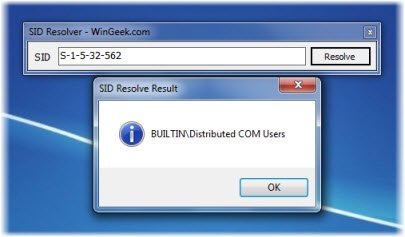
Simply enter the SID you want to resolve, and the utility will identify what account the SID is from.
Additional information is available on KB243330.
Now read: How to find Security Identifier (SID) of any User in Windows.

