
I have discussed in detail how you can use Tags in Windows to enhance your search. One of the basic problems with Windows Tags is that it is not available for every type of files. In this post, we will learn how to Enable Tags for unsupported files in Windows 11/10 formats using File Meta Association Manager.
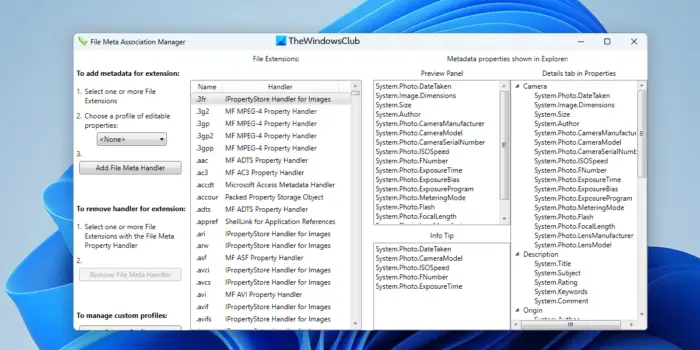
What is interesting to know is that Windows supports tags for every file type, internally. For example, if you create a PDF from Word, it will have the same set of tags as the Word document. It will not be visible in the properties section of that PDF file, but when you search for those tags, the PDF file appears in search results.
Enable Tags for Unsupported files in Windows 11
File Meta Association helps you make those TAGS visible in the Properties section for any file. The tool might look a little complex, but it’s fairly simple once you know how to use it. You can download the file from here, then look at the image showing how to use it. I have numbered the steps for you.
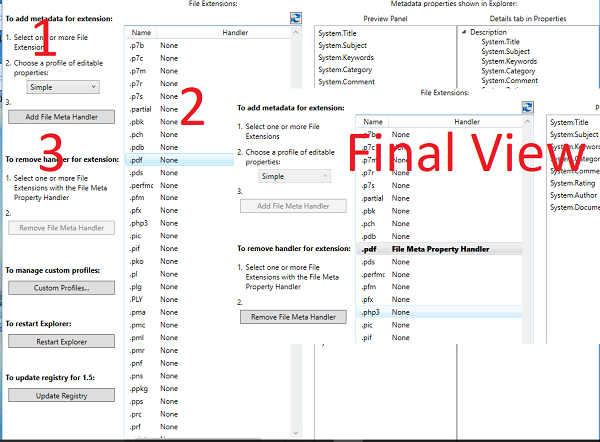
- Select “Simple” profile from the drop-down.
- Then find, and select the extension for which you want to enable tags. (PDF is the example above).
- Next click on Enable File Meta handler.
- The extension will become bold.
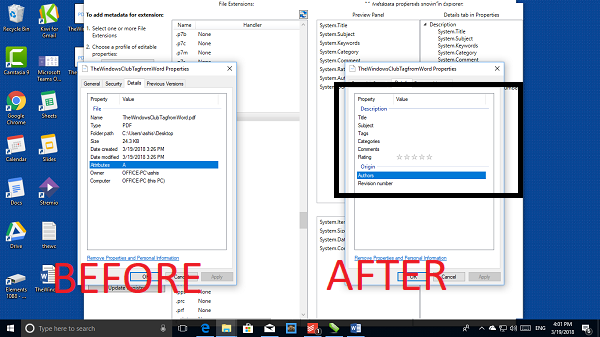
Once done, when you get into the details tab of the file, it will let you add tags. See the image below:
Advanced Usage:
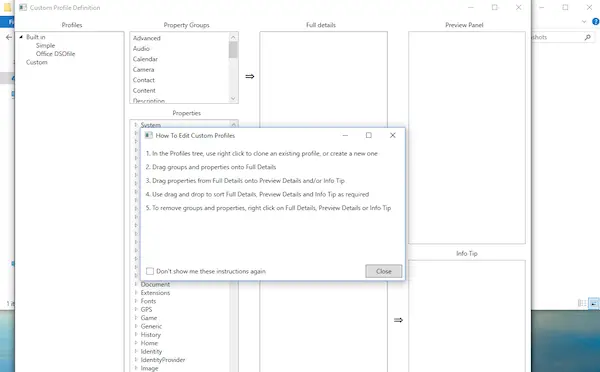
The software lets you create custom profiles. Here you can create new properties by using properties from different file types or copy a complete set of properties. This comes in handy only for specific requirements, and I will suggest only using it when you really need it.
Why didn’t Microsoft enable it for all?
It is such a powerful way to find files; the reason Microsoft didn’t enable it is obvious. According to the developer of this software, these tags are lost when files are moved between different types of file systems. In simple words, if you move between NTFS and FAT, these properties will be lost. If you stay in the same file system, then the tags stay, you will lose them.
File Meta Association free download
To counter this problem, File Meta Association helps export file properties and then reapply them to the original file. You can use it if you are going to move between the file system. You can download the software from Github.
How do I enable Windows tags?
As Windows doesn’t have an in-built option to tag files, you need to use third-party apps. File Meta Association Manager is one of the best options you can download for Windows 11, Windows 10, or older versions. Whether you want to tag files, folders, or anything else, you can make use of File Meta Association Manager.
How do I add tags to Windows files?
To add tags to Windows files, you can utilize the app named File Meta Association Manager. It is an open-source application compatible with Windows 11, Windows 10, and some older versions. You can download the app from GitHub and install it on your PC. Following that, you need to allow the app to access your files and folders. Next, you can set things up according to your requirements.
