
It is always important to verify whether the large file you downloaded is the file you expected to download or not. This is because files may change in some way from the original while downloading. This may be due to corruption, due to errors in the download process. The downloaded files may even possess security-compromising features or include unwanted malicious software such as a virus or malware.
Therefore, no matter what the reason is, you should check the integrity of the files first. You should also check if there is any change from the original form or not. There are various ways by which you can check the original form. For instance, you can check if a file has a digital signature or not or check the hash value of it.
MD5 checksum
The MD5 checksum for a file is a 128-bit value which is unique to the file – something like a fingerprint. It can be used to compare files and their integrity control.
Read: MD5 Hash Checker Tools for Windows 10.
Check the hash value
Some web pages offering programs to download provide a long code called as MD5 near the program link. When you apply a cryptographic hash function to it, a string value is returned which is only valid for that file in the current state. If you download the same file with changed data (at very few places only) from some other website and apply this cryptographic function again, you will observe the value is changed. So, you can easily determine if the file is untouched or not.
Luckily, there are many programs available for Windows that help you calculate the hash value and check if the hash value you have of files matches or not. I am covering some free File Integrity Checkers & File Checksum Integrity verifier tools to check file integrity of downloaded files in Windows using Using MD5 & SHA1 Hashes, by computing MD5 or SHA1 cryptographic hashes for files.
File Integrity & Checksum Checkers
Here are 5 File Integrity & Checksum Checkers that can help you check the hash value:
- IgorWare Hasher
- MultiHasher
- MD5 & SHA-1 Checksum Utility
- Microsoft File Checksum Integrity Verifier
- Verify MD5 Checksum online.
1] IgorWare Hasher
IgorWare Hasher is a free SHA-1, MD5 and CRC32 hash generator for Windows. The program can generate a checksum for a single file and verify its integrity by using verification files (.sha, .md5 and .sfv) generated by Total Commander, with support for UTF-8 verification files. It comes in a portable version also and hence, requires no installation.
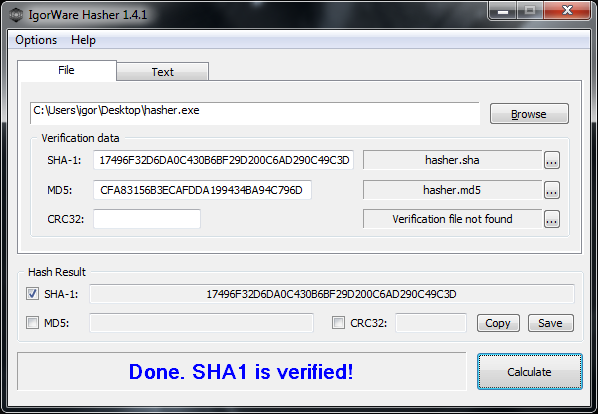
IgorWare Hasher features:
- Calculates SHA-1, MD5 and CRC32 hash for single file or text
- Supports hash verification files (*.sha, *.md5, *.sfv) compatible with Total and Free Commander
- Drag and Drop file support
- Supports UTF8 verification files
- Automatically loads verification files when found
- Includes option to associate hasher with files in windows explorer
2] MultiHasher
The ingenious program provides support for up to five hash algorithms including MD5, SHA-1, SHA-256, SHA-384, and SHA-512. Plus, it has the capability of calculating one or more hashes that exist in a single file, simultaneously.
MultiHasher includes a built-in famous virus scanner – Virus Total that lets a user know from the Virus Total database if a file is infected with some kind of virus. The program when downloaded, integrates into Windows Explorer. The Program contains no spyware, Adware and is 100% freeware.
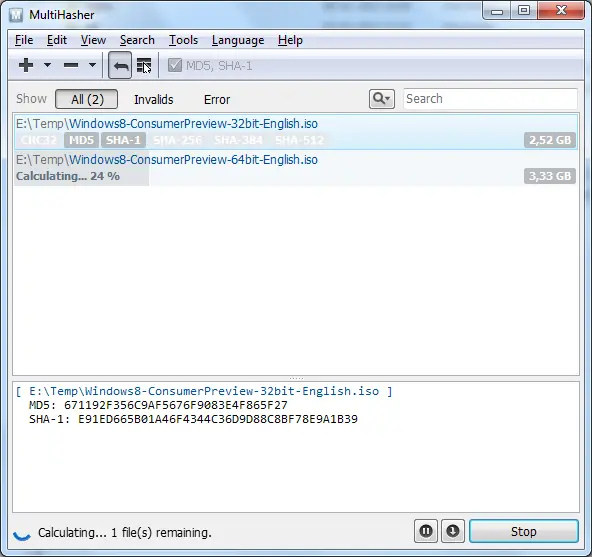
MultiHasher Features:
- Ability to calculate one or more hash values for a single file at once
- Ability to calculate hash values for multiple files and text string
- Supports the following hash algorithms: CRC32, MD5, RIPEMD-160, SHA-1, SHA-256, SHA-384, SHA-512
- Supports hash file verification such as MHX, SFV, MD5Sum, etc.
- Unicode support
- Localizable UI
- Multiple language support
- Built-in virus checker
3] MD5 & SHA-1 Checksum Utility
MD5 & SHA-1 Checksum Utility is simple but very effective in its function. All a user needs to do is browse for the file, or drag and drop them. MD5 and SHA1 hash values are then generated automatically in the corresponding fields. If you would like to verify the generated hash with a previous one, you can just paste it into the box and click Verify.
Unlike other programs that you may find as bloated, the tool just gives you the hash value with no frills thus, sufficient. MD5 & SHA-1 Checksum Utility is a complete freeware, portable and compatible with Windows XP, Vista and 7.
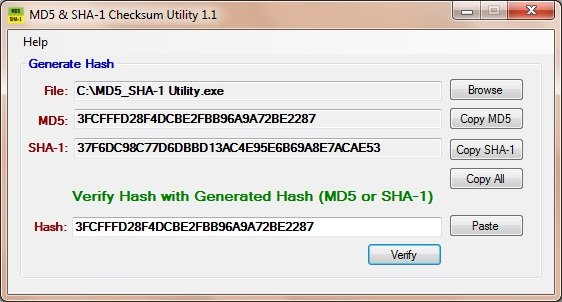
MD5 & SHA-1 Checksum Utility features:
- New and Simple Interface
- Support Drag and Drop for File
- Share hashes easily via Copy All button.
4] Microsoft File Checksum Integrity Verifier
This tool is an unsupported command-line utility that computes MD5 or SHA1 cryptographic hashes for files. It is a command-prompt utility that computes and verifies cryptographic hash values of files. FCIV can compute MD5 or SHA-1 cryptographic hash values. These values can be displayed on the screen or saved in an XML file database for later use and verification.
TIP: You can verify MD5 checksum of files using the built-in command-line tool Certutil.
5] Verify MD5 Checksum online
Onlinemd5.com will help you generate and verify the MD5/SHA1 checksum of a file without uploading it.
Also, have a look at MD5 Check and Marixio File Checksum verifier.
If you’d like to recommend any other, please do so in the comments below.

