
Removable USB devices have become an essential part of our electronic life since these portable devices have the ability to carry GBs of information in them and therefore prove handy at times. However, the same can also be used to upload malicious code to your computer (intentionally or unintentionally) or extract confidential information. So, the best way to avoid such hassle is to prevent users from connecting any USB devices to your system. There appears to be no direct and easy way of doing it in Windows. That said, you can always make use of third-party USB security software under such circumstances.
We covered Kashu USB Flash Security, a free utility for password-protecting USB keys and other sensitive data stored in it. The utility allowed users to generate a password necessary for accessing the protected data on the USB key. And like it, if you want to prevent users from connecting any USB devices to your system and save your data from any unauthorized access, I suggest you use USB Disabler.
USB Disabler for Windows computers
USB Disabler is a small, simple yet powerful program designed to enable or disable USB storage access on your Windows computer.
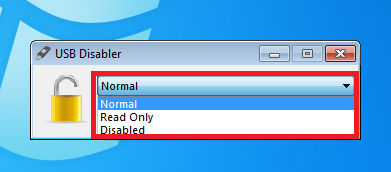
USB Disabler when enabled, allows a user to carry out any one of the following actions,
- Disabling any USB storage / PenDrive access to his laptop or PC.
- Set Read-Only access to USB storage / Pendrive, which means a user’s personal documents, files, etc. cannot be copied over to any removable storage device by anyone.
- Reset everything back to Normal so that a user’s own USB Storage / Pendrive is functioning as before.
How to use USB Disabler
- Download USB Disabler. It is quite light in weight; only 1MB (zipped) in size. Remember you need to extract its contents first, before you can use it.
- Save the extracted contents to a destination folder.
- when done, double-click on the setup and agree to the licensing terms and conditions
- That’s it! Few clicks and you are done. You will observe a simple Window on your computer screen. The application has a very simple interface. Check out the screenshot below.
USB Disabler advantages:
- Lightweight & Portable
- Simple interface
- Compatible with Windows Vista/ Windows 7 UAC feature
- Royalty-free for personal or company usage
To download USB Disabler visit the Wittsoft Blog.
Four ways to disable or enable USB Ports in Windows may also interest you.
You might also want to check out these freeware for your USB:
- Lock, secure, password protect your USB Drive with USB Safeguard
- Keep a track of who used a USB Device on your Windows PC with USBLogView
- Prevent unauthorized use of USB and other removable media with NetWrix’s USB Blocker
- USB Manager is a Windows freeware to manage Portable Devices.

