
What is the TrustedInstaller.exe process in Windows 11/10? Why does TrustedInstaller.exe sometimes utilize a high percentage of processor power and make my system slow? Can I disable TrustedInstaller.exe in Windows 11/10? These are a few questions I will try to answer in this post.
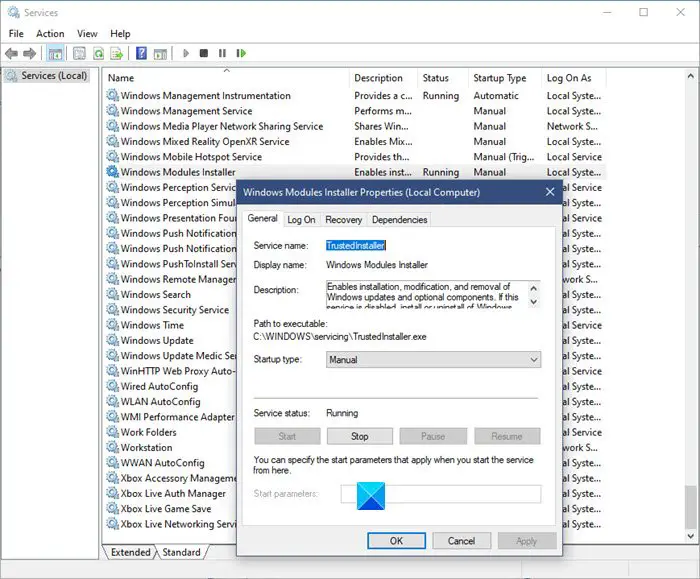
What is TrustedInstaller.exe process?
TrustedInstaller.exe is a process of Windows Modules Installer service in Windows 11/10. Its main function is to enable the installation, removal, and modification of Windows Updates and optional system components. Whether you use Windows 11 or Windows 10, TrustedInstaller works the same way across all platforms.
In this post, we will cover the following topics:
- TrustedInstaller.exe
- TrustedInstaller.exe utilizing a high percentage of resources
- Should you disable TrustedInstaller.exe.
TrustedInstaller.exe location
TrustedInstaller.exe is located at C:\Windows\servicing\ and its normal startup of this service is set at Manual, and it runs under the Local System Account. It has no dependencies.
At times, you may find that TrustedInstaller.exe has been corrupted, and you may receive an error message to that effect. In such a case running the System File Checker may help. But sometimes even the Windows Resource Protection service, which runs the system file checker, is affected. In such a case if you try to run sfc /scannow, you may get the error message – Windows Resource Protection could not start the repair service.
In such a case you may have to Reset Windows.
TrustedInstaller.exe utilizing a high percentage of resources
At times, especially after you have downloaded and installed Windows Updates, on restart, you may find TrustedInstaller.exe in your Task Manager consuming a lot of resources. That is normal. Just allow it to run its course.
If this continues to happen you may need to Run DISM or use the Cloud Reset option to repair your system files.
Can I disable TrustedInstaller.exe
While there are ways to disable or remove TrustedInstaller.exe, and many sites are suggesting these, you don’t want to do that as it is a protected system resource. If you disable this service, Windows Updates may fail to install or uninstall!
Running System File Checker will help you replace deleted or corrupted system files.
Do I need TrustedInstaller?
Yes, you must have TrustedInstaller on your computer. Numerous things, such as enabling installation, removal, etc., of Windows Updates and other components depend on this module. Therefore, it is highly recommended to keep this service running on your PC.
Is it safe to end TrustedInstaller.exe?
At some point, you might need to end the TrustedInstaller process in the Task Manager or Services panel in Windows 11/10. However, you might not get the usual processes running without this functionality when it comes to safety. As various essential things depend on TrustedInstaller, you must keep it running on your computer all the time to get a smooth user experience.
Can I delete TrustedInstaller.exe?
It is highly recommended not to delete TrustedInstaller from your computer as long as you want to continue getting the same options and features in the future. Answering the question, yes, you can delete TrustedInstaller.exe, but it will come with some consequences that might damage the system you are using.
How do I disable TrustedInstaller in Windows 11/10?
You can disable TrustedInstaller or Windows Modules Installer using the Services, which is included in your Windows 11/10 computer. For that, open the Services panel and double-click on the Windows Modules Installer setting. Choose the Disabled option from the Startup type drop-down list and click the OK button. It will disable the TrustedInstaller service on your computer.
This post will show you how to restore TrustedInstaller as Owner and its Permissions to default.
Want to know about these processes?
Svchost.exe | RuntimeBroker.exe | Shellexperiencehost.exe | StorDiag.exe | Spoolersv.exe.
