
The Disk Defragmenter in Windows is automatically scheduled to run at 1.00 am, by default, which means that you don’t really need to run it manually. But if you find that you are unable to manually run the Windows 11/10/8/7 in-built defragmenter utility and you may be, get an error like:
- Disk defragmenter could not start
- Failed to initialize or Optimization not available
- Analyze and Defrag buttons may be grayed out.
Disk defragmenter could not start or Failed to initialize
This may happen if you have uninstalled a 3rd party defragmenter, and the uninstallation may not have gone correctly or may have been incomplete. You may try these suggestions in any order you wish; these are just some options you may want to try.
- Run System File Checker
- Check the status of a Service
- Run ChkDsk
- Ensure that Page File is not disabled
- Use System Restore.
1. Run System File Checker
Click Start > Search Menu Bar > cmd > right-click on the result > Run As Administrator > Type sfc /scannow > Hit Enter. This will run the System File Checker. This will examine all your system files and replace them if any are found to have been corrupted.
2. Check the status of a Service
Type services.msc in start search and hit Enter.
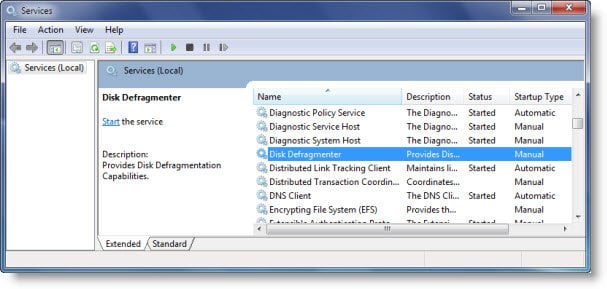
In Windows 10/8/7 ensure that:
Disk Defragmenter service is not Disabled but set to Manual.
This service, defragsvc, is new starting from Windows 7 and is used to defragment disks on a schedule. It does not run at start-up but starts & stops, as required on its own.
Also, ensure that the following services are running and set to Automatic.
- Remote Procedure Call (RPC)
- DCOM Server Process Launcher
- RPC Endpoint Mapper
3. Run ChkDsk
Run chkdsk /r on the drive you plan to defragment. The /r switch identifies bad Sectors and attempts recovery of information.
4. Ensure that Page File is not disabled
Verify that the Page File isn’t turned off.
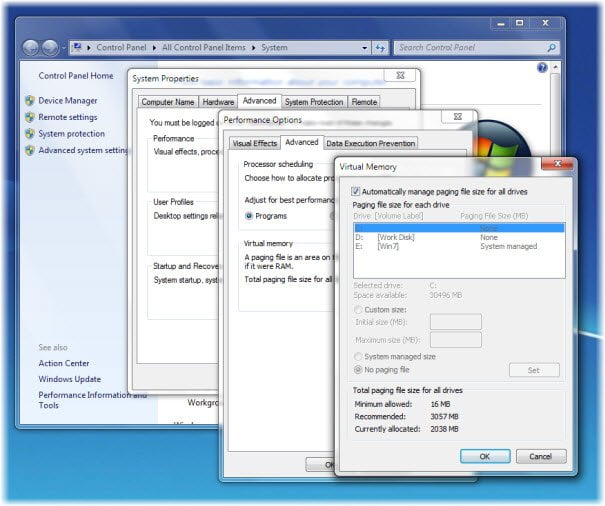
To do so, right-click Computer > Properties > Advanced system settings > Advanced tab > Performance > Settings > Performance Options > Virtual Memory > Change > Ensure that Automatically manage Paging file size for all drives is checked. Make sure that No paging file is NOT selected.
5. Use System Restore
Try a System Restore.
Hope something helps!
This post on Best free defragmentation software for Windows may also interest you.

