
If you find that your Windows 10/8/7 computer is facing some hardware or device issues or problems, you can run the Hardware and Devices Troubleshooter. This automated troubleshooter will try to identify and then resolve the issues that it finds.
Hardware and Devices Troubleshooter
Windows 10/8/7 comes with this troubleshooter in-built. If you recently installed a new driver or some hardware and find some things are not working as you’d like them to, use this troubleshooter.
On Windows 10, you can also open Settings > Update & Security > Troubleshoot and click on Hardware and Devices.
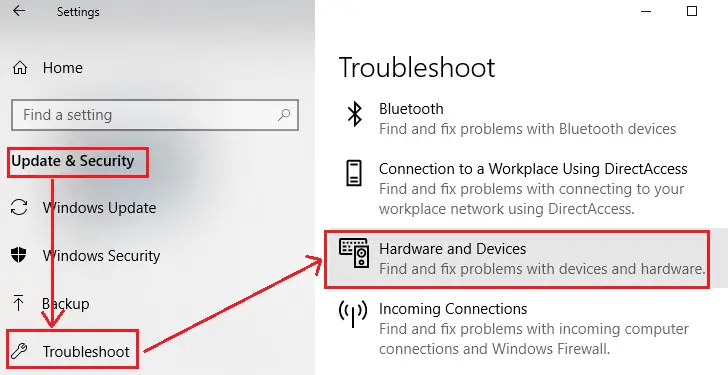
On Windows 8/7, open Control Panel > Hardware and Sound > Configure a device.
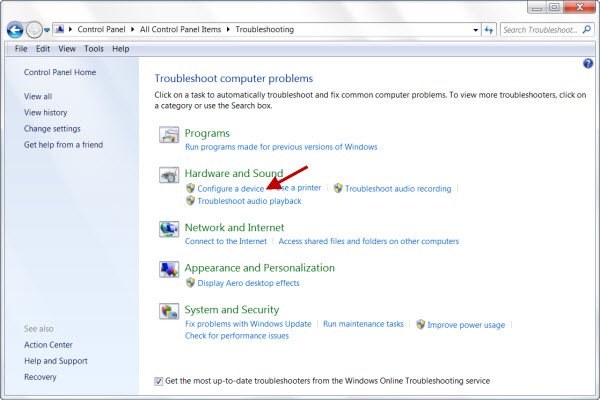
The Hardware Troubleshooter will open. You can set it to fix the detected problems automatically or select and opt to fix only the ones you want.
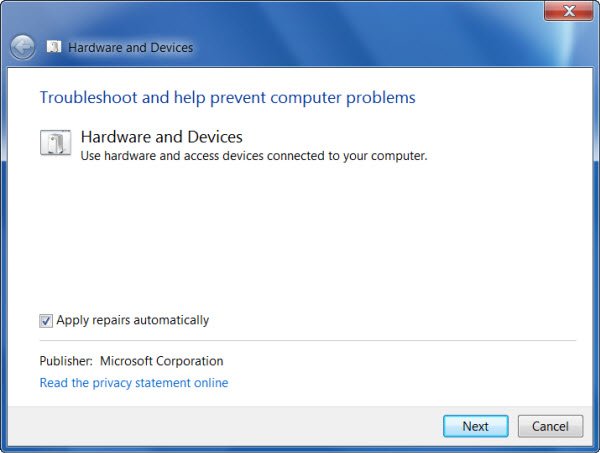
Click on Next to run the Hardware and Devices Troubleshooter. Once the scan is completed, it will present you with a report.
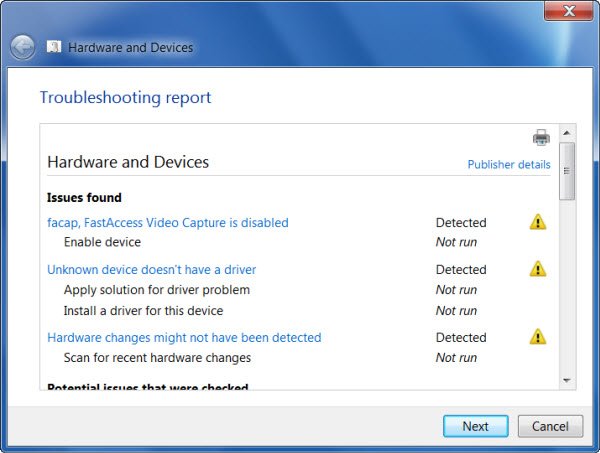
Choose the ones you want to fix and click on Next.
The Hardware and Devices Troubleshooter will try to fix the problems for you.
Hardware and Devices Troubleshooter missing
If the Hardware and Devices Troubleshooter is missing then you can also run the Troubleshooter using the command line. To invoke the troubleshooter, all you need do is to launch the command prompt, then type or copy and paste the command below and hit Enter.
msdt.exe -id DeviceDiagnostic
You can also download and use our useful freeware FixWin to open the troubleshooter with a click.
This post tells you what to do if SD Card Reader not working in Windows.
These links may also interest you:


I have tried all things windows to get my wireless mouse and keyboard to work again after installing some Dell updates. Windows used to recognize them and it word work right away. strangely, when I got into Bios, wireless keyboard and mouse do work. once I get to windows desktop, no joy. I am forced to use the laptop keyboard. tried all of your suggestions and nothing works so something is suppressing my USB connection from windows.
Windows has terrible advice. You sent us Windows 8.1 users to this page and a majority of the options don’t exist. I put a flash drive in and it’s scolding hot burning. Never had this issue and I hate Windows 8.1. It’s no good, nobody should use it and maybe people should start a lawsuit against Microsoft.
Fantastic solution, all is fine now. Thank you very much for your kind advice…
In January 2017 I began using Philips voice tracer LFH0662 on my window 7 laptop and my new windows 10 office computer. Everything worked fine until yesterday, 3-16 when both computers said they did not recognize the USB device.
Tried Hardware Troubleshooting without success on the Windows 7 laptop. I tried unistalling Roots but that didn’t get far at all.
I am now out of business since I cannot dictate.
I am computer illiterate so any help has to be spelled out step by step.
I think I uninstalled my camera recognition for sign in. The light to the left above my screen doesn’t come on. Help!
Configure a device is not an option for Hardware and Sound in the troubleshooter.