
Microsoft Edge and Internet Explorer browser have a feature called the InPrivate browsing mode. The InPrivate Browsing mode, lets you control whether or not the browser should save your browsing history, cookies, and other data. This mode makes sure that once your browsing session is completed, no private data is stored in the browser. This tutorial guides you on how to switch to InPrivate mode of Edge (Chromium) and Internet Explorer browser.
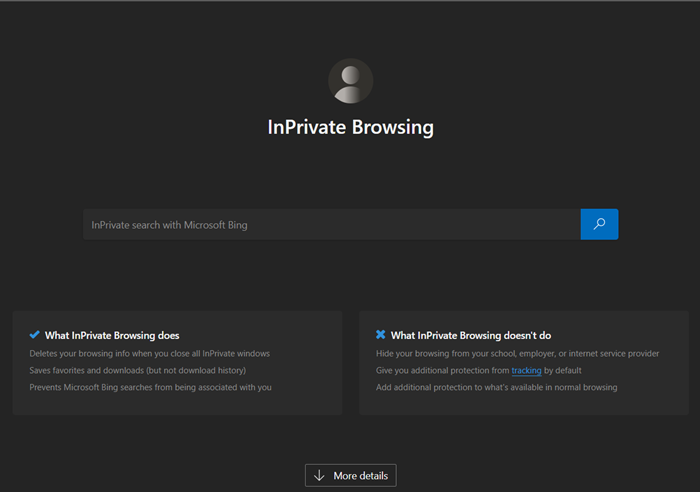
While browsing in the InPrivate mode, the following takes place:
- New cookies are not stored
- New history entries will not be recorded
- New temporary Internet files will be deleted after the Private Browsing window is closed
- Form data is not stored
- Passwords are not stored
- Addresses typed into the address bar are not stored
- Queries entered into the search box are not stored
- Visited links will not be stored.
Open InPrivate window in Edge browser
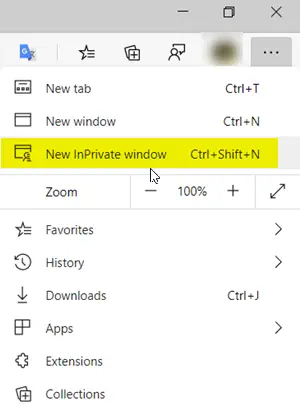
InPrivate Browsing also helps prevent the Edge browser from storing data about your browsing session. This includes cookies, temporary Internet files, history, and other data. Toolbars and extensions are disabled by default.
- Launch the Microsoft Edge browser.
- Go to ‘Settings and more’ menu and click it.
- Here, you will find the ‘New InPrivate window’ option listed, alongside other options.
- Choose the option to start browsing in ‘InPrivate’ mode of the Edge browser.
- When done, close the browser and exit. No temporary Internet files, history, and other data will be saved upon your exit.
To browse in the InPrivate mode, in Edge, click Ctrl+Shift+N. A new private window will open.
Create a shortcut to start Edge in Private Mode
If you prefer always to browse using Edge in the inPrivate mode, you may create a desktop shortcut using the following command-line argument:
msedge.exe -inprivate
Copy-pasting this in the Start search box and hitting Enter will also start your Edge in this mode.
Microsoft Edge now also offers a flag in edge://flags/ named Turn on InPrivate Desktop Shortcut.
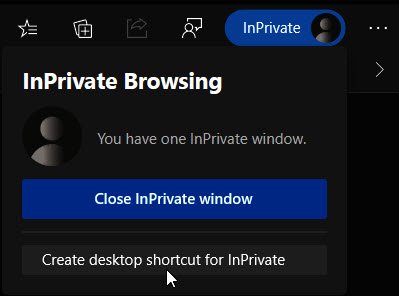
If you enable it, you will see a quick link that allows you to create a desktop shortcut to open Edge in InPrivate mode.
TIP: You can make Microsoft Edge always start in InPrivate mode by editing the Windows Registry.
InPrivate mode in Internet Explorer
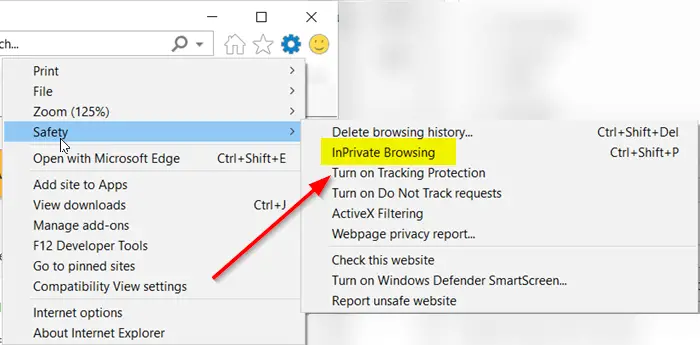
- Launch Internet Explorer browser.
- Navigate the mouse cursor to ‘Tools‘ (visible as a cog icon).
- Select it, scroll down to ‘Safety‘ section.
- Press the side-arrow to expand the safety menu.
- Here, from the list of options displayed, select ‘InPrivate browsing‘ option.
To browse in the InPrivate mode, in IE, click on Tools tab and select InPrivate Browsing or click Ctrl+Shift+P. A new window will open, and you will see the following in your address bar.
Create a shortcut to start IE in inPrivate Mode
If you prefer always to browse using Internet Explorer in the inPrivate mode, you may create a desktop shortcut using the following command-line argument:
iexplore.exe -private
Copy-pasting this in the Start search box and hitting Enter will also start you IE in this mode.
Hope this helps!
Related reads:

