<?xml version="1.0" encoding="UTF-8"?>
<rss version="2.0"
	xmlns:content="http://purl.org/rss/1.0/modules/content/"
	xmlns:wfw="http://wellformedweb.org/CommentAPI/"
	xmlns:dc="http://purl.org/dc/elements/1.1/"
	xmlns:atom="http://www.w3.org/2005/Atom"
	xmlns:sy="http://purl.org/rss/1.0/modules/syndication/"
	xmlns:slash="http://purl.org/rss/1.0/modules/slash/"
	>

<channel>
	<title>The Windows Club &#187; Messenger</title>
	<atom:link href="http://www.thewindowsclub.com/tag/messenger/feed" rel="self" type="application/rss+xml" />
	<link>http://www.thewindowsclub.com</link>
	<description>The Windows Club is  created by Anand Khanse, a Microsoft MVP and is primarily targeted at the Windows 7 &#38; Windows Vista user and will address and cover issues in relation to Microsoft and Windows OS.</description>
	<lastBuildDate>Fri, 19 Mar 2010 18:23:52 +0000</lastBuildDate>
	<generator>http://wordpress.org/?v=2.9.2</generator>
	<language>en</language>
	<sy:updatePeriod>hourly</sy:updatePeriod>
	<sy:updateFrequency>1</sy:updateFrequency>
	<xhtml:meta xmlns:xhtml="http://www.w3.org/1999/xhtml" name="robots" content="noindex" />
		<item>
		<title>Customize Windows Live Messenger with Messenger Live Toolbox</title>
		<link>http://www.thewindowsclub.com/customize-windows-live-messenger-with-messenger-live-toolbox</link>
		<comments>http://www.thewindowsclub.com/customize-windows-live-messenger-with-messenger-live-toolbox#comments</comments>
		<pubDate>Sat, 20 Feb 2010 04:27:37 +0000</pubDate>
		<dc:creator>Windows Club</dc:creator>
				<category><![CDATA[Live]]></category>
		<category><![CDATA[Messenger]]></category>

		<guid isPermaLink="false">http://www.thewindowsclub.com/?p=6856</guid>
		<description><![CDATA[Messenger Live Toolbox lets you customize Windows Live Messenger further, easily. If you use the Messenger regularly, you might want to check it out!

Messenger Live Toolbox adds many customization options to Windows Live Messenger. These changes can be divided into changes to the interface itself and to the visual display of Windows Live Messenger.
This toolbox [...]]]></description>
		<wfw:commentRss>http://www.thewindowsclub.com/customize-windows-live-messenger-with-messenger-live-toolbox/feed</wfw:commentRss>
		<slash:comments>0</slash:comments>
		</item>
		<item>
		<title>Disable Windows Live Messenger Aero Frame Border</title>
		<link>http://www.thewindowsclub.com/disable-windows-live-messenger-aero-frame-border</link>
		<comments>http://www.thewindowsclub.com/disable-windows-live-messenger-aero-frame-border#comments</comments>
		<pubDate>Sun, 31 Jan 2010 06:08:13 +0000</pubDate>
		<dc:creator>Windows Club</dc:creator>
				<category><![CDATA[Live]]></category>
		<category><![CDATA[Messenger]]></category>
		<category><![CDATA[Registry]]></category>
		<category><![CDATA[Tricks]]></category>

		<guid isPermaLink="false">http://www.thewindowsclub.com/?p=6298</guid>
		<description><![CDATA[By default, Windows Live Messenger, comes with its Aero border enabled. But if you want, you may also disable this aero frame, to give it a clean look. 

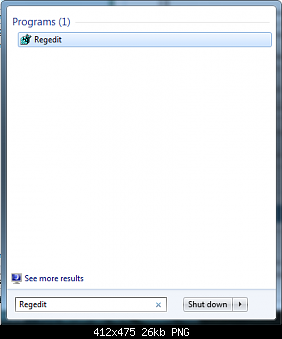
To do so, open regedit and navigate to the following registry key:

HKEY_LOCAL_MACHINE\SOFTWARE\Microsoft\Windows Live\Messenger
In the right pane, create a new DWord AeroWindowFrameEnabled and give it a value &#8216;0&#8216;.
This [...]]]></description>
		<wfw:commentRss>http://www.thewindowsclub.com/disable-windows-live-messenger-aero-frame-border/feed</wfw:commentRss>
		<slash:comments>6</slash:comments>
		</item>
		<item>
		<title>2010 Windows Live Messenger Theme Gift packs from Microsoft</title>
		<link>http://www.thewindowsclub.com/2010-windows-live-messenger-theme-gift-packs-from-microsoft</link>
		<comments>http://www.thewindowsclub.com/2010-windows-live-messenger-theme-gift-packs-from-microsoft#comments</comments>
		<pubDate>Fri, 01 Jan 2010 16:32:03 +0000</pubDate>
		<dc:creator>Windows Club</dc:creator>
				<category><![CDATA[Live]]></category>
		<category><![CDATA[Messenger]]></category>
		<category><![CDATA[Themes]]></category>

		<guid isPermaLink="false">http://www.thewindowsclub.com/?p=5611</guid>
		<description><![CDATA[Put some art in your Messenger conversations ! Download &#38; Enjoy these unique newly released Windows Live™ Messenger gift packs, named Moody Bob, Emotipuff, Carnival Squad &#38; Bunny HaHa created by some very talented artists from around the world. 

Each pack comes with display pics, emoticons, and a wink—choose your favorite or download them all!

These [...]]]></description>
		<wfw:commentRss>http://www.thewindowsclub.com/2010-windows-live-messenger-theme-gift-packs-from-microsoft/feed</wfw:commentRss>
		<slash:comments>0</slash:comments>
		</item>
		<item>
		<title>Download Eid Emoticons from MSN Arabia for Windows Live Messenger</title>
		<link>http://www.thewindowsclub.com/download-eid-emoticons-msn-arabia-windows-live-messenger</link>
		<comments>http://www.thewindowsclub.com/download-eid-emoticons-msn-arabia-windows-live-messenger#comments</comments>
		<pubDate>Sun, 13 Dec 2009 07:16:21 +0000</pubDate>
		<dc:creator>Windows Club</dc:creator>
				<category><![CDATA[Live]]></category>
		<category><![CDATA[Emoticons]]></category>
		<category><![CDATA[Messenger]]></category>

		<guid isPermaLink="false">http://www.thewindowsclub.com/?p=5274</guid>
		<description><![CDATA[MSN Arabia has released an exclusive set of 10 free emoticons, with a local Arabian flavour, for Windows Live Messenger.

The emoticons carry a local Arabian flavour and have the characters dressed in local costumes, and can be used at all times. They look really nice and are worth a check-out!

The installer has pre-checked options to [...]]]></description>
		<wfw:commentRss>http://www.thewindowsclub.com/download-eid-emoticons-msn-arabia-windows-live-messenger/feed</wfw:commentRss>
		<slash:comments>0</slash:comments>
		</item>
		<item>
		<title>Free Windows Live Messenger &amp; Windows 7 Christmas Downloads</title>
		<link>http://www.thewindowsclub.com/free-windows-live-messenger-windows-7-christmas-downloads</link>
		<comments>http://www.thewindowsclub.com/free-windows-live-messenger-windows-7-christmas-downloads#comments</comments>
		<pubDate>Fri, 04 Dec 2009 03:37:30 +0000</pubDate>
		<dc:creator>Windows Club</dc:creator>
				<category><![CDATA[Downloads]]></category>
		<category><![CDATA[Christmas]]></category>
		<category><![CDATA[Customize]]></category>
		<category><![CDATA[Messenger]]></category>
		<category><![CDATA[Themes]]></category>

		<guid isPermaLink="false">http://www.thewindowsclub.com/?p=5013</guid>
		<description><![CDATA[The holiday season is around the corner and here are a few great ways you can spruce up your Windows 7 and spread a little Christmas cheer!

Check out these free Christmas Theme Packs, Themes, Windows Media Player Playlists, WMP Visualization, etc for your Windows 7 &#38; Windows Live Messenger:
Yule Log Visualization for Windows Media Player [...]]]></description>
		<wfw:commentRss>http://www.thewindowsclub.com/free-windows-live-messenger-windows-7-christmas-downloads/feed</wfw:commentRss>
		<slash:comments>0</slash:comments>
		</item>
		<item>
		<title>Microsoft launches MSN Juku as a part of ClubM in China</title>
		<link>http://www.thewindowsclub.com/microsoft-launches-msn-juku-as-a-part-of-clubm-in-china</link>
		<comments>http://www.thewindowsclub.com/microsoft-launches-msn-juku-as-a-part-of-clubm-in-china#comments</comments>
		<pubDate>Tue, 01 Dec 2009 13:49:18 +0000</pubDate>
		<dc:creator>Windows Club</dc:creator>
				<category><![CDATA[News]]></category>
		<category><![CDATA[Messenger]]></category>
		<category><![CDATA[MSN]]></category>

		<guid isPermaLink="false">http://www.thewindowsclub.com/?p=4943</guid>
		<description><![CDATA[Microsoft has launched a microblog / twitter style service in China based on Windows Live Messenger, expanding the social-networking functions linked to the chat software in a country where it is a hit.

The new service, which is called MSN Juku and is now in beta, lets users post 140-character messages to an update screen that [...]]]></description>
		<wfw:commentRss>http://www.thewindowsclub.com/microsoft-launches-msn-juku-as-a-part-of-clubm-in-china/feed</wfw:commentRss>
		<slash:comments>3</slash:comments>
		</item>
		<item>
		<title>aMSN : A Portable MSN Messenger clone.</title>
		<link>http://www.thewindowsclub.com/amsn-a-portable-msn-messenger-clone</link>
		<comments>http://www.thewindowsclub.com/amsn-a-portable-msn-messenger-clone#comments</comments>
		<pubDate>Mon, 23 Nov 2009 12:06:46 +0000</pubDate>
		<dc:creator>Windows Club</dc:creator>
				<category><![CDATA[Downloads]]></category>
		<category><![CDATA[Messenger]]></category>
		<category><![CDATA[Portable]]></category>

		<guid isPermaLink="false">http://www.thewindowsclub.com/?p=4791</guid>
		<description><![CDATA[aMSN is a free open source portable MSN Messenger clone, which runs right out of the box. With aMSN you can chat or video chat with your MSN contacts on the go!

Carry it with you an a stick, wherever you go! It is customizable with plenty of skins available and has plugins support too.
Features: 
- [...]]]></description>
		<wfw:commentRss>http://www.thewindowsclub.com/amsn-a-portable-msn-messenger-clone/feed</wfw:commentRss>
		<slash:comments>1</slash:comments>
		</item>
		<item>
		<title>Halloween Theme for Windows Live Messenger</title>
		<link>http://www.thewindowsclub.com/halloween-theme-for-windows-live-messenger</link>
		<comments>http://www.thewindowsclub.com/halloween-theme-for-windows-live-messenger#comments</comments>
		<pubDate>Fri, 30 Oct 2009 17:46:49 +0000</pubDate>
		<dc:creator>Windows Club</dc:creator>
				<category><![CDATA[Downloads]]></category>
		<category><![CDATA[Messenger]]></category>

		<guid isPermaLink="false">http://www.thewindowsclub.com/?p=4410</guid>
		<description><![CDATA[Here is a nice skin, themed for Halloween. You may want to check it out and see how your Windows Live Messenger 2009 looks. 


Try not to scare your contacts too much, by the way !
Download Page for Halloween Live 2009 theme.
]]></description>
		<wfw:commentRss>http://www.thewindowsclub.com/halloween-theme-for-windows-live-messenger/feed</wfw:commentRss>
		<slash:comments>0</slash:comments>
		</item>
		<item>
		<title>Windows Live Messenger 2009 Command Line Parameters</title>
		<link>http://www.thewindowsclub.com/windows-live-messenger-2009-command-line-parameters</link>
		<comments>http://www.thewindowsclub.com/windows-live-messenger-2009-command-line-parameters#comments</comments>
		<pubDate>Fri, 16 Oct 2009 18:11:22 +0000</pubDate>
		<dc:creator>Windows Club</dc:creator>
				<category><![CDATA[Live]]></category>
		<category><![CDATA[cmd]]></category>
		<category><![CDATA[Messenger]]></category>

		<guid isPermaLink="false">http://www.thewindowsclub.com/?p=4038</guid>
		<description><![CDATA[Windows Live Messenger 2009 has a number of Command Line Parameters available that you can use to start actions within Messenger without opening it up. 
You can use these for a variety of purposes, like scripts, hotkey/macro applications and anywhere else where you can start a program.
Parameter : Action
/available : Sets your status to available [...]]]></description>
		<wfw:commentRss>http://www.thewindowsclub.com/windows-live-messenger-2009-command-line-parameters/feed</wfw:commentRss>
		<slash:comments>0</slash:comments>
		</item>
		<item>
		<title>Messenger does not remember username and password</title>
		<link>http://www.thewindowsclub.com/messenger-does-not-remember-username-and-password</link>
		<comments>http://www.thewindowsclub.com/messenger-does-not-remember-username-and-password#comments</comments>
		<pubDate>Fri, 16 Oct 2009 15:30:21 +0000</pubDate>
		<dc:creator>Windows Club</dc:creator>
				<category><![CDATA[Live]]></category>
		<category><![CDATA[Messenger]]></category>

		<guid isPermaLink="false">http://www.thewindowsclub.com/?p=4028</guid>
		<description><![CDATA[If you find that, for some reason, your Windows Love Live Messenger forgets to remember your Windows Live IDs after a Windows restart, you may want to try Make Messenger Remember.

Just download the zip for Make Messenger Remember and run the executable contained inside.  Make Messenger Remember will automatically restart Windows after completing its work, [...]]]></description>
		<wfw:commentRss>http://www.thewindowsclub.com/messenger-does-not-remember-username-and-password/feed</wfw:commentRss>
		<slash:comments>2</slash:comments>
		</item>
	</channel>
</rss>