<?xml version="1.0" encoding="UTF-8"?>
<rss version="2.0"
	xmlns:content="http://purl.org/rss/1.0/modules/content/"
	xmlns:wfw="http://wellformedweb.org/CommentAPI/"
	xmlns:dc="http://purl.org/dc/elements/1.1/"
	xmlns:atom="http://www.w3.org/2005/Atom"
	xmlns:sy="http://purl.org/rss/1.0/modules/syndication/"
	xmlns:slash="http://purl.org/rss/1.0/modules/slash/"
	>

<channel>
	<title>The Windows Club &#187; Logon UI</title>
	<atom:link href="http://www.thewindowsclub.com/tag/logon-ui/feed" rel="self" type="application/rss+xml" />
	<link>http://www.thewindowsclub.com</link>
	<description>The Windows Club is  created by Anand Khanse, a Microsoft MVP and is primarily targeted at the Windows 7, 8 &#38; Vista user and will address and cover issues in relation to Microsoft and Windows OS.</description>
	<lastBuildDate>Thu, 09 Feb 2012 03:47:25 +0000</lastBuildDate>
	<language>en</language>
	<sy:updatePeriod>hourly</sy:updatePeriod>
	<sy:updateFrequency>1</sy:updateFrequency>
	<generator>http://wordpress.org/?v=3.3.1</generator>
<xhtml:meta xmlns:xhtml="http://www.w3.org/1999/xhtml" name="robots" content="noindex" />
		<item>
		<title>Customize Ctrl+Alt+Del Screen In Windows 7 Using Group Policy</title>
		<link>http://www.thewindowsclub.com/customize-ctrlaltdel-screen-windows-7-group-policy?utm_source=rss&#038;utm_medium=rss&#038;utm_campaign=customize-ctrlaltdel-screen-windows-7-group-policy</link>
		<comments>http://www.thewindowsclub.com/customize-ctrlaltdel-screen-windows-7-group-policy#comments</comments>
		<pubDate>Wed, 03 Aug 2011 00:09:54 +0000</pubDate>
		<dc:creator>NithinR@TWC</dc:creator>
				<category><![CDATA[Windows]]></category>
		<category><![CDATA[Group Policy]]></category>
		<category><![CDATA[Logon UI]]></category>

		<guid isPermaLink="false">http://www.thewindowsclub.com/?p=31397</guid>
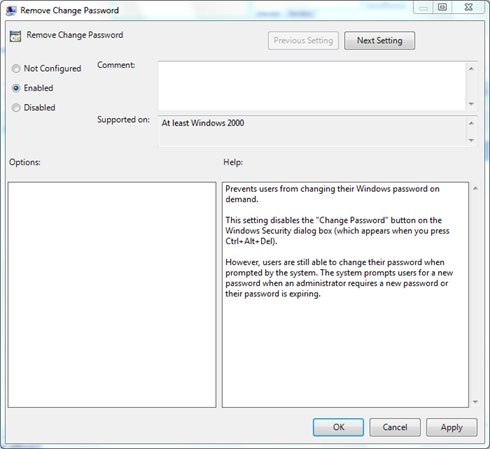
		<description><![CDATA[<div style=" float: left; padding: 4px; margin: 0 10px 5px 0; width: 75px; height: 75px;"><img style=" float: left; padding: 4px; margin: 0 10px 5px 0;" width="75" height="75" src="http://www.thewindowsclub.com/wp-content/themes/Twc/scripts/thumb.php?src=http://www.thewindowsclub.com/wp-content/uploads/2011/07/073111_1109_Customizeth1.png&amp;w=75&amp;h=75&amp;zc=1"/></div>Until Windows XP, the Ctrl+Alt+Del shortcut, was used to open the Windows Task Manager. But from Windows Vista onwards it was changed to open a new Ctrl+Alt+Del screen with consisted of options such as locking or logging off, starting the <span><a class="more-link" href="http://www.thewindowsclub.com/customize-ctrlaltdel-screen-windows-7-group-policy">...more &#62;&#62;&#62;</a></span>]]></description>
		<wfw:commentRss>http://www.thewindowsclub.com/customize-ctrlaltdel-screen-windows-7-group-policy/feed</wfw:commentRss>
		<slash:comments>3</slash:comments>
		</item>
		<item>
		<title>Change your Windows 7 Logon Screen the easy way, without resource hacks</title>
		<link>http://www.thewindowsclub.com/change-your-windows-7-logon-screen-the-easy-way-without-resource-hacks?utm_source=rss&#038;utm_medium=rss&#038;utm_campaign=change-your-windows-7-logon-screen-the-easy-way-without-resource-hacks</link>
		<comments>http://www.thewindowsclub.com/change-your-windows-7-logon-screen-the-easy-way-without-resource-hacks#comments</comments>
		<pubDate>Fri, 25 Feb 2011 08:39:29 +0000</pubDate>
		<dc:creator>Lee@TWC</dc:creator>
				<category><![CDATA[Windows]]></category>
		<category><![CDATA[Customize]]></category>
		<category><![CDATA[Logon UI]]></category>

		<guid isPermaLink="false">http://www.thewindowsclub.com/?p=24573</guid>
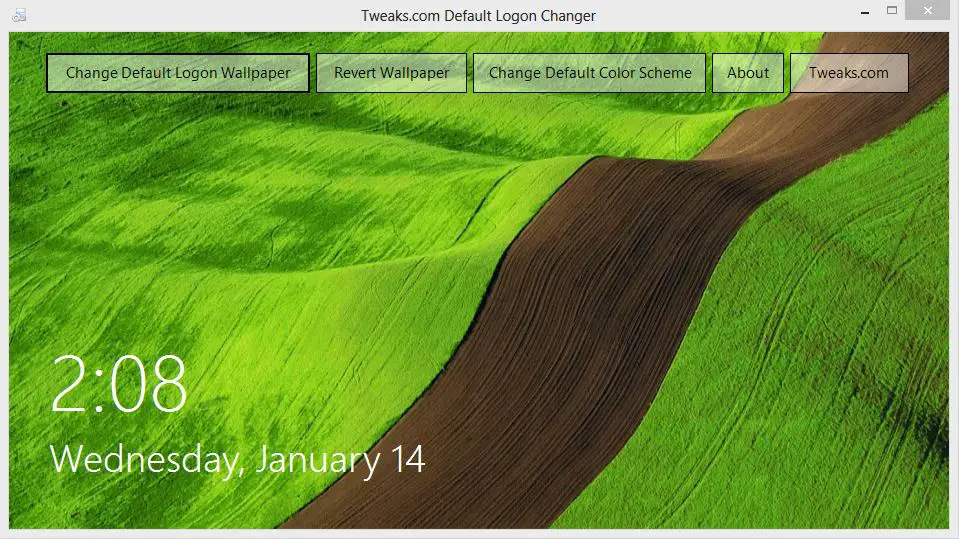
		<description><![CDATA[<div style=" float: left; padding: 4px; margin: 0 10px 5px 0; width: 75px; height: 75px;"><img style=" float: left; padding: 4px; margin: 0 10px 5px 0;" width="75" height="75" src="http://www.thewindowsclub.com/wp-content/themes/Twc/scripts/thumb.php?src=http://www.thewindowsclub.com/wp-content/uploads/2011/02/scrnshot-600x338.jpg&amp;w=75&amp;h=75&amp;zc=1"/></div>Since the release of Windows 7 there have been many hacks\tweaks that have surfaced to customize all aspects of Windows 7 and the one I see popular are hacks\tweaks to customize the Logon Screen. While a good many users tend <span><a class="more-link" href="http://www.thewindowsclub.com/change-your-windows-7-logon-screen-the-easy-way-without-resource-hacks">...more &#62;&#62;&#62;</a></span>]]></description>
		<wfw:commentRss>http://www.thewindowsclub.com/change-your-windows-7-logon-screen-the-easy-way-without-resource-hacks/feed</wfw:commentRss>
		<slash:comments>0</slash:comments>
		</item>
		<item>
		<title>Getting bored with the Windows 7 Logon Screen? Try these alternatives!</title>
		<link>http://www.thewindowsclub.com/getting-bored-with-the-windows-7-logon-screen-try-these-alternatives?utm_source=rss&#038;utm_medium=rss&#038;utm_campaign=getting-bored-with-the-windows-7-logon-screen-try-these-alternatives</link>
		<comments>http://www.thewindowsclub.com/getting-bored-with-the-windows-7-logon-screen-try-these-alternatives#comments</comments>
		<pubDate>Fri, 24 Sep 2010 13:49:46 +0000</pubDate>
		<dc:creator>Lee@TWC</dc:creator>
				<category><![CDATA[Windows]]></category>
		<category><![CDATA[Customize]]></category>
		<category><![CDATA[Logon UI]]></category>

		<guid isPermaLink="false">http://www.thewindowsclub.com/?p=17569</guid>
		<description><![CDATA[<div style=" float: left; padding: 4px; margin: 0 10px 5px 0; width: 75px; height: 75px;"><img style=" float: left; padding: 4px; margin: 0 10px 5px 0;" width="75" height="75" src="http://www.thewindowsclub.com/wp-content/themes/Twc/scripts/thumb.php?src=http://www.thewindowsclub.com/wp-content/uploads/2010/09/Snow_Leopard_Logon_for_7_by_asilaydyingdl1-600x480.jpg&amp;w=75&amp;h=75&amp;zc=1"/></div>Like to tweak your Windows 7 Computer? Get bored with the default Windows 7 Logon Screen? Check out these alternative Logon Screens that have been created by some talented artist from Deviantart. Snow Leopard by asilaydyingdl &#8211; Download page at <span><a class="more-link" href="http://www.thewindowsclub.com/getting-bored-with-the-windows-7-logon-screen-try-these-alternatives">...more &#62;&#62;&#62;</a></span>]]></description>
		<wfw:commentRss>http://www.thewindowsclub.com/getting-bored-with-the-windows-7-logon-screen-try-these-alternatives/feed</wfw:commentRss>
		<slash:comments>3</slash:comments>
		</item>
		<item>
		<title>Download Windows 7 Logon Screen Rotator</title>
		<link>http://www.thewindowsclub.com/download-windows-7-login-screen-rotator?utm_source=rss&#038;utm_medium=rss&#038;utm_campaign=download-windows-7-login-screen-rotator</link>
		<comments>http://www.thewindowsclub.com/download-windows-7-login-screen-rotator#comments</comments>
		<pubDate>Tue, 16 Jun 2009 02:35:54 +0000</pubDate>
		<dc:creator>AnandK@TWC</dc:creator>
				<category><![CDATA[Downloads]]></category>
		<category><![CDATA[Customize]]></category>
		<category><![CDATA[Logon UI]]></category>

		<guid isPermaLink="false">http://www.thewindowsclub.com/?p=1477</guid>
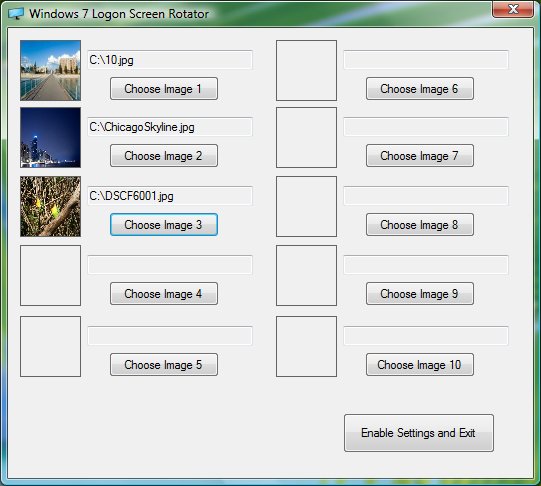
		<description><![CDATA[<div style=" float: left; padding: 4px; margin: 0 10px 5px 0; width: 75px; height: 75px;"><img style=" float: left; padding: 4px; margin: 0 10px 5px 0;" width="75" height="75" src="http://www.thewindowsclub.com/wp-content/themes/Twc/scripts/thumb.php?src=http://www.thewindowsclub.com/wp-content/uploads/2009/06/logonrotator-400x359.jpg&amp;w=75&amp;h=75&amp;zc=1"/></div>This program will let you chose up to 10 images to rotate through on your Windows 7 logon screen. After each logon the image will change.  luke_smily_face of Neowin, has made this little app for himself, but after seeing a <span><a class="more-link" href="http://www.thewindowsclub.com/download-windows-7-login-screen-rotator">...more &#62;&#62;&#62;</a></span>]]></description>
		<wfw:commentRss>http://www.thewindowsclub.com/download-windows-7-login-screen-rotator/feed</wfw:commentRss>
		<slash:comments>1</slash:comments>
		</item>
		<item>
		<title>How to tweak your Windows 7 logon text &amp; button set.</title>
		<link>http://www.thewindowsclub.com/how-to-tweak-your-windows-7-logon-text-button-set?utm_source=rss&#038;utm_medium=rss&#038;utm_campaign=how-to-tweak-your-windows-7-logon-text-button-set</link>
		<comments>http://www.thewindowsclub.com/how-to-tweak-your-windows-7-logon-text-button-set#comments</comments>
		<pubDate>Mon, 15 Jun 2009 02:46:16 +0000</pubDate>
		<dc:creator>AnandK@TWC</dc:creator>
				<category><![CDATA[Windows]]></category>
		<category><![CDATA[Logon UI]]></category>
		<category><![CDATA[Tips]]></category>

		<guid isPermaLink="false">http://www.thewindowsclub.com/?p=1459</guid>
		<description><![CDATA[<div style=" float: left; padding: 4px; margin: 0 10px 5px 0; width: 75px; height: 75px;"><img style=" float: left; padding: 4px; margin: 0 10px 5px 0;" width="75" height="75" src="http://www.thewindowsclub.com/wp-content/themes/Twc/scripts/thumb.php?src=http://www.thewindowsclub.com/wp-content/uploads/2009/06/ButtonSetComparison-400x135.png&amp;w=75&amp;h=75&amp;zc=1"/></div>Microsoft has added the ability to change the active “button set” to a couple of alternatives, in Windows 7 logon UI. This setting can be used to improve text readability with lighter or darker backgrounds, as the case may be. <span><a class="more-link" href="http://www.thewindowsclub.com/how-to-tweak-your-windows-7-logon-text-button-set">...more &#62;&#62;&#62;</a></span>]]></description>
		<wfw:commentRss>http://www.thewindowsclub.com/how-to-tweak-your-windows-7-logon-text-button-set/feed</wfw:commentRss>
		<slash:comments>0</slash:comments>
		</item>
		<item>
		<title>How to change the Logon UI background in Windows 7.</title>
		<link>http://www.thewindowsclub.com/how-to-change-the-logon-ui-background-in-windows-7?utm_source=rss&#038;utm_medium=rss&#038;utm_campaign=how-to-change-the-logon-ui-background-in-windows-7</link>
		<comments>http://www.thewindowsclub.com/how-to-change-the-logon-ui-background-in-windows-7#comments</comments>
		<pubDate>Mon, 30 Mar 2009 09:05:23 +0000</pubDate>
		<dc:creator>AnandK@TWC</dc:creator>
				<category><![CDATA[Windows]]></category>
		<category><![CDATA[Customize]]></category>
		<category><![CDATA[Logon UI]]></category>
		<category><![CDATA[Tips]]></category>

		<guid isPermaLink="false">http://www.thewindowsclub.com/?p=211</guid>
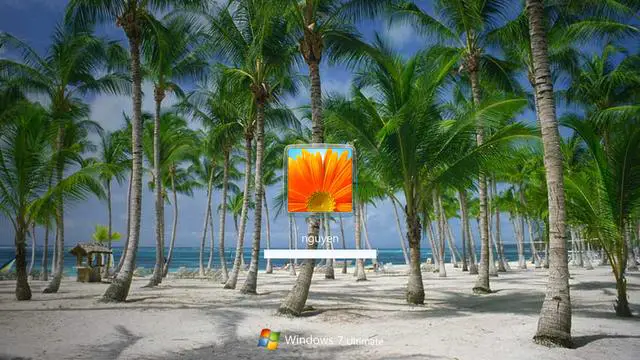
		<description><![CDATA[<div style=" float: left; padding: 4px; margin: 0 10px 5px 0; width: 75px; height: 75px;"><img style=" float: left; padding: 4px; margin: 0 10px 5px 0;" width="75" height="75" src="http://www.thewindowsclub.com/wp-content/themes/Twc/scripts/thumb.php?src=http://www.thewindowsclub.com/wp-content/uploads/2009/03/customize-logon.jpg&amp;w=75&amp;h=75&amp;zc=1"/></div>You can now change the logon UI screen of Windows 7 with or without the use of 3rd party software or hacks, since Windows 7 now supports the ability to load images into the background of the login screen. Although <span><a class="more-link" href="http://www.thewindowsclub.com/how-to-change-the-logon-ui-background-in-windows-7">...more &#62;&#62;&#62;</a></span>]]></description>
		<wfw:commentRss>http://www.thewindowsclub.com/how-to-change-the-logon-ui-background-in-windows-7/feed</wfw:commentRss>
		<slash:comments>1</slash:comments>
		</item>
	</channel>
</rss>