<?xml version="1.0" encoding="UTF-8"?>
<rss version="2.0"
	xmlns:content="http://purl.org/rss/1.0/modules/content/"
	xmlns:wfw="http://wellformedweb.org/CommentAPI/"
	xmlns:dc="http://purl.org/dc/elements/1.1/"
	xmlns:atom="http://www.w3.org/2005/Atom"
	xmlns:sy="http://purl.org/rss/1.0/modules/syndication/"
	xmlns:slash="http://purl.org/rss/1.0/modules/slash/"
	>

<channel>
	<title>The Windows Club &#187; Live</title>
	<atom:link href="http://www.thewindowsclub.com/tag/live/feed" rel="self" type="application/rss+xml" />
	<link>http://www.thewindowsclub.com</link>
	<description>The Windows Club is  created by Anand Khanse, a Microsoft MVP and is primarily targeted at the Windows 7, 8 &#38; Vista user and will address and cover issues in relation to Microsoft and Windows OS.</description>
	<lastBuildDate>Wed, 08 Feb 2012 18:37:32 +0000</lastBuildDate>
	<language>en</language>
	<sy:updatePeriod>hourly</sy:updatePeriod>
	<sy:updateFrequency>1</sy:updateFrequency>
	<generator>http://wordpress.org/?v=3.3.1</generator>
<xhtml:meta xmlns:xhtml="http://www.w3.org/1999/xhtml" name="robots" content="noindex" />
		<item>
		<title>Microsoft shuts down Windows Live Gallery</title>
		<link>http://www.thewindowsclub.com/microsoft-shuts-windows-live-gallery?utm_source=rss&#038;utm_medium=rss&#038;utm_campaign=microsoft-shuts-windows-live-gallery</link>
		<comments>http://www.thewindowsclub.com/microsoft-shuts-windows-live-gallery#comments</comments>
		<pubDate>Sun, 02 Oct 2011 18:42:00 +0000</pubDate>
		<dc:creator>AnandK@TWC</dc:creator>
				<category><![CDATA[News]]></category>
		<category><![CDATA[Live]]></category>
		<category><![CDATA[Microsoft]]></category>

		<guid isPermaLink="false">http://www.thewindowsclub.com/?p=35267</guid>
		<description><![CDATA[<div style=" float: left; padding: 4px; margin: 0 10px 5px 0; width: 75px; height: 75px;"><img style=" float: left; padding: 4px; margin: 0 10px 5px 0;" width="75" height="75" src="http://www.thewindowsclub.com/wp-content/themes/Twc/scripts/thumb.php?src=http://www.thewindowsclub.com/wp-content/uploads/2011/10/live-gadets-400x91.jpg&amp;w=75&amp;h=75&amp;zc=1"/></div>Try visiting Windows Live Gallery at gallery.live.com and you will be greeted not with rows of gadgets, plugins, emoticons and more, but a short statement by Microsoft, stating that the Windows Live Gallery has been retired. The Windows Live Gallery has <span><a class="more-link" href="http://www.thewindowsclub.com/microsoft-shuts-windows-live-gallery">...more &#62;&#62;&#62;</a></span>]]></description>
		<wfw:commentRss>http://www.thewindowsclub.com/microsoft-shuts-windows-live-gallery/feed</wfw:commentRss>
		<slash:comments>10</slash:comments>
		</item>
		<item>
		<title>Product Activation Failed error message when trying to associate Live ID in Windows Phone</title>
		<link>http://www.thewindowsclub.com/product-activation-failed-error-message-associate-live-id-windows-phone-7?utm_source=rss&#038;utm_medium=rss&#038;utm_campaign=product-activation-failed-error-message-associate-live-id-windows-phone-7</link>
		<comments>http://www.thewindowsclub.com/product-activation-failed-error-message-associate-live-id-windows-phone-7#comments</comments>
		<pubDate>Sun, 24 Oct 2010 15:58:57 +0000</pubDate>
		<dc:creator>AnandK@TWC</dc:creator>
				<category><![CDATA[Phone]]></category>
		<category><![CDATA[Live]]></category>

		<guid isPermaLink="false">http://www.thewindowsclub.com/?p=19650</guid>
		<description><![CDATA[<div style=" float: left; padding: 4px; margin: 0 10px 5px 0; width: 75px; height: 75px;"><img style=" float: left; padding: 4px; margin: 0 10px 5px 0;" width="75" height="75" src="http://www.thewindowsclub.com/wp-content/themes/Twc/scripts/thumb.php?src=http://www.thewindowsclub.com/wp-content/uploads/2010/10/wp7-live-fail.jpg&amp;w=75&amp;h=75&amp;zc=1"/></div>When signing in to your Windows Phone 7 with a Windows Live ID you will be for an activation code. If, during your first Windows Live ID sign in on Windows Phone 7, you receive an error stating that an <span><a class="more-link" href="http://www.thewindowsclub.com/product-activation-failed-error-message-associate-live-id-windows-phone-7">...more &#62;&#62;&#62;</a></span>]]></description>
		<wfw:commentRss>http://www.thewindowsclub.com/product-activation-failed-error-message-associate-live-id-windows-phone-7/feed</wfw:commentRss>
		<slash:comments>0</slash:comments>
		</item>
		<item>
		<title>How to add a Windows Live account in Windows Phone 7</title>
		<link>http://www.thewindowsclub.com/how-to-add-a-windows-live-account-in-windows-phone-7?utm_source=rss&#038;utm_medium=rss&#038;utm_campaign=how-to-add-a-windows-live-account-in-windows-phone-7</link>
		<comments>http://www.thewindowsclub.com/how-to-add-a-windows-live-account-in-windows-phone-7#comments</comments>
		<pubDate>Sun, 24 Oct 2010 15:52:02 +0000</pubDate>
		<dc:creator>AnandK@TWC</dc:creator>
				<category><![CDATA[Phone]]></category>
		<category><![CDATA[Live]]></category>
		<category><![CDATA[Tips]]></category>

		<guid isPermaLink="false">http://www.thewindowsclub.com/?p=19648</guid>
		<description><![CDATA[You will be required to add a Windows Live account in Windows Phone 7. When signing in to your Windows Phone 7 with a Windows Live ID you will be for an activation code. To do so: Press the Start <span><a class="more-link" href="http://www.thewindowsclub.com/how-to-add-a-windows-live-account-in-windows-phone-7">...more &#62;&#62;&#62;</a></span>]]></description>
		<wfw:commentRss>http://www.thewindowsclub.com/how-to-add-a-windows-live-account-in-windows-phone-7/feed</wfw:commentRss>
		<slash:comments>1</slash:comments>
		</item>
		<item>
		<title>New Version of Windows Live for Windows Phone released</title>
		<link>http://www.thewindowsclub.com/new-version-of-windows-live-for-windows-phone-released?utm_source=rss&#038;utm_medium=rss&#038;utm_campaign=new-version-of-windows-live-for-windows-phone-released</link>
		<comments>http://www.thewindowsclub.com/new-version-of-windows-live-for-windows-phone-released#comments</comments>
		<pubDate>Mon, 25 Jan 2010 00:39:23 +0000</pubDate>
		<dc:creator>AnandK@TWC</dc:creator>
				<category><![CDATA[Phone]]></category>
		<category><![CDATA[Features]]></category>
		<category><![CDATA[Live]]></category>

		<guid isPermaLink="false">http://www.thewindowsclub.com/?p=6120</guid>
		<description><![CDATA[<div style=" float: left; padding: 4px; margin: 0 10px 5px 0; width: 75px; height: 75px;"><img style=" float: left; padding: 4px; margin: 0 10px 5px 0;" width="75" height="75" src="http://www.thewindowsclub.com/wp-content/themes/Twc/scripts/thumb.php?src=http://www.thewindowsclub.com/wp-content/uploads/2010/01/winmo-live.png&amp;w=75&amp;h=75&amp;zc=1"/></div>A new version of Windows Live for Windows Phone, working in Standard or Professional phones, has just been released as a free download. This new version, 11.1, can be found on the Windows Marketplace for Mobile Marketplace. Features: - Windows <span><a class="more-link" href="http://www.thewindowsclub.com/new-version-of-windows-live-for-windows-phone-released">...more &#62;&#62;&#62;</a></span>]]></description>
		<wfw:commentRss>http://www.thewindowsclub.com/new-version-of-windows-live-for-windows-phone-released/feed</wfw:commentRss>
		<slash:comments>0</slash:comments>
		</item>
		<item>
		<title>Windows Live for Windows® phone (Pro)</title>
		<link>http://www.thewindowsclub.com/windows-live-for-windows%c2%ae-phone-pro?utm_source=rss&#038;utm_medium=rss&#038;utm_campaign=windows-live-for-windows%25c2%25ae-phone-pro</link>
		<comments>http://www.thewindowsclub.com/windows-live-for-windows%c2%ae-phone-pro#comments</comments>
		<pubDate>Sun, 10 Jan 2010 06:25:10 +0000</pubDate>
		<dc:creator>AnandK@TWC</dc:creator>
				<category><![CDATA[Phone]]></category>
		<category><![CDATA[Features]]></category>
		<category><![CDATA[Live]]></category>

		<guid isPermaLink="false">http://www.thewindowsclub.com/?p=5830</guid>
		<description><![CDATA[<div style=" float: left; padding: 4px; margin: 0 10px 5px 0; width: 75px; height: 75px;"><img style=" float: left; padding: 4px; margin: 0 10px 5px 0;" width="75" height="75" src="http://www.thewindowsclub.com/wp-content/themes/Twc/scripts/thumb.php?src=http://www.thewindowsclub.com/wp-content/uploads/2009/10/windowsphone.jpg&amp;w=75&amp;h=75&amp;zc=1"/></div>Now  you can stay connected to those that matter most with Windows Live™ for Windows® phone. Windows Live Messenger, Hotmail®, Photos and the “What’s New” feed are now all available on your 6.x Windows® phone. Windows Live™ for Windows® phone <span><a class="more-link" href="http://www.thewindowsclub.com/windows-live-for-windows%c2%ae-phone-pro">...more &#62;&#62;&#62;</a></span>]]></description>
		<wfw:commentRss>http://www.thewindowsclub.com/windows-live-for-windows%c2%ae-phone-pro/feed</wfw:commentRss>
		<slash:comments>0</slash:comments>
		</item>
		<item>
		<title>Time to Bing It, now !</title>
		<link>http://www.thewindowsclub.com/time-to-bing-it-now?utm_source=rss&#038;utm_medium=rss&#038;utm_campaign=time-to-bing-it-now</link>
		<comments>http://www.thewindowsclub.com/time-to-bing-it-now#comments</comments>
		<pubDate>Fri, 05 Jun 2009 19:16:44 +0000</pubDate>
		<dc:creator>AnandK@TWC</dc:creator>
				<category><![CDATA[News]]></category>
		<category><![CDATA[Bing]]></category>
		<category><![CDATA[Live]]></category>
		<category><![CDATA[Search]]></category>

		<guid isPermaLink="false">http://www.thewindowsclub.com/?p=1276</guid>
		<description><![CDATA[<div style=" float: left; padding: 4px; margin: 0 10px 5px 0; width: 75px; height: 75px;"><img style=" float: left; padding: 4px; margin: 0 10px 5px 0;" width="75" height="75" src="http://www.thewindowsclub.com/wp-content/themes/Twc/scripts/thumb.php?src=http://www.thewindowsclub.com/wp-content/uploads/2009/06/binglogo.jpg&amp;w=75&amp;h=75&amp;zc=1"/></div>Microsoft recently unveiled Bing, a new Search Decision Engine and consumer brand, providing customers with a first step in moving beyond search to help make faster, more informed decisions. Bing is specifically designed to build on the benefits of today’s <span><a class="more-link" href="http://www.thewindowsclub.com/time-to-bing-it-now">...more &#62;&#62;&#62;</a></span>]]></description>
		<wfw:commentRss>http://www.thewindowsclub.com/time-to-bing-it-now/feed</wfw:commentRss>
		<slash:comments>0</slash:comments>
		</item>
		<item>
		<title>What to do if your Windows Live account has been stolen.</title>
		<link>http://www.thewindowsclub.com/what-to-do-if-your-windows-live-account-has-been-stolen?utm_source=rss&#038;utm_medium=rss&#038;utm_campaign=what-to-do-if-your-windows-live-account-has-been-stolen</link>
		<comments>http://www.thewindowsclub.com/what-to-do-if-your-windows-live-account-has-been-stolen#comments</comments>
		<pubDate>Fri, 01 May 2009 02:35:12 +0000</pubDate>
		<dc:creator>AnandK@TWC</dc:creator>
				<category><![CDATA[Live]]></category>
		<category><![CDATA[Hotmail]]></category>
		<category><![CDATA[Passwords]]></category>

		<guid isPermaLink="false">http://www.thewindowsclub.com/?p=993</guid>
		<description><![CDATA[<div style=" float: left; padding: 4px; margin: 0 10px 5px 0; width: 75px; height: 75px;"><img style=" float: left; padding: 4px; margin: 0 10px 5px 0;" width="75" height="75" src="http://www.thewindowsclub.com/wp-content/themes/Twc/scripts/thumb.php?src=http://www.thewindowsclub.com/wp-content/uploads/2009/05/windowslive-300x59.jpg&amp;w=75&amp;h=75&amp;zc=1"/></div>If you find that an unauthorized person has used your Windows Live ID to sign into your Windows Live Hotmail acccount, or any other Windows Live service, then this write-up may help you. Ask yourself: Did you share it with <span><a class="more-link" href="http://www.thewindowsclub.com/what-to-do-if-your-windows-live-account-has-been-stolen">...more &#62;&#62;&#62;</a></span>]]></description>
		<wfw:commentRss>http://www.thewindowsclub.com/what-to-do-if-your-windows-live-account-has-been-stolen/feed</wfw:commentRss>
		<slash:comments>6</slash:comments>
		</item>
		<item>
		<title>How to link online IDs with User Account in Windows 7</title>
		<link>http://www.thewindowsclub.com/how-to-link-online-ids-with-user-account-in-windows-7?utm_source=rss&#038;utm_medium=rss&#038;utm_campaign=how-to-link-online-ids-with-user-account-in-windows-7</link>
		<comments>http://www.thewindowsclub.com/how-to-link-online-ids-with-user-account-in-windows-7#comments</comments>
		<pubDate>Mon, 27 Apr 2009 14:18:33 +0000</pubDate>
		<dc:creator>AnandK@TWC</dc:creator>
				<category><![CDATA[Windows]]></category>
		<category><![CDATA[Features]]></category>
		<category><![CDATA[Internet]]></category>
		<category><![CDATA[Live]]></category>
		<category><![CDATA[User Account]]></category>

		<guid isPermaLink="false">http://www.thewindowsclub.com/?p=893</guid>
		<description><![CDATA[<div style=" float: left; padding: 4px; margin: 0 10px 5px 0; width: 75px; height: 75px;"><img style=" float: left; padding: 4px; margin: 0 10px 5px 0;" width="75" height="75" src="http://www.thewindowsclub.com/wp-content/themes/Twc/scripts/thumb.php?src=http://www.thewindowsclub.com/wp-content/uploads/2009/04/linkonlineids.jpg&amp;w=75&amp;h=75&amp;zc=1"/></div>Microsoft has released a new version of Windows Live ID Sign-in Assistant, which adds Windows Live ID online provider for Windows 7. This enables linking of a Windows 7 User Account to a Windows Live ID. If you have an <span><a class="more-link" href="http://www.thewindowsclub.com/how-to-link-online-ids-with-user-account-in-windows-7">...more &#62;&#62;&#62;</a></span>]]></description>
		<wfw:commentRss>http://www.thewindowsclub.com/how-to-link-online-ids-with-user-account-in-windows-7/feed</wfw:commentRss>
		<slash:comments>0</slash:comments>
		</item>
		<item>
		<title>Location of Windows Live Mail Store Folder</title>
		<link>http://www.thewindowsclub.com/location-of-windows-live-mail-store-folder?utm_source=rss&#038;utm_medium=rss&#038;utm_campaign=location-of-windows-live-mail-store-folder</link>
		<comments>http://www.thewindowsclub.com/location-of-windows-live-mail-store-folder#comments</comments>
		<pubDate>Thu, 16 Apr 2009 08:14:49 +0000</pubDate>
		<dc:creator>AnandK@TWC</dc:creator>
				<category><![CDATA[Live]]></category>
		<category><![CDATA[Mail]]></category>
		<category><![CDATA[Tricks]]></category>

		<guid isPermaLink="false">http://www.thewindowsclub.com/?p=545</guid>
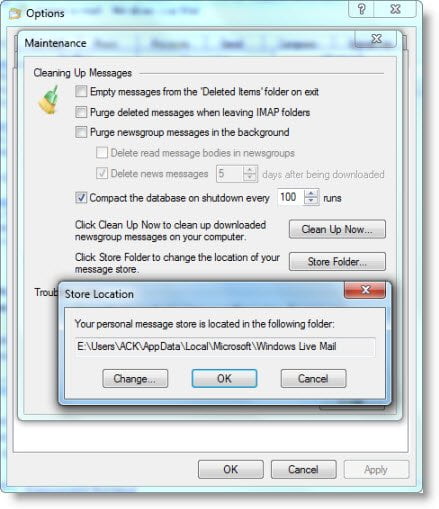
		<description><![CDATA[<div style=" float: left; padding: 4px; margin: 0 10px 5px 0; width: 75px; height: 75px;"><img style=" float: left; padding: 4px; margin: 0 10px 5px 0;" width="75" height="75" src="http://www.thewindowsclub.com/wp-content/themes/Twc/scripts/thumb.php?src=http://www.thewindowsclub.com/wp-content/uploads/2009/04/wlmailstore.jpg&amp;w=75&amp;h=75&amp;zc=1"/></div>While you can always access your emails, email id&#8217;s, etc from the Windows Live Mail, you may want to know the location of the folder where they are stored. To identify its location, open Windows Live Mail &#62; Tools &#62; <span><a class="more-link" href="http://www.thewindowsclub.com/location-of-windows-live-mail-store-folder">...more &#62;&#62;&#62;</a></span>]]></description>
		<wfw:commentRss>http://www.thewindowsclub.com/location-of-windows-live-mail-store-folder/feed</wfw:commentRss>
		<slash:comments>0</slash:comments>
		</item>
		<item>
		<title>Send Receive button missing in Windows Live Mail</title>
		<link>http://www.thewindowsclub.com/send-receive-button-missing-in-windows-live-mail?utm_source=rss&#038;utm_medium=rss&#038;utm_campaign=send-receive-button-missing-in-windows-live-mail</link>
		<comments>http://www.thewindowsclub.com/send-receive-button-missing-in-windows-live-mail#comments</comments>
		<pubDate>Wed, 15 Apr 2009 13:58:26 +0000</pubDate>
		<dc:creator>AnandK@TWC</dc:creator>
				<category><![CDATA[Live]]></category>
		<category><![CDATA[Mail]]></category>

		<guid isPermaLink="false">http://www.thewindowsclub.com/?p=538</guid>
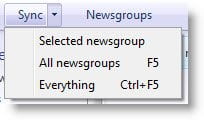
		<description><![CDATA[<div style=" float: left; padding: 4px; margin: 0 10px 5px 0; width: 75px; height: 75px;"><img style=" float: left; padding: 4px; margin: 0 10px 5px 0;" width="75" height="75" src="http://www.thewindowsclub.com/wp-content/themes/Twc/scripts/thumb.php?src=http://www.thewindowsclub.com/wp-content/uploads/2009/04/wlmailsyncnw.jpg&amp;w=75&amp;h=75&amp;zc=1"/></div>If you&#8217;ve installed one of the latter versions of Windows Live Mail, you will notice that there is no Send / Receive button on the menu bar. It will not be available even from the Customize Toolbar options. The fact <span><a class="more-link" href="http://www.thewindowsclub.com/send-receive-button-missing-in-windows-live-mail">...more &#62;&#62;&#62;</a></span>]]></description>
		<wfw:commentRss>http://www.thewindowsclub.com/send-receive-button-missing-in-windows-live-mail/feed</wfw:commentRss>
		<slash:comments>0</slash:comments>
		</item>
	</channel>
</rss>