<?xml version="1.0" encoding="UTF-8"?>
<rss version="2.0"
	xmlns:content="http://purl.org/rss/1.0/modules/content/"
	xmlns:wfw="http://wellformedweb.org/CommentAPI/"
	xmlns:dc="http://purl.org/dc/elements/1.1/"
	xmlns:atom="http://www.w3.org/2005/Atom"
	xmlns:sy="http://purl.org/rss/1.0/modules/syndication/"
	xmlns:slash="http://purl.org/rss/1.0/modules/slash/"
	>

<channel>
	<title>The Windows Club &#187; Fonts</title>
	<atom:link href="http://www.thewindowsclub.com/tag/fonts/feed" rel="self" type="application/rss+xml" />
	<link>http://www.thewindowsclub.com</link>
	<description>The Windows Club is  created by Anand Khanse, a Microsoft MVP and is primarily targeted at the Windows 7, 8 &#38; Vista user and will address and cover issues in relation to Microsoft and Windows OS.</description>
	<lastBuildDate>Wed, 08 Feb 2012 18:37:32 +0000</lastBuildDate>
	<language>en</language>
	<sy:updatePeriod>hourly</sy:updatePeriod>
	<sy:updateFrequency>1</sy:updateFrequency>
	<generator>http://wordpress.org/?v=3.3.1</generator>
<xhtml:meta xmlns:xhtml="http://www.w3.org/1999/xhtml" name="robots" content="noindex" />
		<item>
		<title>Font Load-Unload : Load and Unload fonts without installing, uninstalling them</title>
		<link>http://www.thewindowsclub.com/font-load-unload-windows?utm_source=rss&#038;utm_medium=rss&#038;utm_campaign=font-load-unload-windows</link>
		<comments>http://www.thewindowsclub.com/font-load-unload-windows#comments</comments>
		<pubDate>Wed, 28 Dec 2011 01:59:22 +0000</pubDate>
		<dc:creator>Azharuddin@TWC</dc:creator>
				<category><![CDATA[Downloads]]></category>
		<category><![CDATA[Fonts]]></category>
		<category><![CDATA[Freeware]]></category>

		<guid isPermaLink="false">http://www.thewindowsclub.com/?p=41024</guid>
		<description><![CDATA[<div style=" float: left; padding: 4px; margin: 0 10px 5px 0; width: 75px; height: 75px;"><img style=" float: left; padding: 4px; margin: 0 10px 5px 0;" width="75" height="75" src="http://www.thewindowsclub.com/wp-content/themes/Twc/scripts/thumb.php?src=http://www.thewindowsclub.com/wp-content/uploads/2011/12/font-load-unload1.png&amp;w=75&amp;h=75&amp;zc=1"/></div>Installing too many fonts on your Windows can affect the performance of your system. It may delay the launching of your Microsoft Word application and maybe even your Windows start-up as well, as all of the fonts have to be loaded into the computer&#8217;s memory. <span><a class="more-link" href="http://www.thewindowsclub.com/font-load-unload-windows">...more &#62;&#62;&#62;</a></span>]]></description>
		<wfw:commentRss>http://www.thewindowsclub.com/font-load-unload-windows/feed</wfw:commentRss>
		<slash:comments>1</slash:comments>
		</item>
		<item>
		<title>Make text easier to read using ClearType Tuner in Windows 7</title>
		<link>http://www.thewindowsclub.com/text-easier-read-cleartype-tuner-windows-7?utm_source=rss&#038;utm_medium=rss&#038;utm_campaign=text-easier-read-cleartype-tuner-windows-7</link>
		<comments>http://www.thewindowsclub.com/text-easier-read-cleartype-tuner-windows-7#comments</comments>
		<pubDate>Mon, 29 Aug 2011 13:37:11 +0000</pubDate>
		<dc:creator>HarshM@TWC</dc:creator>
				<category><![CDATA[Windows]]></category>
		<category><![CDATA[Features]]></category>
		<category><![CDATA[Fonts]]></category>

		<guid isPermaLink="false">http://www.thewindowsclub.com/?p=32709</guid>
		<description><![CDATA[<div style=" float: left; padding: 4px; margin: 0 10px 5px 0; width: 75px; height: 75px;"><img style=" float: left; padding: 4px; margin: 0 10px 5px 0;" width="75" height="75" src="http://www.thewindowsclub.com/wp-content/themes/Twc/scripts/thumb.php?src=http://www.thewindowsclub.com/wp-content/uploads/2011/08/cleartype-tuner-1-400x325.jpg&amp;w=75&amp;h=75&amp;zc=1"/></div>ClearType is a font technology which allows you to read the text for all periods of time. It is possible by the fact that it makes  text on your screen almost as sharp and clear as text that&#8217;s printed on <span><a class="more-link" href="http://www.thewindowsclub.com/text-easier-read-cleartype-tuner-windows-7">...more &#62;&#62;&#62;</a></span>]]></description>
		<wfw:commentRss>http://www.thewindowsclub.com/text-easier-read-cleartype-tuner-windows-7/feed</wfw:commentRss>
		<slash:comments>1</slash:comments>
		</item>
		<item>
		<title>Google Font Directory offers hundreds of web safe fonts</title>
		<link>http://www.thewindowsclub.com/google-font-directory-offers-hundreds-of-web-safe-fonts?utm_source=rss&#038;utm_medium=rss&#038;utm_campaign=google-font-directory-offers-hundreds-of-web-safe-fonts</link>
		<comments>http://www.thewindowsclub.com/google-font-directory-offers-hundreds-of-web-safe-fonts#comments</comments>
		<pubDate>Sun, 20 Feb 2011 02:42:12 +0000</pubDate>
		<dc:creator>AnandK@TWC</dc:creator>
				<category><![CDATA[General]]></category>
		<category><![CDATA[Blogging]]></category>
		<category><![CDATA[Fonts]]></category>
		<category><![CDATA[Google]]></category>

		<guid isPermaLink="false">http://www.thewindowsclub.com/?p=24339</guid>
		<description><![CDATA[<div style=" float: left; padding: 4px; margin: 0 10px 5px 0; width: 75px; height: 75px;"><img style=" float: left; padding: 4px; margin: 0 10px 5px 0;" width="75" height="75" src="http://www.thewindowsclub.com/wp-content/themes/Twc/scripts/thumb.php?src=http://www.thewindowsclub.com/wp-content/uploads/2011/02/google-web-fonts.jpg&amp;w=75&amp;h=75&amp;zc=1"/></div>Web safe fonts are fonts that are most likely to be present on computer systems. These are thus used by web designers to increase the likelihood that the content will be displayed in their chosen font. If a visitor to <span><a class="more-link" href="http://www.thewindowsclub.com/google-font-directory-offers-hundreds-of-web-safe-fonts">...more &#62;&#62;&#62;</a></span>]]></description>
		<wfw:commentRss>http://www.thewindowsclub.com/google-font-directory-offers-hundreds-of-web-safe-fonts/feed</wfw:commentRss>
		<slash:comments>1</slash:comments>
		</item>
		<item>
		<title>How to restore default fonts in Windows 7</title>
		<link>http://www.thewindowsclub.com/how-to-restore-default-fonts-in-windows-7?utm_source=rss&#038;utm_medium=rss&#038;utm_campaign=how-to-restore-default-fonts-in-windows-7</link>
		<comments>http://www.thewindowsclub.com/how-to-restore-default-fonts-in-windows-7#comments</comments>
		<pubDate>Tue, 13 Apr 2010 19:39:14 +0000</pubDate>
		<dc:creator>AnandK@TWC</dc:creator>
				<category><![CDATA[Windows]]></category>
		<category><![CDATA[Fonts]]></category>
		<category><![CDATA[Tips]]></category>

		<guid isPermaLink="false">http://www.thewindowsclub.com/?p=8267</guid>
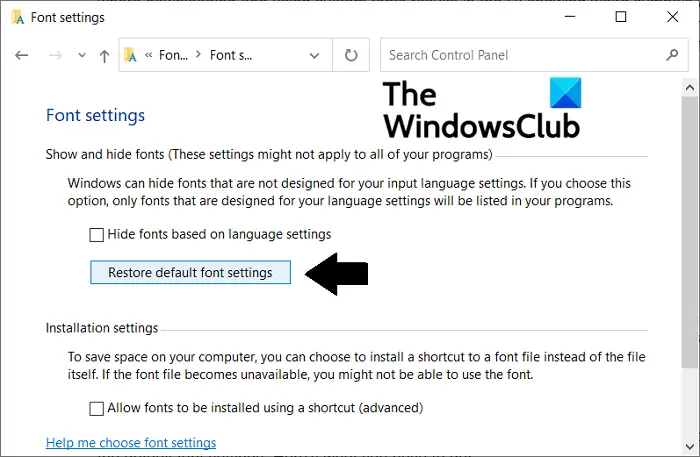
		<description><![CDATA[<div style=" float: left; padding: 4px; margin: 0 10px 5px 0; width: 75px; height: 75px;"><img style=" float: left; padding: 4px; margin: 0 10px 5px 0;" width="75" height="75" src="http://www.thewindowsclub.com/wp-content/themes/Twc/scripts/thumb.php?src=http://www.thewindowsclub.com/wp-content/uploads/2010/04/restore-fonts.png&amp;w=75&amp;h=75&amp;zc=1"/></div>Maybe you have installed a lot of new fonts and maybe made some changes as a result of which some of your software are not working thing broke! In such a scenario, it might be a good idea to restore <span><a class="more-link" href="http://www.thewindowsclub.com/how-to-restore-default-fonts-in-windows-7">...more &#62;&#62;&#62;</a></span>]]></description>
		<wfw:commentRss>http://www.thewindowsclub.com/how-to-restore-default-fonts-in-windows-7/feed</wfw:commentRss>
		<slash:comments>7</slash:comments>
		</item>
		<item>
		<title>Download IbarraReal Font for Windows 7 &amp; Vista from Microsoft</title>
		<link>http://www.thewindowsclub.com/download-ibarrareal-font-for-windows-7-vista-from-microsoft?utm_source=rss&#038;utm_medium=rss&#038;utm_campaign=download-ibarrareal-font-for-windows-7-vista-from-microsoft</link>
		<comments>http://www.thewindowsclub.com/download-ibarrareal-font-for-windows-7-vista-from-microsoft#comments</comments>
		<pubDate>Mon, 08 Feb 2010 17:33:52 +0000</pubDate>
		<dc:creator>AnandK@TWC</dc:creator>
				<category><![CDATA[Downloads]]></category>
		<category><![CDATA[Fonts]]></category>

		<guid isPermaLink="false">http://www.thewindowsclub.com/?p=6530</guid>
		<description><![CDATA[<div style=" float: left; padding: 4px; margin: 0 10px 5px 0; width: 75px; height: 75px;"><img style=" float: left; padding: 4px; margin: 0 10px 5px 0;" width="75" height="75" src="http://www.thewindowsclub.com/wp-content/themes/Twc/scripts/thumb.php?src=http://www.thewindowsclub.com/wp-content/uploads/2010/02/IbarraReal-font.png&amp;w=75&amp;h=75&amp;zc=1"/></div>Microsoft is providing users of its operating system, including of the latest version of the platform Windows 7, with a free font, in addition to the items shipping by default with the operating system.  In this regard, end users running <span><a class="more-link" href="http://www.thewindowsclub.com/download-ibarrareal-font-for-windows-7-vista-from-microsoft">...more &#62;&#62;&#62;</a></span>]]></description>
		<wfw:commentRss>http://www.thewindowsclub.com/download-ibarrareal-font-for-windows-7-vista-from-microsoft/feed</wfw:commentRss>
		<slash:comments>1</slash:comments>
		</item>
		<item>
		<title>How to install and uninstall Fonts in Windows 7</title>
		<link>http://www.thewindowsclub.com/how-to-install-and-uninstall-fonts-in-windows-7?utm_source=rss&#038;utm_medium=rss&#038;utm_campaign=how-to-install-and-uninstall-fonts-in-windows-7</link>
		<comments>http://www.thewindowsclub.com/how-to-install-and-uninstall-fonts-in-windows-7#comments</comments>
		<pubDate>Thu, 27 Aug 2009 03:29:37 +0000</pubDate>
		<dc:creator>AnandK@TWC</dc:creator>
				<category><![CDATA[Windows]]></category>
		<category><![CDATA[Fonts]]></category>
		<category><![CDATA[Tips]]></category>
		<category><![CDATA[Tricks]]></category>

		<guid isPermaLink="false">http://www.thewindowsclub.com/?p=3052</guid>
		<description><![CDATA[<div style=" float: left; padding: 4px; margin: 0 10px 5px 0; width: 75px; height: 75px;"><img style=" float: left; padding: 4px; margin: 0 10px 5px 0;" width="75" height="75" src="http://www.thewindowsclub.com/wp-content/themes/Twc/scripts/thumb.php?src=http://www.thewindowsclub.com/wp-content/uploads/2009/08/installfonts1.jpg&amp;w=75&amp;h=75&amp;zc=1"/></div>Fonts in Windows 7 are located in the C:\Windows\Fonts folder. Windows 7 features over 40 new fonts. However if you would still like to install new fonts in Windows 7, the process to do so now is simplified. Install and <span><a class="more-link" href="http://www.thewindowsclub.com/how-to-install-and-uninstall-fonts-in-windows-7">...more &#62;&#62;&#62;</a></span>]]></description>
		<wfw:commentRss>http://www.thewindowsclub.com/how-to-install-and-uninstall-fonts-in-windows-7/feed</wfw:commentRss>
		<slash:comments>0</slash:comments>
		</item>
		<item>
		<title>New Fonts in Windows 7</title>
		<link>http://www.thewindowsclub.com/new-fonts-in-windows-7?utm_source=rss&#038;utm_medium=rss&#038;utm_campaign=new-fonts-in-windows-7</link>
		<comments>http://www.thewindowsclub.com/new-fonts-in-windows-7#comments</comments>
		<pubDate>Mon, 27 Jul 2009 07:50:37 +0000</pubDate>
		<dc:creator>AnandK@TWC</dc:creator>
				<category><![CDATA[Windows]]></category>
		<category><![CDATA[Features]]></category>
		<category><![CDATA[Fonts]]></category>

		<guid isPermaLink="false">http://www.thewindowsclub.com/?p=2309</guid>
		<description><![CDATA[<div style=" float: left; padding: 4px; margin: 0 10px 5px 0; width: 75px; height: 75px;"><img style=" float: left; padding: 4px; margin: 0 10px 5px 0;" width="75" height="75" src="http://www.thewindowsclub.com/wp-content/themes/Twc/scripts/thumb.php?src=http://www.thewindowsclub.com/wp-content/uploads/2009/07/newfontswindows7.JPG&amp;w=75&amp;h=75&amp;zc=1"/></div>Microsoft ships an extensive collection of fonts with Windows to support users around the world in almost any language. Basic, clean and legible fonts are used by Windows to display menus, dialogs, labels, etc. These are commonly referred to as <span><a class="more-link" href="http://www.thewindowsclub.com/new-fonts-in-windows-7">...more &#62;&#62;&#62;</a></span>]]></description>
		<wfw:commentRss>http://www.thewindowsclub.com/new-fonts-in-windows-7/feed</wfw:commentRss>
		<slash:comments>1</slash:comments>
		</item>
	</channel>
</rss>