<?xml version="1.0" encoding="UTF-8"?>
<rss version="2.0"
	xmlns:content="http://purl.org/rss/1.0/modules/content/"
	xmlns:wfw="http://wellformedweb.org/CommentAPI/"
	xmlns:dc="http://purl.org/dc/elements/1.1/"
	xmlns:atom="http://www.w3.org/2005/Atom"
	xmlns:sy="http://purl.org/rss/1.0/modules/syndication/"
	xmlns:slash="http://purl.org/rss/1.0/modules/slash/"
	>

<channel>
	<title>The Windows Club &#187; Firewall</title>
	<atom:link href="http://www.thewindowsclub.com/tag/firewall/feed" rel="self" type="application/rss+xml" />
	<link>http://www.thewindowsclub.com</link>
	<description>The Windows Club is  created by Anand Khanse, a Microsoft MVP and is primarily targeted at the Windows 7 &#38; Windows Vista user and will address and cover issues in relation to Microsoft and Windows OS.</description>
	<lastBuildDate>Sat, 20 Mar 2010 01:39:19 +0000</lastBuildDate>
	<generator>http://wordpress.org/?v=2.9.2</generator>
	<language>en</language>
	<sy:updatePeriod>hourly</sy:updatePeriod>
	<sy:updateFrequency>1</sy:updateFrequency>
	<xhtml:meta xmlns:xhtml="http://www.w3.org/1999/xhtml" name="robots" content="noindex" />
		<item>
		<title>Troubleshoot: Windows 7 Firewall, Diagnostics, Tools</title>
		<link>http://www.thewindowsclub.com/troubleshoot-windows-7-firewall-with-advanced-security-diagnostics-tools</link>
		<comments>http://www.thewindowsclub.com/troubleshoot-windows-7-firewall-with-advanced-security-diagnostics-tools#comments</comments>
		<pubDate>Thu, 25 Feb 2010 01:39:51 +0000</pubDate>
		<dc:creator>Windows Club</dc:creator>
				<category><![CDATA[Security]]></category>
		<category><![CDATA[Firewall]]></category>

		<guid isPermaLink="false">http://www.thewindowsclub.com/?p=6952</guid>
		<description><![CDATA[Windows Firewall with Advanced Security, a Microsoft Management Console (MMC) snap-in, in Windows 7 &#38; Vista is a stateful, host-based firewall that filters incoming and outgoing connections based on its configuration. 

Windows Firewall with Advanced Security also supports an RFC-compliant implementation of Internet Protocol security (IPsec), IPsec and firewall configuration can now be done together [...]]]></description>
		<wfw:commentRss>http://www.thewindowsclub.com/troubleshoot-windows-7-firewall-with-advanced-security-diagnostics-tools/feed</wfw:commentRss>
		<slash:comments>0</slash:comments>
		</item>
		<item>
		<title>How to Backup, Restore &amp; Reset to Defaults, Windows 7 Firewall settings</title>
		<link>http://www.thewindowsclub.com/how-to-backup-restore-reset-to-defaults-windows-7-firewall-settings</link>
		<comments>http://www.thewindowsclub.com/how-to-backup-restore-reset-to-defaults-windows-7-firewall-settings#comments</comments>
		<pubDate>Tue, 23 Feb 2010 15:59:58 +0000</pubDate>
		<dc:creator>Windows Club</dc:creator>
				<category><![CDATA[Security]]></category>
		<category><![CDATA[Firewall]]></category>

		<guid isPermaLink="false">http://www.thewindowsclub.com/?p=6946</guid>
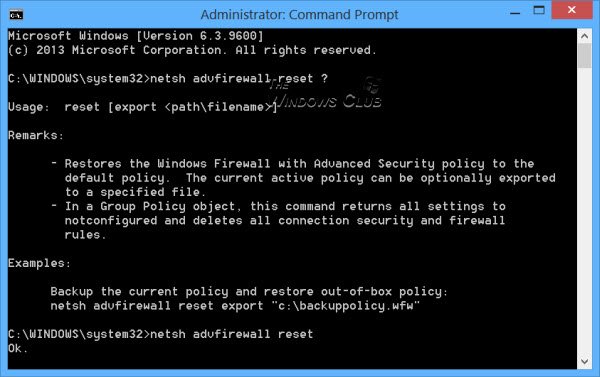
		<description><![CDATA[OK, if you are here, you were probably trying to configure your Windows firewall, and maybe something went wrong somewhere and you messed up ! In such a case, you may want to restore Windows Firewall to default settings with Advanced Security.  


If you wish to reset your Windows firewall settings &#38; rules, to  [...]]]></description>
		<wfw:commentRss>http://www.thewindowsclub.com/how-to-backup-restore-reset-to-defaults-windows-7-firewall-settings/feed</wfw:commentRss>
		<slash:comments>0</slash:comments>
		</item>
		<item>
		<title>Remove AntiVirus &amp; security applications easily with AppRemover</title>
		<link>http://www.thewindowsclub.com/remove-antivirus-security-applications-easily-with-appremover</link>
		<comments>http://www.thewindowsclub.com/remove-antivirus-security-applications-easily-with-appremover#comments</comments>
		<pubDate>Wed, 16 Dec 2009 10:01:37 +0000</pubDate>
		<dc:creator>Windows Club</dc:creator>
				<category><![CDATA[Downloads]]></category>
		<category><![CDATA[Anti-spyware]]></category>
		<category><![CDATA[AntiVirus]]></category>
		<category><![CDATA[Firewall]]></category>
		<category><![CDATA[Uninstall]]></category>

		<guid isPermaLink="false">http://www.thewindowsclub.com/?p=5374</guid>
		<description><![CDATA[Since I was running 2 anti-virus on my Windows Vista,  I wanted to remove one. The Windows Uninstall  Programs Control Panel applet was unable to uninstall it. I tried everything, but the uninstall did not proceed beyond a point and the process then had to roll back.
While there are are several stand-alone antivirus removal tools [...]]]></description>
		<wfw:commentRss>http://www.thewindowsclub.com/remove-antivirus-security-applications-easily-with-appremover/feed</wfw:commentRss>
		<slash:comments>1</slash:comments>
		</item>
		<item>
		<title>How to Manage Windows 7 Firewall.</title>
		<link>http://www.thewindowsclub.com/how-to-manage-windows-7-firewall</link>
		<comments>http://www.thewindowsclub.com/how-to-manage-windows-7-firewall#comments</comments>
		<pubDate>Wed, 19 Aug 2009 17:44:57 +0000</pubDate>
		<dc:creator>Windows Club</dc:creator>
				<category><![CDATA[Security]]></category>
		<category><![CDATA[Firewall]]></category>

		<guid isPermaLink="false">http://www.thewindowsclub.com/?p=2837</guid>
		<description><![CDATA[The Windows 7 Firewall builds up on &#38; polishes further the already improved vista firewall. It brings out some of its advanced features out into the open. 
While we have already discussed in a little more detail, how to manage the Windows Vista firewall, a few of the changes in Windows 7 firewall are touched [...]]]></description>
		<wfw:commentRss>http://www.thewindowsclub.com/how-to-manage-windows-7-firewall/feed</wfw:commentRss>
		<slash:comments>0</slash:comments>
		</item>
		<item>
		<title>Windows 7 Action Center</title>
		<link>http://www.thewindowsclub.com/windows-7-action-center</link>
		<comments>http://www.thewindowsclub.com/windows-7-action-center#comments</comments>
		<pubDate>Sun, 26 Apr 2009 17:04:16 +0000</pubDate>
		<dc:creator>Windows Club</dc:creator>
				<category><![CDATA[Features]]></category>
		<category><![CDATA[Action Center]]></category>
		<category><![CDATA[Firewall]]></category>
		<category><![CDATA[Security]]></category>

		<guid isPermaLink="false">http://www.thewindowsclub.com/?p=880</guid>
		<description><![CDATA[The Windows 7 Action Center can be considered as a place where you can find all the messages relating to your PC, on which you need to take action.It contains messages about the running of your PC which help you diagnose and solve issues, if any, relating to your PC. This includes information about Security [...]]]></description>
		<wfw:commentRss>http://www.thewindowsclub.com/windows-7-action-center/feed</wfw:commentRss>
		<slash:comments>0</slash:comments>
		</item>
		<item>
		<title>How to configure Windows 7 Firewall.</title>
		<link>http://www.thewindowsclub.com/how-to-configure-windows-7-firewall</link>
		<comments>http://www.thewindowsclub.com/how-to-configure-windows-7-firewall#comments</comments>
		<pubDate>Sun, 26 Apr 2009 16:49:25 +0000</pubDate>
		<dc:creator>Windows Club</dc:creator>
				<category><![CDATA[Security]]></category>
		<category><![CDATA[Firewall]]></category>
		<category><![CDATA[Internet]]></category>

		<guid isPermaLink="false">http://www.thewindowsclub.com/?p=873</guid>
		<description><![CDATA[A firewall is software or hardware that checks information coming from the Internet or a network, and then either blocks it or allows it to pass through to your computer, depending on your firewall settings. 
A firewall can help prevent hackers or malicious software from gaining access to your computer through a network or the [...]]]></description>
		<wfw:commentRss>http://www.thewindowsclub.com/how-to-configure-windows-7-firewall/feed</wfw:commentRss>
		<slash:comments>0</slash:comments>
		</item>
	</channel>
</rss>