<?xml version="1.0" encoding="UTF-8"?>
<rss version="2.0"
	xmlns:content="http://purl.org/rss/1.0/modules/content/"
	xmlns:wfw="http://wellformedweb.org/CommentAPI/"
	xmlns:dc="http://purl.org/dc/elements/1.1/"
	xmlns:atom="http://www.w3.org/2005/Atom"
	xmlns:sy="http://purl.org/rss/1.0/modules/syndication/"
	xmlns:slash="http://purl.org/rss/1.0/modules/slash/"
	>

<channel>
	<title>The Windows Club &#187; Explorer</title>
	<atom:link href="http://www.thewindowsclub.com/tag/explorer/feed" rel="self" type="application/rss+xml" />
	<link>http://www.thewindowsclub.com</link>
	<description>The Windows Club is  created by Anand Khanse, a Microsoft MVP and is primarily targeted at the Windows 7 &#38; Windows Vista user and will address and cover issues in relation to Microsoft and Windows OS.</description>
	<lastBuildDate>Sun, 21 Mar 2010 16:10:48 +0000</lastBuildDate>
	<generator>http://wordpress.org/?v=2.9.2</generator>
	<language>en</language>
	<sy:updatePeriod>hourly</sy:updatePeriod>
	<sy:updateFrequency>1</sy:updateFrequency>
	<xhtml:meta xmlns:xhtml="http://www.w3.org/1999/xhtml" name="robots" content="noindex" />
		<item>
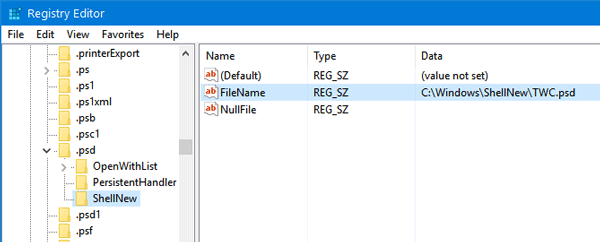
		<title>Disable or enable items from New submenu in Explorer context menu</title>
		<link>http://www.thewindowsclub.com/disable-or-enable-items-from-new-submenu-in-explorer-right-click-context-menu</link>
		<comments>http://www.thewindowsclub.com/disable-or-enable-items-from-new-submenu-in-explorer-right-click-context-menu#comments</comments>
		<pubDate>Tue, 02 Feb 2010 19:39:55 +0000</pubDate>
		<dc:creator>Windows Club</dc:creator>
				<category><![CDATA[Downloads]]></category>
		<category><![CDATA[Explorer]]></category>

		<guid isPermaLink="false">http://www.thewindowsclub.com/?p=6362</guid>
		<description><![CDATA[When we install programs, many items get added to the right click context menu of explorer.exe, in the &#8216;New&#8217; submenu. This submenu is requeired when you want to open a new file (or command or item) of that type on, say, your desktop. 

But many a times, we end up with adding items which we [...]]]></description>
		<wfw:commentRss>http://www.thewindowsclub.com/disable-or-enable-items-from-new-submenu-in-explorer-right-click-context-menu/feed</wfw:commentRss>
		<slash:comments>0</slash:comments>
		</item>
		<item>
		<title>How to Remove Start Orb Button in Windows 7 or Vista</title>
		<link>http://www.thewindowsclub.com/how-to-remove-start-orb-button-in-windows-7-or-vista</link>
		<comments>http://www.thewindowsclub.com/how-to-remove-start-orb-button-in-windows-7-or-vista#comments</comments>
		<pubDate>Wed, 27 Jan 2010 10:37:09 +0000</pubDate>
		<dc:creator>Windows Club</dc:creator>
				<category><![CDATA[Downloads]]></category>
		<category><![CDATA[Explorer]]></category>
		<category><![CDATA[Start Menu]]></category>

		<guid isPermaLink="false">http://www.thewindowsclub.com/?p=6224</guid>
		<description><![CDATA[For those of you who dont like the start orb and want to do away with it, you now have two easy ways to do it.

Download No Start Orb for Win7 and use it.
- Add take ownership to your right click context menu using the registry patch.
- Browse to Windows folder.
- Rightclick on &#8216;explorer&#8217; and [...]]]></description>
		<wfw:commentRss>http://www.thewindowsclub.com/how-to-remove-start-orb-button-in-windows-7-or-vista/feed</wfw:commentRss>
		<slash:comments>3</slash:comments>
		</item>
		<item>
		<title>Change the color of Windows 7 &amp; Vista explorer navigation button</title>
		<link>http://www.thewindowsclub.com/change-the-color-of-windows-vista-explorer-navigation-button</link>
		<comments>http://www.thewindowsclub.com/change-the-color-of-windows-vista-explorer-navigation-button#comments</comments>
		<pubDate>Mon, 18 Jan 2010 16:23:47 +0000</pubDate>
		<dc:creator>Windows Club</dc:creator>
				<category><![CDATA[Downloads]]></category>
		<category><![CDATA[Customize]]></category>
		<category><![CDATA[Explorer]]></category>

		<guid isPermaLink="false">http://www.thewindowsclub.com/?p=6070</guid>
		<description><![CDATA[Vista/7 Navigation Button Colorizer is a tool which can easily change your Windows 7 &#38; Vista&#8217;s explorer navigation button colour in one click. The app now seems to have been updated to run on Windows 7 too!


While I have not tried it, Windows 7 &#38; Vista users may want to check it out on DeviantArt.
PS: [...]]]></description>
		<wfw:commentRss>http://www.thewindowsclub.com/change-the-color-of-windows-vista-explorer-navigation-button/feed</wfw:commentRss>
		<slash:comments>2</slash:comments>
		</item>
		<item>
		<title>Synchronize Navigation pane of Windows 7 explorer with Main pane.</title>
		<link>http://www.thewindowsclub.com/synchronize-the-navigation-pane-of-windows-7-explorer-with-the-main-pane</link>
		<comments>http://www.thewindowsclub.com/synchronize-the-navigation-pane-of-windows-7-explorer-with-the-main-pane#comments</comments>
		<pubDate>Mon, 18 Jan 2010 10:19:35 +0000</pubDate>
		<dc:creator>Windows Club</dc:creator>
				<category><![CDATA[Tips]]></category>
		<category><![CDATA[Explorer]]></category>
		<category><![CDATA[Folder]]></category>

		<guid isPermaLink="false">http://www.thewindowsclub.com/?p=6000</guid>
		<description><![CDATA[When you open Windows explorer, you notice that it has a left pane called as the Navigation Pane, which includes links to Drives, Special Folders, Favorites, etc and the main or right pane which contains your files and folders.

To make navigation easier using the Navigation Pane, you might want to consider checking on the Show [...]]]></description>
		<wfw:commentRss>http://www.thewindowsclub.com/synchronize-the-navigation-pane-of-windows-7-explorer-with-the-main-pane/feed</wfw:commentRss>
		<slash:comments>0</slash:comments>
		</item>
		<item>
		<title>BinManager: A Manager for your Recycle Bin</title>
		<link>http://www.thewindowsclub.com/binmanager-a-manager-for-your-recycle-bin</link>
		<comments>http://www.thewindowsclub.com/binmanager-a-manager-for-your-recycle-bin#comments</comments>
		<pubDate>Mon, 28 Dec 2009 13:49:47 +0000</pubDate>
		<dc:creator>Windows Club</dc:creator>
				<category><![CDATA[Downloads]]></category>
		<category><![CDATA[Explorer]]></category>
		<category><![CDATA[Recycle Bin]]></category>

		<guid isPermaLink="false">http://www.thewindowsclub.com/?p=5479</guid>
		<description><![CDATA[BinManager is shell context menu command for deleting old items from Windows Recycle Bin, as well as a scriptable component for managing the Recycle Bin. 

This freeware utility enables you to empty all but the most recent items from your recycle bin.
This is useful for several reasons: 
- You&#8217;re most likely to need to restore [...]]]></description>
		<wfw:commentRss>http://www.thewindowsclub.com/binmanager-a-manager-for-your-recycle-bin/feed</wfw:commentRss>
		<slash:comments>1</slash:comments>
		</item>
		<item>
		<title>Add SkyDrive To Your Windows Explorer with SkyDrive Explorer</title>
		<link>http://www.thewindowsclub.com/add-skydrive-to-your-windows-explorer-with-skydrive-explorer</link>
		<comments>http://www.thewindowsclub.com/add-skydrive-to-your-windows-explorer-with-skydrive-explorer#comments</comments>
		<pubDate>Mon, 28 Dec 2009 13:15:49 +0000</pubDate>
		<dc:creator>Windows Club</dc:creator>
				<category><![CDATA[Downloads]]></category>
		<category><![CDATA[Explorer]]></category>
		<category><![CDATA[SkyDrive]]></category>

		<guid isPermaLink="false">http://www.thewindowsclub.com/?p=5474</guid>
		<description><![CDATA[Windows Live SkyDrive is part of Microsoft&#8217;s Windows Live  online services. SkyDrive is a file storage and sharing service that allows users to upload files to the computing cloud, then access them from a web browser.

To access it however, you have to use your browser. SkyDrive Explorer however lets you access it easily. It is [...]]]></description>
		<wfw:commentRss>http://www.thewindowsclub.com/add-skydrive-to-your-windows-explorer-with-skydrive-explorer/feed</wfw:commentRss>
		<slash:comments>2</slash:comments>
		</item>
		<item>
		<title>A Double Explorer for Windows 7 !</title>
		<link>http://www.thewindowsclub.com/a-double-explorer-for-windows-7</link>
		<comments>http://www.thewindowsclub.com/a-double-explorer-for-windows-7#comments</comments>
		<pubDate>Tue, 01 Dec 2009 15:42:03 +0000</pubDate>
		<dc:creator>Windows Club</dc:creator>
				<category><![CDATA[News]]></category>
		<category><![CDATA[Explorer]]></category>

		<guid isPermaLink="false">http://www.thewindowsclub.com/?p=4950</guid>
		<description><![CDATA[Windows Double Explorer for Windows 7, from CodePlex, manages two or more Windows Explorer in one application. 

You can also add your favorite folders with drag and drop to the toolbar for quick access.
It&#8217;s also much easier to manage your disc structure with the help of this freeware application.
Visit CodePlex for more.
How to add Tabs [...]]]></description>
		<wfw:commentRss>http://www.thewindowsclub.com/a-double-explorer-for-windows-7/feed</wfw:commentRss>
		<slash:comments>0</slash:comments>
		</item>
		<item>
		<title>How to add Tabs to Windows Explorer</title>
		<link>http://www.thewindowsclub.com/how-to-add-tabs-to-windows-explorer</link>
		<comments>http://www.thewindowsclub.com/how-to-add-tabs-to-windows-explorer#comments</comments>
		<pubDate>Sat, 28 Nov 2009 09:09:45 +0000</pubDate>
		<dc:creator>Windows Club</dc:creator>
				<category><![CDATA[Downloads]]></category>
		<category><![CDATA[Explorer]]></category>
		<category><![CDATA[Tabs]]></category>

		<guid isPermaLink="false">http://www.thewindowsclub.com/?p=4883</guid>
		<description><![CDATA[Like the tabbed browsing feature in Internet Explorer, you can also add tabs to your Windows Explorer.


To do so, download and use QTTabBar. It is an Add-In that gives Tab Browsing Feature to your Explorer. It also adds a few other features like a drop-down preview, useful toolbar buttons, Recently Closed button, plus plugin support.  [...]]]></description>
		<wfw:commentRss>http://www.thewindowsclub.com/how-to-add-tabs-to-windows-explorer/feed</wfw:commentRss>
		<slash:comments>4</slash:comments>
		</item>
		<item>
		<title>Explore as Administrator PowerToy released.</title>
		<link>http://www.thewindowsclub.com/explore-as-administrator-powertoy-released</link>
		<comments>http://www.thewindowsclub.com/explore-as-administrator-powertoy-released#comments</comments>
		<pubDate>Tue, 24 Nov 2009 15:28:04 +0000</pubDate>
		<dc:creator>Windows Club</dc:creator>
				<category><![CDATA[Downloads]]></category>
		<category><![CDATA[Explorer]]></category>

		<guid isPermaLink="false">http://www.thewindowsclub.com/?p=4812</guid>
		<description><![CDATA[Have you ever tried to use Windows Explorer to create a folder within or copy a file into a protected folder such a Program Files or Windows and had to deal with the confusing “File Operation” dialog box before you could complete your task.  This is one of the most confusing and poorly understood features [...]]]></description>
		<wfw:commentRss>http://www.thewindowsclub.com/explore-as-administrator-powertoy-released/feed</wfw:commentRss>
		<slash:comments>0</slash:comments>
		</item>
		<item>
		<title>Display any file, folder, program in Computer folder of Windows 7 easily</title>
		<link>http://www.thewindowsclub.com/display-any-file-folder-program-in-computer-folder-of-windows-7-easily</link>
		<comments>http://www.thewindowsclub.com/display-any-file-folder-program-in-computer-folder-of-windows-7-easily#comments</comments>
		<pubDate>Sun, 18 Oct 2009 05:40:38 +0000</pubDate>
		<dc:creator>Windows Club</dc:creator>
				<category><![CDATA[Tips]]></category>
		<category><![CDATA[Explorer]]></category>
		<category><![CDATA[Tricks]]></category>

		<guid isPermaLink="false">http://www.thewindowsclub.com/?p=4088</guid>
		<description><![CDATA[You can, if you wish to, display your favorite file or its shortcuts directly in the (My) Computer folder of Windows 7 &#38; Vista. 

To do so, open Windows Explorer and through Organize &#62;  Folder Options, allow showing of Hidden &#38; also System files &#38; folders.
Next navigate to the following folder:
C:\Users\UserName\AppData\Roaming\Microsoft\Windows\Network Shortcuts
Place the files [...]]]></description>
		<wfw:commentRss>http://www.thewindowsclub.com/display-any-file-folder-program-in-computer-folder-of-windows-7-easily/feed</wfw:commentRss>
		<slash:comments>2</slash:comments>
		</item>
	</channel>
</rss>