<?xml version="1.0" encoding="UTF-8"?>
<rss version="2.0"
	xmlns:content="http://purl.org/rss/1.0/modules/content/"
	xmlns:wfw="http://wellformedweb.org/CommentAPI/"
	xmlns:dc="http://purl.org/dc/elements/1.1/"
	xmlns:atom="http://www.w3.org/2005/Atom"
	xmlns:sy="http://purl.org/rss/1.0/modules/syndication/"
	xmlns:slash="http://purl.org/rss/1.0/modules/slash/"
	>

<channel>
	<title>The Windows Club &#187; Defrag</title>
	<atom:link href="http://www.thewindowsclub.com/tag/defrag/feed" rel="self" type="application/rss+xml" />
	<link>http://www.thewindowsclub.com</link>
	<description>The Windows Club is  created by Anand Khanse, a Microsoft MVP and is primarily targeted at the Windows 7, 8 &#38; Vista user and will address and cover issues in relation to Microsoft and Windows OS.</description>
	<lastBuildDate>Wed, 08 Feb 2012 18:37:32 +0000</lastBuildDate>
	<language>en</language>
	<sy:updatePeriod>hourly</sy:updatePeriod>
	<sy:updateFrequency>1</sy:updateFrequency>
	<generator>http://wordpress.org/?v=3.3.1</generator>
<xhtml:meta xmlns:xhtml="http://www.w3.org/1999/xhtml" name="robots" content="noindex" />
		<item>
		<title>Top 5 Free Defragmentation Software for Windows 7</title>
		<link>http://www.thewindowsclub.com/best-free-defragmentation-software-windows?utm_source=rss&#038;utm_medium=rss&#038;utm_campaign=best-free-defragmentation-software-windows</link>
		<comments>http://www.thewindowsclub.com/best-free-defragmentation-software-windows#comments</comments>
		<pubDate>Tue, 03 Jan 2012 17:36:56 +0000</pubDate>
		<dc:creator>AnandK@TWC</dc:creator>
				<category><![CDATA[Downloads]]></category>
		<category><![CDATA[Defrag]]></category>
		<category><![CDATA[Freeware]]></category>
		<category><![CDATA[Hard Disk]]></category>

		<guid isPermaLink="false">http://www.thewindowsclub.com/?p=41389</guid>
		<description><![CDATA[<div style=" float: left; padding: 4px; margin: 0 10px 5px 0; width: 75px; height: 75px;"><img style=" float: left; padding: 4px; margin: 0 10px 5px 0;" width="75" height="75" src="http://www.thewindowsclub.com/wp-content/themes/Twc/scripts/thumb.php?src=http://www.thewindowsclub.com/wp-content/uploads/2012/01/index_gui-400x311.png&amp;w=75&amp;h=75&amp;zc=1"/></div>Microsoft has substantially improved the native Defragmenting Utility in Windows, with the release of Windows Vista, and further improved upon it in Windows 7. The defrag engine and the manageability of fragmentation is much better than what existed in Windows XP. <span><a class="more-link" href="http://www.thewindowsclub.com/best-free-defragmentation-software-windows">...more &#62;&#62;&#62;</a></span>]]></description>
		<wfw:commentRss>http://www.thewindowsclub.com/best-free-defragmentation-software-windows/feed</wfw:commentRss>
		<slash:comments>7</slash:comments>
		</item>
		<item>
		<title>Defrag disk, files and system files at boot-time with Defraggler</title>
		<link>http://www.thewindowsclub.com/defrag-disk-files-and-system-files-at-boot-time-with-defraggler-v-2-0?utm_source=rss&#038;utm_medium=rss&#038;utm_campaign=defrag-disk-files-and-system-files-at-boot-time-with-defraggler-v-2-0</link>
		<comments>http://www.thewindowsclub.com/defrag-disk-files-and-system-files-at-boot-time-with-defraggler-v-2-0#comments</comments>
		<pubDate>Mon, 25 Oct 2010 15:49:15 +0000</pubDate>
		<dc:creator>AnandK@TWC</dc:creator>
				<category><![CDATA[Windows]]></category>
		<category><![CDATA[Defrag]]></category>

		<guid isPermaLink="false">http://www.thewindowsclub.com/?p=19706</guid>
		<description><![CDATA[<div style=" float: left; padding: 4px; margin: 0 10px 5px 0; width: 75px; height: 75px;"><img style=" float: left; padding: 4px; margin: 0 10px 5px 0;" width="75" height="75" src="http://www.thewindowsclub.com/wp-content/themes/Twc/scripts/thumb.php?src=http://www.thewindowsclub.com/wp-content/uploads/2010/10/defraggler.png&amp;w=75&amp;h=75&amp;zc=1"/></div>Defraggler is a free Disk defragmentation software which lets you quickly defrag the individual files you want to, without having to process the whole drive. The new version now lets you even defrag system files at boot-time. This compact and <span><a class="more-link" href="http://www.thewindowsclub.com/defrag-disk-files-and-system-files-at-boot-time-with-defraggler-v-2-0">...more &#62;&#62;&#62;</a></span>]]></description>
		<wfw:commentRss>http://www.thewindowsclub.com/defrag-disk-files-and-system-files-at-boot-time-with-defraggler-v-2-0/feed</wfw:commentRss>
		<slash:comments>1</slash:comments>
		</item>
		<item>
		<title>How to defrag MFT, Page File, Registry, System Files in Windows 7</title>
		<link>http://www.thewindowsclub.com/how-to-defrag-mft-page-file-registry-system-files-in-windows-7?utm_source=rss&#038;utm_medium=rss&#038;utm_campaign=how-to-defrag-mft-page-file-registry-system-files-in-windows-7</link>
		<comments>http://www.thewindowsclub.com/how-to-defrag-mft-page-file-registry-system-files-in-windows-7#comments</comments>
		<pubDate>Wed, 25 Aug 2010 10:53:36 +0000</pubDate>
		<dc:creator>AnandK@TWC</dc:creator>
				<category><![CDATA[Windows]]></category>
		<category><![CDATA[Defrag]]></category>
		<category><![CDATA[Tips]]></category>

		<guid isPermaLink="false">http://www.thewindowsclub.com/?p=15783</guid>
		<description><![CDATA[<div style=" float: left; padding: 4px; margin: 0 10px 5px 0; width: 75px; height: 75px;"><img style=" float: left; padding: 4px; margin: 0 10px 5px 0;" width="75" height="75" src="http://www.thewindowsclub.com/wp-content/themes/Twc/scripts/thumb.php?src=http://www.thewindowsclub.com/wp-content/uploads/2010/08/puran-defrag.png&amp;w=75&amp;h=75&amp;zc=1"/></div>The Windows 7 disk defragment utility is scheduled to work in the background. The Disk Defragmenter runs as a low priority task in the background without affecting the performance of the computer. It runs only when the machine is idle <span><a class="more-link" href="http://www.thewindowsclub.com/how-to-defrag-mft-page-file-registry-system-files-in-windows-7">...more &#62;&#62;&#62;</a></span>]]></description>
		<wfw:commentRss>http://www.thewindowsclub.com/how-to-defrag-mft-page-file-registry-system-files-in-windows-7/feed</wfw:commentRss>
		<slash:comments>2</slash:comments>
		</item>
		<item>
		<title>Troubleshooting Windows Disk Defragmenter utility.</title>
		<link>http://www.thewindowsclub.com/troubleshooting-windows-disk-defragmenter-utility?utm_source=rss&#038;utm_medium=rss&#038;utm_campaign=troubleshooting-windows-disk-defragmenter-utility</link>
		<comments>http://www.thewindowsclub.com/troubleshooting-windows-disk-defragmenter-utility#comments</comments>
		<pubDate>Fri, 24 Jul 2009 14:55:54 +0000</pubDate>
		<dc:creator>AnandK@TWC</dc:creator>
				<category><![CDATA[Windows]]></category>
		<category><![CDATA[Defrag]]></category>
		<category><![CDATA[Tips]]></category>

		<guid isPermaLink="false">http://www.thewindowsclub.com/?p=2216</guid>
		<description><![CDATA[<div style=" float: left; padding: 4px; margin: 0 10px 5px 0; width: 75px; height: 75px;"><img style=" float: left; padding: 4px; margin: 0 10px 5px 0;" width="75" height="75" src="http://www.thewindowsclub.com/wp-content/themes/Twc/scripts/thumb.php?src=http://www.thewindowsclub.com/wp-content/uploads/2009/07/defragservice.jpg&amp;w=75&amp;h=75&amp;zc=1"/></div>Like Windows Vista, the disk defragmenter utility in Windows 7 is automatically scheduled to run at 1.00 am, by default, which means that you don&#8217;t really need to run it manually. But if you find that you are unable to <span><a class="more-link" href="http://www.thewindowsclub.com/troubleshooting-windows-disk-defragmenter-utility">...more &#62;&#62;&#62;</a></span>]]></description>
		<wfw:commentRss>http://www.thewindowsclub.com/troubleshooting-windows-disk-defragmenter-utility/feed</wfw:commentRss>
		<slash:comments>0</slash:comments>
		</item>
		<item>
		<title>Defrag options in Windows 7</title>
		<link>http://www.thewindowsclub.com/defrag-options-in-windows-7?utm_source=rss&#038;utm_medium=rss&#038;utm_campaign=defrag-options-in-windows-7</link>
		<comments>http://www.thewindowsclub.com/defrag-options-in-windows-7#comments</comments>
		<pubDate>Tue, 21 Jul 2009 06:49:12 +0000</pubDate>
		<dc:creator>AnandK@TWC</dc:creator>
				<category><![CDATA[Windows]]></category>
		<category><![CDATA[CMD]]></category>
		<category><![CDATA[Defrag]]></category>
		<category><![CDATA[Features]]></category>

		<guid isPermaLink="false">http://www.thewindowsclub.com/?p=2098</guid>
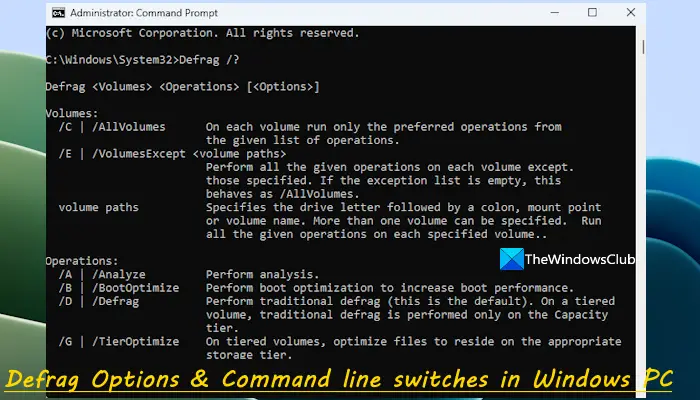
		<description><![CDATA[<div style=" float: left; padding: 4px; margin: 0 10px 5px 0; width: 75px; height: 75px;"><img style=" float: left; padding: 4px; margin: 0 10px 5px 0;" width="75" height="75" src="http://www.thewindowsclub.com/wp-content/themes/Twc/scripts/thumb.php?src=http://www.thewindowsclub.com/wp-content/uploads/2009/07/cmddefrag.jpg&amp;w=75&amp;h=75&amp;zc=1"/></div>The Defrag tool in Windows 7 offers some additional options compared to that in Windows Vista. Its command line version has some additional switches. Defrag /? : gives you all the options. Here are a couple of useful switches: /H switch <span><a class="more-link" href="http://www.thewindowsclub.com/defrag-options-in-windows-7">...more &#62;&#62;&#62;</a></span>]]></description>
		<wfw:commentRss>http://www.thewindowsclub.com/defrag-options-in-windows-7/feed</wfw:commentRss>
		<slash:comments>0</slash:comments>
		</item>
	</channel>
</rss>