<?xml version="1.0" encoding="UTF-8"?>
<rss version="2.0"
	xmlns:content="http://purl.org/rss/1.0/modules/content/"
	xmlns:wfw="http://wellformedweb.org/CommentAPI/"
	xmlns:dc="http://purl.org/dc/elements/1.1/"
	xmlns:atom="http://www.w3.org/2005/Atom"
	xmlns:sy="http://purl.org/rss/1.0/modules/syndication/"
	xmlns:slash="http://purl.org/rss/1.0/modules/slash/"
	>

<channel>
	<title>The Windows Club &#187; Control Panel</title>
	<atom:link href="http://www.thewindowsclub.com/tag/control-panel/feed" rel="self" type="application/rss+xml" />
	<link>http://www.thewindowsclub.com</link>
	<description>The Windows Club is  created by Anand Khanse, a Microsoft MVP and is primarily targeted at the Windows 7, 8 &#38; Vista user and will address and cover issues in relation to Microsoft and Windows OS.</description>
	<lastBuildDate>Thu, 09 Feb 2012 03:47:25 +0000</lastBuildDate>
	<language>en</language>
	<sy:updatePeriod>hourly</sy:updatePeriod>
	<sy:updateFrequency>1</sy:updateFrequency>
	<generator>http://wordpress.org/?v=3.3.1</generator>
<xhtml:meta xmlns:xhtml="http://www.w3.org/1999/xhtml" name="robots" content="noindex" />
		<item>
		<title>Pin Control Panel items and folders to Windows Start Menu with PinToStartMenu</title>
		<link>http://www.thewindowsclub.com/pin-control-panel-items-folders-windows-start-menu-pintostartmenu?utm_source=rss&#038;utm_medium=rss&#038;utm_campaign=pin-control-panel-items-folders-windows-start-menu-pintostartmenu</link>
		<comments>http://www.thewindowsclub.com/pin-control-panel-items-folders-windows-start-menu-pintostartmenu#comments</comments>
		<pubDate>Wed, 03 Aug 2011 17:19:23 +0000</pubDate>
		<dc:creator>AnandK@TWC</dc:creator>
				<category><![CDATA[Downloads]]></category>
		<category><![CDATA[Control Panel]]></category>
		<category><![CDATA[Folder]]></category>
		<category><![CDATA[TWC App]]></category>

		<guid isPermaLink="false">http://www.thewindowsclub.com/?p=31610</guid>
		<description><![CDATA[<div style=" float: left; padding: 4px; margin: 0 10px 5px 0; width: 75px; height: 75px;"><img style=" float: left; padding: 4px; margin: 0 10px 5px 0;" width="75" height="75" src="http://www.thewindowsclub.com/wp-content/themes/Twc/scripts/thumb.php?src=http://www.thewindowsclub.com/wp-content/uploads/2011/08/pin-to-start-menu-400x274.jpg&amp;w=75&amp;h=75&amp;zc=1"/></div>We are pleased to release PinToStartMenu. PinToStartMenu lets you pin Control Panel items and folders to Windows Start Menu, via your right-click context menu. There are three different ways using which we can add folders to the start menu and/or <span><a class="more-link" href="http://www.thewindowsclub.com/pin-control-panel-items-folders-windows-start-menu-pintostartmenu">...more &#62;&#62;&#62;</a></span>]]></description>
		<wfw:commentRss>http://www.thewindowsclub.com/pin-control-panel-items-folders-windows-start-menu-pintostartmenu/feed</wfw:commentRss>
		<slash:comments>3</slash:comments>
		</item>
		<item>
		<title>List Printers using the same printer driver, seperately in Windows 7</title>
		<link>http://www.thewindowsclub.com/list-printers-using-the-same-printer-driver-seperately-in-windows-7?utm_source=rss&#038;utm_medium=rss&#038;utm_campaign=list-printers-using-the-same-printer-driver-seperately-in-windows-7</link>
		<comments>http://www.thewindowsclub.com/list-printers-using-the-same-printer-driver-seperately-in-windows-7#comments</comments>
		<pubDate>Fri, 31 Dec 2010 15:59:45 +0000</pubDate>
		<dc:creator>AnandK@TWC</dc:creator>
				<category><![CDATA[Windows]]></category>
		<category><![CDATA[Control Panel]]></category>
		<category><![CDATA[Printer]]></category>
		<category><![CDATA[Tips]]></category>

		<guid isPermaLink="false">http://www.thewindowsclub.com/?p=21737</guid>
		<description><![CDATA[<div style=" float: left; padding: 4px; margin: 0 10px 5px 0; width: 75px; height: 75px;"><img style=" float: left; padding: 4px; margin: 0 10px 5px 0;" width="75" height="75" src="http://www.thewindowsclub.com/wp-content/themes/Twc/scripts/thumb.php?src=http://www.thewindowsclub.com/wp-content/uploads/2010/12/printers.jpg&amp;w=75&amp;h=75&amp;zc=1"/></div>On Windows 7, you may have noticed that when you install two or more printers, that use the same printer on the same port, all such printers are, by design, grouped together as one in the Control Panel&#8217;s Devices and <span><a class="more-link" href="http://www.thewindowsclub.com/list-printers-using-the-same-printer-driver-seperately-in-windows-7">...more &#62;&#62;&#62;</a></span>]]></description>
		<wfw:commentRss>http://www.thewindowsclub.com/list-printers-using-the-same-printer-driver-seperately-in-windows-7/feed</wfw:commentRss>
		<slash:comments>0</slash:comments>
		</item>
		<item>
		<title>Why does Windows 7 not support size reporting in Programs and Features?</title>
		<link>http://www.thewindowsclub.com/why-does-windows-7-not-support-size-reporting-in-programs-and-features?utm_source=rss&#038;utm_medium=rss&#038;utm_campaign=why-does-windows-7-not-support-size-reporting-in-programs-and-features</link>
		<comments>http://www.thewindowsclub.com/why-does-windows-7-not-support-size-reporting-in-programs-and-features#comments</comments>
		<pubDate>Thu, 14 Oct 2010 17:28:36 +0000</pubDate>
		<dc:creator>AnandK@TWC</dc:creator>
				<category><![CDATA[Windows]]></category>
		<category><![CDATA[Control Panel]]></category>
		<category><![CDATA[MSI]]></category>

		<guid isPermaLink="false">http://www.thewindowsclub.com/?p=18849</guid>
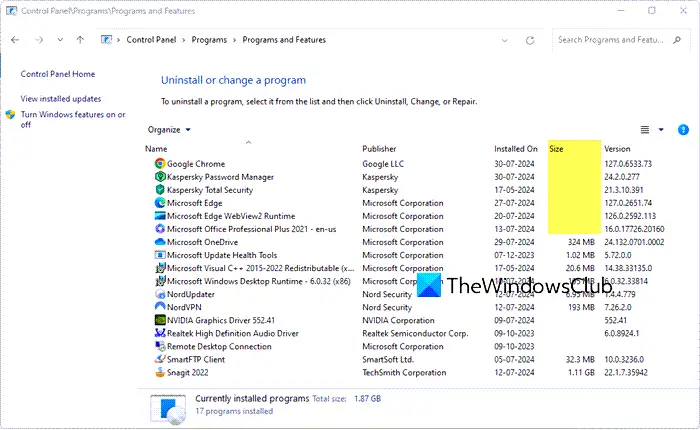
		<description><![CDATA[<div style=" float: left; padding: 4px; margin: 0 10px 5px 0; width: 75px; height: 75px;"><img style=" float: left; padding: 4px; margin: 0 10px 5px 0;" width="75" height="75" src="http://www.thewindowsclub.com/wp-content/themes/Twc/scripts/thumb.php?src=http://www.thewindowsclub.com/wp-content/uploads/2010/10/cp-uninstall-size.png&amp;w=75&amp;h=75&amp;zc=1"/></div>When you open the Control Panel &#62; Programs and Features applet, you may have noticed in Windows 7 that in some cases the sizes of the installed programs are not being displayed. A question which may arise in one&#8217;s mind <span><a class="more-link" href="http://www.thewindowsclub.com/why-does-windows-7-not-support-size-reporting-in-programs-and-features">...more &#62;&#62;&#62;</a></span>]]></description>
		<wfw:commentRss>http://www.thewindowsclub.com/why-does-windows-7-not-support-size-reporting-in-programs-and-features/feed</wfw:commentRss>
		<slash:comments>0</slash:comments>
		</item>
		<item>
		<title>Windows Access Panel for Windows 7 &amp; Vista</title>
		<link>http://www.thewindowsclub.com/windows-access-panel-for-windows-7-vista?utm_source=rss&#038;utm_medium=rss&#038;utm_campaign=windows-access-panel-for-windows-7-vista</link>
		<comments>http://www.thewindowsclub.com/windows-access-panel-for-windows-7-vista#comments</comments>
		<pubDate>Mon, 19 Oct 2009 08:54:55 +0000</pubDate>
		<dc:creator>AnandK@TWC</dc:creator>
				<category><![CDATA[Downloads]]></category>
		<category><![CDATA[Control Panel]]></category>
		<category><![CDATA[TWC App]]></category>

		<guid isPermaLink="false">http://www.thewindowsclub.com/?p=4136</guid>
		<description><![CDATA[<div style=" float: left; padding: 4px; margin: 0 10px 5px 0; width: 75px; height: 75px;"><img style=" float: left; padding: 4px; margin: 0 10px 5px 0;" width="75" height="75" src="http://www.thewindowsclub.com/wp-content/themes/Twc/scripts/thumb.php?src=http://www.thewindowsclub.com/wp-includes/js/tinymce/plugins/wordpress/img/trans.gif&amp;w=75&amp;h=75&amp;zc=1"/></div>We are pleased to release Access Panel for Windows 7 &#38; Vista, x86 and x64. While you can use Control Panel to change settings which control nearly everything about how Windows looks and works, in some cases to access these <span><a class="more-link" href="http://www.thewindowsclub.com/windows-access-panel-for-windows-7-vista">...more &#62;&#62;&#62;</a></span>]]></description>
		<wfw:commentRss>http://www.thewindowsclub.com/windows-access-panel-for-windows-7-vista/feed</wfw:commentRss>
		<slash:comments>0</slash:comments>
		</item>
		<item>
		<title>Make Control Panel list all options instantly</title>
		<link>http://www.thewindowsclub.com/make-control-panel-list-all-options-instantly?utm_source=rss&#038;utm_medium=rss&#038;utm_campaign=make-control-panel-list-all-options-instantly</link>
		<comments>http://www.thewindowsclub.com/make-control-panel-list-all-options-instantly#comments</comments>
		<pubDate>Sat, 17 Oct 2009 15:29:21 +0000</pubDate>
		<dc:creator>AnandK@TWC</dc:creator>
				<category><![CDATA[Windows]]></category>
		<category><![CDATA[Control Panel]]></category>
		<category><![CDATA[Tips]]></category>

		<guid isPermaLink="false">http://www.thewindowsclub.com/?p=4072</guid>
		<description><![CDATA[<div style=" float: left; padding: 4px; margin: 0 10px 5px 0; width: 75px; height: 75px;"><img style=" float: left; padding: 4px; margin: 0 10px 5px 0;" width="75" height="75" src="http://www.thewindowsclub.com/wp-content/themes/Twc/scripts/thumb.php?src=http://www.thewindowsclub.com/wp-content/uploads/2009/10/controlpanellist-284x400.png&amp;w=75&amp;h=75&amp;zc=1"/></div>Now this one&#8217;s a real simple tip. You are basically making Windows 7 Search work for you. You open your Control Panel and you see it as you have set it, viz by Category view or by Icons (Large/Small) view. <span><a class="more-link" href="http://www.thewindowsclub.com/make-control-panel-list-all-options-instantly">...more &#62;&#62;&#62;</a></span>]]></description>
		<wfw:commentRss>http://www.thewindowsclub.com/make-control-panel-list-all-options-instantly/feed</wfw:commentRss>
		<slash:comments>3</slash:comments>
		</item>
		<item>
		<title>Change Display Language in Windows 7, for new user accounts.</title>
		<link>http://www.thewindowsclub.com/change-display-language-in-windows-7-for-new-user-accounts?utm_source=rss&#038;utm_medium=rss&#038;utm_campaign=change-display-language-in-windows-7-for-new-user-accounts</link>
		<comments>http://www.thewindowsclub.com/change-display-language-in-windows-7-for-new-user-accounts#comments</comments>
		<pubDate>Tue, 23 Jun 2009 16:24:03 +0000</pubDate>
		<dc:creator>AnandK@TWC</dc:creator>
				<category><![CDATA[Windows]]></category>
		<category><![CDATA[Control Panel]]></category>
		<category><![CDATA[Features]]></category>
		<category><![CDATA[Tricks]]></category>

		<guid isPermaLink="false">http://www.thewindowsclub.com/?p=1666</guid>
		<description><![CDATA[<div style=" float: left; padding: 4px; margin: 0 10px 5px 0; width: 75px; height: 75px;"><img style=" float: left; padding: 4px; margin: 0 10px 5px 0;" width="75" height="75" src="http://www.thewindowsclub.com/wp-content/themes/Twc/scripts/thumb.php?src=http://www.thewindowsclub.com/wp-content/uploads/2009/06/languagesettings-600x452.jpg&amp;w=75&amp;h=75&amp;zc=1"/></div>Windows 7 can let you set different display language settings for different user accounts. When you choose regional and language settings for your computer, such as your default input language or keyboard layout, you can apply those settings to special <span><a class="more-link" href="http://www.thewindowsclub.com/change-display-language-in-windows-7-for-new-user-accounts">...more &#62;&#62;&#62;</a></span>]]></description>
		<wfw:commentRss>http://www.thewindowsclub.com/change-display-language-in-windows-7-for-new-user-accounts/feed</wfw:commentRss>
		<slash:comments>0</slash:comments>
		</item>
		<item>
		<title>How to Pin Control Panel to Windows 7 TaskBar</title>
		<link>http://www.thewindowsclub.com/how-to-pin-control-panel-to-windows-7-taskbar?utm_source=rss&#038;utm_medium=rss&#038;utm_campaign=how-to-pin-control-panel-to-windows-7-taskbar</link>
		<comments>http://www.thewindowsclub.com/how-to-pin-control-panel-to-windows-7-taskbar#comments</comments>
		<pubDate>Sat, 13 Jun 2009 13:38:11 +0000</pubDate>
		<dc:creator>AnandK@TWC</dc:creator>
				<category><![CDATA[Windows]]></category>
		<category><![CDATA[Control Panel]]></category>
		<category><![CDATA[Taskbar]]></category>
		<category><![CDATA[Tips]]></category>

		<guid isPermaLink="false">http://www.thewindowsclub.com/?p=1446</guid>
		<description><![CDATA[<div style=" float: left; padding: 4px; margin: 0 10px 5px 0; width: 75px; height: 75px;"><img style=" float: left; padding: 4px; margin: 0 10px 5px 0;" width="75" height="75" src="http://www.thewindowsclub.com/wp-content/themes/Twc/scripts/thumb.php?src=http://www.thewindowsclub.com/wp-content/uploads/2009/06/pincontrolpanel.jpg&amp;w=75&amp;h=75&amp;zc=1"/></div>If you want to add Control Panel to the Windows 7 taskbar, you would probably, right click on the Control Panel icon in the start menu and want to click on Pin to Taskbar. But you wont see the option <span><a class="more-link" href="http://www.thewindowsclub.com/how-to-pin-control-panel-to-windows-7-taskbar">...more &#62;&#62;&#62;</a></span>]]></description>
		<wfw:commentRss>http://www.thewindowsclub.com/how-to-pin-control-panel-to-windows-7-taskbar/feed</wfw:commentRss>
		<slash:comments>0</slash:comments>
		</item>
	</channel>
</rss>