<?xml version="1.0" encoding="UTF-8"?>
<rss version="2.0"
	xmlns:content="http://purl.org/rss/1.0/modules/content/"
	xmlns:wfw="http://wellformedweb.org/CommentAPI/"
	xmlns:dc="http://purl.org/dc/elements/1.1/"
	xmlns:atom="http://www.w3.org/2005/Atom"
	xmlns:sy="http://purl.org/rss/1.0/modules/syndication/"
	xmlns:slash="http://purl.org/rss/1.0/modules/slash/"
	>

<channel>
	<title>The Windows Club &#187; Context Menu</title>
	<atom:link href="http://www.thewindowsclub.com/tag/context-menu/feed" rel="self" type="application/rss+xml" />
	<link>http://www.thewindowsclub.com</link>
	<description>The Windows Club is  created by Anand Khanse, a Microsoft MVP and is primarily targeted at the Windows 7, 8 &#38; Vista user and will address and cover issues in relation to Microsoft and Windows OS.</description>
	<lastBuildDate>Thu, 09 Feb 2012 03:47:25 +0000</lastBuildDate>
	<language>en</language>
	<sy:updatePeriod>hourly</sy:updatePeriod>
	<sy:updateFrequency>1</sy:updateFrequency>
	<generator>http://wordpress.org/?v=3.3.1</generator>
<xhtml:meta xmlns:xhtml="http://www.w3.org/1999/xhtml" name="robots" content="noindex" />
		<item>
		<title>Add or Pin website links to your Windows 7 desktop context menu with Web Pinner</title>
		<link>http://www.thewindowsclub.com/add-pin-website-links-windows-7-desktop-context-menu-web-pinner?utm_source=rss&#038;utm_medium=rss&#038;utm_campaign=add-pin-website-links-windows-7-desktop-context-menu-web-pinner</link>
		<comments>http://www.thewindowsclub.com/add-pin-website-links-windows-7-desktop-context-menu-web-pinner#comments</comments>
		<pubDate>Thu, 08 Sep 2011 16:49:48 +0000</pubDate>
		<dc:creator>AnandK@TWC</dc:creator>
				<category><![CDATA[Downloads]]></category>
		<category><![CDATA[Context Menu]]></category>
		<category><![CDATA[TWC App]]></category>

		<guid isPermaLink="false">http://www.thewindowsclub.com/?p=33310</guid>
		<description><![CDATA[<div style=" float: left; padding: 4px; margin: 0 10px 5px 0; width: 75px; height: 75px;"><img style=" float: left; padding: 4px; margin: 0 10px 5px 0;" width="75" height="75" src="http://www.thewindowsclub.com/wp-content/themes/Twc/scripts/thumb.php?src=http://www.thewindowsclub.com/wp-content/uploads/2011/09/web-pinner.jpg&amp;w=75&amp;h=75&amp;zc=1"/></div>Web Pinner is a freeware app that can add website links to your Windows 7 desktop&#8217;s right-click context menu, quickly and easily. Do you visit one or more particular websites very frequently? If you do, then here is one more <span><a class="more-link" href="http://www.thewindowsclub.com/add-pin-website-links-windows-7-desktop-context-menu-web-pinner">...more &#62;&#62;&#62;</a></span>]]></description>
		<wfw:commentRss>http://www.thewindowsclub.com/add-pin-website-links-windows-7-desktop-context-menu-web-pinner/feed</wfw:commentRss>
		<slash:comments>10</slash:comments>
		</item>
		<item>
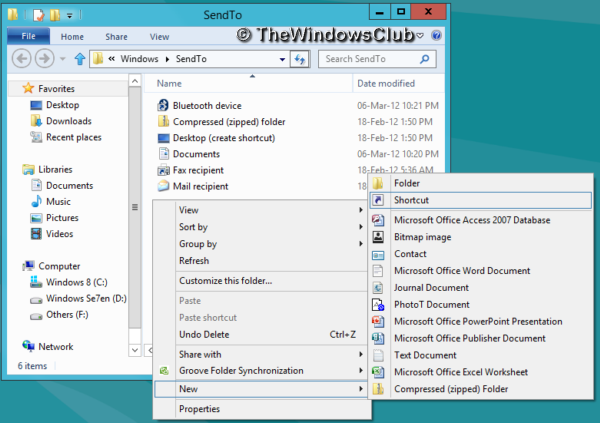
		<title>Add items to the Send To context menu with SendToSendTo easily</title>
		<link>http://www.thewindowsclub.com/add-items-to-the-send-to-context-menu-with-sendtosendto-easily?utm_source=rss&#038;utm_medium=rss&#038;utm_campaign=add-items-to-the-send-to-context-menu-with-sendtosendto-easily</link>
		<comments>http://www.thewindowsclub.com/add-items-to-the-send-to-context-menu-with-sendtosendto-easily#comments</comments>
		<pubDate>Wed, 20 Jul 2011 13:12:37 +0000</pubDate>
		<dc:creator>Guest@TWC</dc:creator>
				<category><![CDATA[Downloads]]></category>
		<category><![CDATA[Context Menu]]></category>

		<guid isPermaLink="false">http://www.thewindowsclub.com/?p=30836</guid>
		<description><![CDATA[<div style=" float: left; padding: 4px; margin: 0 10px 5px 0; width: 75px; height: 75px;"><img style=" float: left; padding: 4px; margin: 0 10px 5px 0;" width="75" height="75" src="http://www.thewindowsclub.com/wp-content/themes/Twc/scripts/thumb.php?src=http://www.thewindowsclub.com/wp-content/uploads/2011/07/sendto3.jpg&amp;w=75&amp;h=75&amp;zc=1"/></div>Adding items to the Send To context menu has never been easier with a small shell extension that goes by the name of SendToSendTo. Once installed it adds an option to your Send To menu that you simply click, to <span><a class="more-link" href="http://www.thewindowsclub.com/add-items-to-the-send-to-context-menu-with-sendtosendto-easily">...more &#62;&#62;&#62;</a></span>]]></description>
		<wfw:commentRss>http://www.thewindowsclub.com/add-items-to-the-send-to-context-menu-with-sendtosendto-easily/feed</wfw:commentRss>
		<slash:comments>2</slash:comments>
		</item>
		<item>
		<title>Resize, edit, upload, convert images from right click context menu with XnView shell extension</title>
		<link>http://www.thewindowsclub.com/resize-edit-upload-convert-image-formats-from-right-click-context-menu-with-xnview-shell-extension?utm_source=rss&#038;utm_medium=rss&#038;utm_campaign=resize-edit-upload-convert-image-formats-from-right-click-context-menu-with-xnview-shell-extension</link>
		<comments>http://www.thewindowsclub.com/resize-edit-upload-convert-image-formats-from-right-click-context-menu-with-xnview-shell-extension#comments</comments>
		<pubDate>Thu, 07 Apr 2011 13:59:37 +0000</pubDate>
		<dc:creator>AnandK@TWC</dc:creator>
				<category><![CDATA[Downloads]]></category>
		<category><![CDATA[Context Menu]]></category>
		<category><![CDATA[Images]]></category>

		<guid isPermaLink="false">http://www.thewindowsclub.com/?p=26469</guid>
		<description><![CDATA[<div style=" float: left; padding: 4px; margin: 0 10px 5px 0; width: 75px; height: 75px;"><img style=" float: left; padding: 4px; margin: 0 10px 5px 0;" width="75" height="75" src="http://www.thewindowsclub.com/wp-content/themes/Twc/scripts/thumb.php?src=http://www.thewindowsclub.com/wp-content/uploads/2011/04/xnview-context-menu.jpg&amp;w=75&amp;h=75&amp;zc=1"/></div>XnView Shell Extension is an extension for windows explorer which lets you edit images right from the explorer right click context menu itself. We have earlier blogged about XnView, a freeware utility for viewing, editing and converting graphic files, however <span><a class="more-link" href="http://www.thewindowsclub.com/resize-edit-upload-convert-image-formats-from-right-click-context-menu-with-xnview-shell-extension">...more &#62;&#62;&#62;</a></span>]]></description>
		<wfw:commentRss>http://www.thewindowsclub.com/resize-edit-upload-convert-image-formats-from-right-click-context-menu-with-xnview-shell-extension/feed</wfw:commentRss>
		<slash:comments>1</slash:comments>
		</item>
		<item>
		<title>Delete items from your right click context menu with MenuMaid</title>
		<link>http://www.thewindowsclub.com/delete-items-from-your-right-click-context-menu-with-menumaid?utm_source=rss&#038;utm_medium=rss&#038;utm_campaign=delete-items-from-your-right-click-context-menu-with-menumaid</link>
		<comments>http://www.thewindowsclub.com/delete-items-from-your-right-click-context-menu-with-menumaid#comments</comments>
		<pubDate>Fri, 27 Aug 2010 03:39:11 +0000</pubDate>
		<dc:creator>AnandK@TWC</dc:creator>
				<category><![CDATA[Downloads]]></category>
		<category><![CDATA[Context Menu]]></category>

		<guid isPermaLink="false">http://www.thewindowsclub.com/?p=15395</guid>
		<description><![CDATA[<div style=" float: left; padding: 4px; margin: 0 10px 5px 0; width: 75px; height: 75px;"><img style=" float: left; padding: 4px; margin: 0 10px 5px 0;" width="75" height="75" src="http://www.thewindowsclub.com/wp-content/themes/Twc/scripts/thumb.php?src=http://www.thewindowsclub.com/wp-content/uploads/2010/08/context-menu-cleaner.png&amp;w=75&amp;h=75&amp;zc=1"/></div>Over a period of time, you tend to install several programs on your Windows computer. Many of these programs end up adding entries to your right click context menu, some useful, some not really. As a result your explorer or <span><a class="more-link" href="http://www.thewindowsclub.com/delete-items-from-your-right-click-context-menu-with-menumaid">...more &#62;&#62;&#62;</a></span>]]></description>
		<wfw:commentRss>http://www.thewindowsclub.com/delete-items-from-your-right-click-context-menu-with-menumaid/feed</wfw:commentRss>
		<slash:comments>1</slash:comments>
		</item>
		<item>
		<title>Fix: Open, Print, Edit context menu items missing in Windows 7</title>
		<link>http://www.thewindowsclub.com/fix-open-print-edit-context-menu-items-missing-in-windows-7?utm_source=rss&#038;utm_medium=rss&#038;utm_campaign=fix-open-print-edit-context-menu-items-missing-in-windows-7</link>
		<comments>http://www.thewindowsclub.com/fix-open-print-edit-context-menu-items-missing-in-windows-7#comments</comments>
		<pubDate>Tue, 30 Mar 2010 14:01:53 +0000</pubDate>
		<dc:creator>AnandK@TWC</dc:creator>
				<category><![CDATA[Windows]]></category>
		<category><![CDATA[Context Menu]]></category>
		<category><![CDATA[Registry]]></category>
		<category><![CDATA[Tips]]></category>

		<guid isPermaLink="false">http://www.thewindowsclub.com/?p=7803</guid>
		<description><![CDATA[<div style=" float: left; padding: 4px; margin: 0 10px 5px 0; width: 75px; height: 75px;"><img style=" float: left; padding: 4px; margin: 0 10px 5px 0;" width="75" height="75" src="http://www.thewindowsclub.com/wp-content/themes/Twc/scripts/thumb.php?src=http://www.thewindowsclub.com/wp-content/uploads/2010/03/regedit-151.jpg&amp;w=75&amp;h=75&amp;zc=1"/></div>In Windows 7, if you select more than 15 files, you may find that the right click context menu has been shortened and that items like Open, Print, Edit are missing! This is by design and Windows 7 does so <span><a class="more-link" href="http://www.thewindowsclub.com/fix-open-print-edit-context-menu-items-missing-in-windows-7">...more &#62;&#62;&#62;</a></span>]]></description>
		<wfw:commentRss>http://www.thewindowsclub.com/fix-open-print-edit-context-menu-items-missing-in-windows-7/feed</wfw:commentRss>
		<slash:comments>0</slash:comments>
		</item>
		<item>
		<title>Context Menu Editor for Windows 7 &amp; Vista Released</title>
		<link>http://www.thewindowsclub.com/context-menu-editor-for-windows-7-vista-released?utm_source=rss&#038;utm_medium=rss&#038;utm_campaign=context-menu-editor-for-windows-7-vista-released</link>
		<comments>http://www.thewindowsclub.com/context-menu-editor-for-windows-7-vista-released#comments</comments>
		<pubDate>Mon, 01 Mar 2010 14:39:41 +0000</pubDate>
		<dc:creator>AnandK@TWC</dc:creator>
				<category><![CDATA[Downloads]]></category>
		<category><![CDATA[Context Menu]]></category>
		<category><![CDATA[TWC App]]></category>

		<guid isPermaLink="false">http://www.thewindowsclub.com/?p=7031</guid>
		<description><![CDATA[<div style=" float: left; padding: 4px; margin: 0 10px 5px 0; width: 75px; height: 75px;"><img style=" float: left; padding: 4px; margin: 0 10px 5px 0;" width="75" height="75" src="http://www.thewindowsclub.com/wp-content/themes/Twc/scripts/thumb.php?src=http://www.thewindowsclub.com/wp-content/uploads/2010/03/context-menu-editor.png&amp;w=75&amp;h=75&amp;zc=1"/></div>We are pleased to release Context Menu Editor for Windows 7 &#38; Vista. Context Menu Editor is a freeware tweaking utility to add/delete application shortcuts, Win32 commands, files, and website urls to your desktop and folder context menu. Context Menu <span><a class="more-link" href="http://www.thewindowsclub.com/context-menu-editor-for-windows-7-vista-released">...more &#62;&#62;&#62;</a></span>]]></description>
		<wfw:commentRss>http://www.thewindowsclub.com/context-menu-editor-for-windows-7-vista-released/feed</wfw:commentRss>
		<slash:comments>0</slash:comments>
		</item>
		<item>
		<title>Right Click Context Menu Extender for Windows 7 Released</title>
		<link>http://www.thewindowsclub.com/right-click-context-menu-extender-for-windows-7-released?utm_source=rss&#038;utm_medium=rss&#038;utm_campaign=right-click-context-menu-extender-for-windows-7-released</link>
		<comments>http://www.thewindowsclub.com/right-click-context-menu-extender-for-windows-7-released#comments</comments>
		<pubDate>Fri, 19 Feb 2010 13:09:24 +0000</pubDate>
		<dc:creator>AnandK@TWC</dc:creator>
				<category><![CDATA[Downloads]]></category>
		<category><![CDATA[Context Menu]]></category>
		<category><![CDATA[TWC App]]></category>

		<guid isPermaLink="false">http://www.thewindowsclub.com/?p=6839</guid>
		<description><![CDATA[<div style=" float: left; padding: 4px; margin: 0 10px 5px 0; width: 75px; height: 75px;"><img style=" float: left; padding: 4px; margin: 0 10px 5px 0;" width="75" height="75" src="http://www.thewindowsclub.com/wp-content/themes/Twc/scripts/thumb.php?src=http://www.thewindowsclub.com/wp-content/uploads/2010/02/right-click-extender1-600x430.png&amp;w=75&amp;h=75&amp;zc=1"/></div>We are pleased to release Right-Click Extender for Windows 7. Right-Click Extender is a freeware utility which allows you to add some important items to the right click context menu. UPDATE: 11th March, 2010. Right-Click Extender for Windows 7 has <span><a class="more-link" href="http://www.thewindowsclub.com/right-click-context-menu-extender-for-windows-7-released">...more &#62;&#62;&#62;</a></span>]]></description>
		<wfw:commentRss>http://www.thewindowsclub.com/right-click-context-menu-extender-for-windows-7-released/feed</wfw:commentRss>
		<slash:comments>0</slash:comments>
		</item>
		<item>
		<title>Add Attach &amp; Detach option to context menu of VHD files</title>
		<link>http://www.thewindowsclub.com/add-attach-detach-option-to-context-menu-of-vhd-files?utm_source=rss&#038;utm_medium=rss&#038;utm_campaign=add-attach-detach-option-to-context-menu-of-vhd-files</link>
		<comments>http://www.thewindowsclub.com/add-attach-detach-option-to-context-menu-of-vhd-files#comments</comments>
		<pubDate>Sat, 31 Oct 2009 12:34:41 +0000</pubDate>
		<dc:creator>AnandK@TWC</dc:creator>
				<category><![CDATA[Downloads]]></category>
		<category><![CDATA[Context Menu]]></category>
		<category><![CDATA[VHD]]></category>
		<category><![CDATA[Virtual]]></category>

		<guid isPermaLink="false">http://www.thewindowsclub.com/?p=4419</guid>
		<description><![CDATA[<div style=" float: left; padding: 4px; margin: 0 10px 5px 0; width: 75px; height: 75px;"><img style=" float: left; padding: 4px; margin: 0 10px 5px 0;" width="75" height="75" src="http://www.thewindowsclub.com/wp-content/themes/Twc/scripts/thumb.php?src=http://www.thewindowsclub.com/wp-content/uploads/2009/10/vhdattach.png&amp;w=75&amp;h=75&amp;zc=1"/></div>VHD Attach is small tool that adds Attach and Detach option to right click context menu of Virtual disk (VHD) files. This enables those operations to be done easily, without trip to Disk Management console. The Detach option is available <span><a class="more-link" href="http://www.thewindowsclub.com/add-attach-detach-option-to-context-menu-of-vhd-files">...more &#62;&#62;&#62;</a></span>]]></description>
		<wfw:commentRss>http://www.thewindowsclub.com/add-attach-detach-option-to-context-menu-of-vhd-files/feed</wfw:commentRss>
		<slash:comments>1</slash:comments>
		</item>
		<item>
		<title>Backup data via Windows right click context menu with SimpleBackup</title>
		<link>http://www.thewindowsclub.com/backup-data-via-windows-right-click-context-menu-with-simplebackup?utm_source=rss&#038;utm_medium=rss&#038;utm_campaign=backup-data-via-windows-right-click-context-menu-with-simplebackup</link>
		<comments>http://www.thewindowsclub.com/backup-data-via-windows-right-click-context-menu-with-simplebackup#comments</comments>
		<pubDate>Sat, 12 Sep 2009 14:14:38 +0000</pubDate>
		<dc:creator>AnandK@TWC</dc:creator>
				<category><![CDATA[Downloads]]></category>
		<category><![CDATA[Backup]]></category>
		<category><![CDATA[Context Menu]]></category>

		<guid isPermaLink="false">http://www.thewindowsclub.com/?p=3358</guid>
		<description><![CDATA[<div style=" float: left; padding: 4px; margin: 0 10px 5px 0; width: 75px; height: 75px;"><img style=" float: left; padding: 4px; margin: 0 10px 5px 0;" width="75" height="75" src="http://www.thewindowsclub.com/wp-content/themes/Twc/scripts/thumb.php?src=http://www.thewindowsclub.com/wp-content/uploads/2009/09/simplebackup1.jpg&amp;w=75&amp;h=75&amp;zc=1"/></div>SimpleBackup is free backup software, which adds the backup option to the right click context menu of files and folder. SimpleBackup makes it easier for you to backup your files and folders regulary and very quickly&#8230;on the fly! You will <span><a class="more-link" href="http://www.thewindowsclub.com/backup-data-via-windows-right-click-context-menu-with-simplebackup">...more &#62;&#62;&#62;</a></span>]]></description>
		<wfw:commentRss>http://www.thewindowsclub.com/backup-data-via-windows-right-click-context-menu-with-simplebackup/feed</wfw:commentRss>
		<slash:comments>0</slash:comments>
		</item>
		<item>
		<title>Upload files directly from your right click context menu</title>
		<link>http://www.thewindowsclub.com/upload-files-directly-from-your-right-click-context-menu?utm_source=rss&#038;utm_medium=rss&#038;utm_campaign=upload-files-directly-from-your-right-click-context-menu</link>
		<comments>http://www.thewindowsclub.com/upload-files-directly-from-your-right-click-context-menu#comments</comments>
		<pubDate>Sat, 08 Aug 2009 07:55:39 +0000</pubDate>
		<dc:creator>AnandK@TWC</dc:creator>
				<category><![CDATA[Downloads]]></category>
		<category><![CDATA[Context Menu]]></category>
		<category><![CDATA[Freeware]]></category>

		<guid isPermaLink="false">http://www.thewindowsclub.com/?p=2544</guid>
		<description><![CDATA[<div style=" float: left; padding: 4px; margin: 0 10px 5px 0; width: 75px; height: 75px;"><img style=" float: left; padding: 4px; margin: 0 10px 5px 0;" width="75" height="75" src="http://www.thewindowsclub.com/wp-content/themes/Twc/scripts/thumb.php?src=http://www.thewindowsclub.com/wp-content/uploads/2009/08/rightload.jpg&amp;w=75&amp;h=75&amp;zc=1"/></div>Rightload is a small freeware program that allows you to quickly upload files directly from a Windows folder to your server. Instead of using complicated software just to upload a few pictures, you just right-click on the files, select the <span><a class="more-link" href="http://www.thewindowsclub.com/upload-files-directly-from-your-right-click-context-menu">...more &#62;&#62;&#62;</a></span>]]></description>
		<wfw:commentRss>http://www.thewindowsclub.com/upload-files-directly-from-your-right-click-context-menu/feed</wfw:commentRss>
		<slash:comments>0</slash:comments>
		</item>
	</channel>
</rss>