
While simply plugging in the device and letting Windows 11 or Windows 10 install the driver automatically is cool, you may for some reason prefer not to have the Driver installed automatically. You can if you wish, stop Windows from installing the drivers automatically. If you follow this tutorial, you can disable automatic driver installation or updates for specific devices in Windows 11/10, using Control Panel, Windows Registry, or Group Policy Editor.
Disable Automatic Driver Updates for specific devices in Windows 11/10
To stop or disable Automatic Driver Installation or Updates for specific devices in Windows 11/10, you can use any one of these methods:
1] Use the Control Panel to stop automatic driver updates
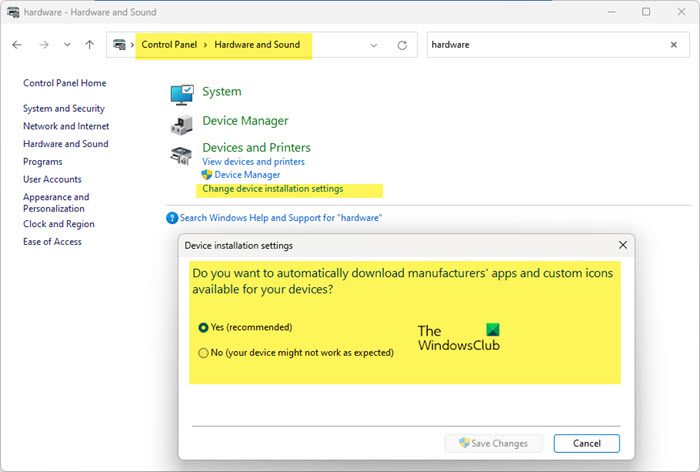
While it is recommended that you let make Windows download Drivers & Realistic Icons automatically if you wish, you can stop Windows from automatically installing Drivers:
Open Windows Settings > System > About > Advanced system settings > Hardware tab > Click on Device installation settings
You can also access it by opening Control Panel > Hardware and Sound > Change device installation settings.
Once the Device installation setup box opens, you will be asked,
- Do you want to automatically download manufacturers’ apps and custom icons available for your device, or
- Do you want to download driver software and realistic icons for your devices?
Here select No, let me choose what to do. Click Save changes.
2] Prevent Installation or Updating using Group Policy Editor
Type gpedit.msc in start search and hit Enter to open Group Policy Editor.
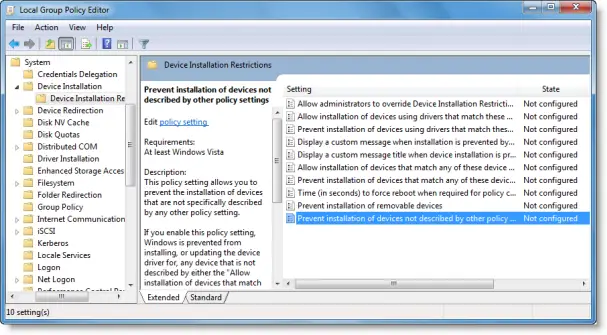
Navigate to Computer Configuration > Administrative Templates > System > Device Installation > Device Installation.
Now in the right pane double click on Prevent Installation of Devices not described by other policy settings.
This policy setting allows you to prevent the installation of devices that are not specifically described by any other policy setting.
If you enable this policy setting, Windows is prevented from installing or updating the device driver for any device that is not described by either the “Allow installation of devices that match any of these device IDs”, the “Allow installation of devices for these device classes”, or the “Allow installation of devices that match any of these device instance IDs” policy setting.
If you disable or do not configure this policy setting, Windows is allowed to install or update the device driver for any device that is not described by the “Prevent installation of devices that match any of these device IDs”, “Prevent installation of devices for these device classes” policy setting, “Prevent installation of devices that match any of these device instance IDs”, or “Prevent installation of removable devices” policy setting.
Set it to Enabled. Click Apply / OK.
3] Block automatic driver updates using Windows Registry
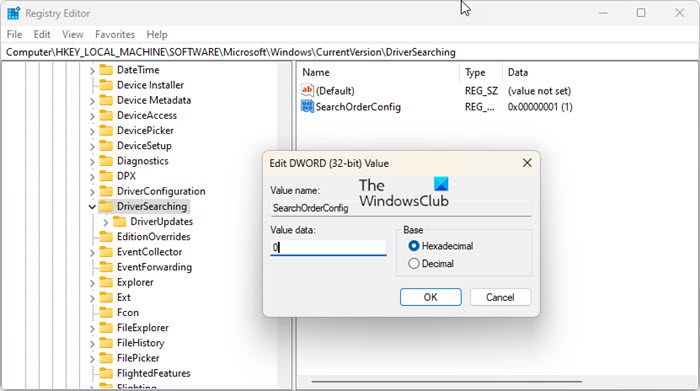
If your Windows does not have Group Policy, you can navigate to the following key in Windows Registry:
HKEY_LOCAL_MACHINE\SOFTWARE\Microsoft\Windows\CurrentVersion\DriverSearching
Set the value of SearchOrderConfig to 0 to block driver updates. A value of 1 allows downloads of driver updates.
Restart your computer.
NOTE: These options don’t prevent the installation of those drivers whose device IDs, device instance IDs, and device classes are added in Group Policy for automatic installation. If you want to prevent the automatic updates of all the drivers, then you can check this post on how to Block Driver Updates via Windows Quality Update.
How to get Device IDs from Device Manager?
To get Device IDs for Hardrwae from Device Manager in Windows 11/10:
- Open Device Manager
- Select the device
- Right-click on it and choose Properties
- Go to the Details tab
- Now, select Hardware Ids from the dropdown menu under the Property
You will see the hardware IDs there.
How to stop automatic driver installation or reinstallation?
If a Device Driver has already been installed and you want to remove it and then stop that particular driver from being update, do the following:
- Uninstall the Driver via Devices Manager
- Use the Show or Hide Updates Tool in Windows 11/10 to block the particular driver update.
Hope this helps.

