
When someone asks you for your system configuration, does it leave you saying “Duh!“? Well, check out Speccy, a cool freeware System Information tool that will tell you all the specs you may need to know, about your Windows PC.
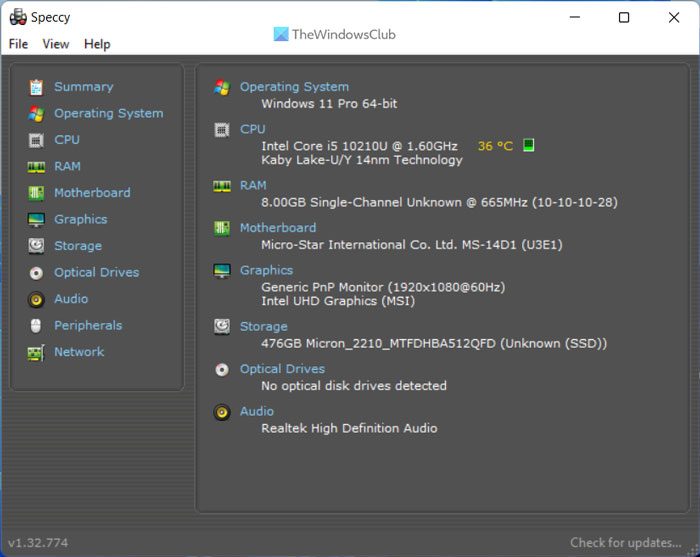
Speccy for Windows 11/10
While most of the information can be found out by right-clicking Computer > properties or via Device Manager, Speccy lays it down all in one place!
Speccy will give you detailed statistics on every piece of hardware in your computer.
This includes CPU, Motherboard, RAM, Graphics Cards, Hard Disks, Optical Drives, Audio support, and much more.
Additionally, Speccy adds the temperatures of your different components, so you can easily see if there’s a problem.
Read: What are the main components of a Computer system?
You can download Speccy for Windows 11/10/8/7 from its home page. I installed it and found that it installs CCleaner as well.
How do I find the full details of my computer?
There are multiple ways to find the full details of your computer. Whether you want to find the hardware configuration or installed software list, you can do both on your computer. You can search for system information in the Taskbar search box and click on the individual search result. Alternatively, you can use a third-party tool like Speccy to get the same thing done.
What is the best system information tool?
Although there are countless system information tools available for Windows 11 and Windows 10 PCs, Speccy is one of the best out there. However, you can also try the CPU-Z. Both of them work the same way. They are uncluttered, and you can find almost any information on your screen without any issue.
Read: 5 System Information Tools in Windows 11/10.
Other tools that can provide the provides hardware configuration information about your computer easily:
Sandra Lite | MiTeC System Information X | HiBit System Information | Hardware Identify.
Know of any more freeware system information tools for Windows? Please do share!

