
In general, Hardware Acceleration means using a computer’s hardware to perform a certain task and function faster than would be possible using software. This also allows for the smooth rendering of graphics. Hardware Acceleration or GPU Rendering is feature in Internet Options that allows the browser to use or not use Software Rendering while loading a webpage, move all graphics and text rendering from the Central Processing Unit to the Graphics Processing Unit. The idea is to speed up graphic performance and the rendering of webpages by moving it from the CPU to the GPU, thereby making Internet Explorer perform faster.
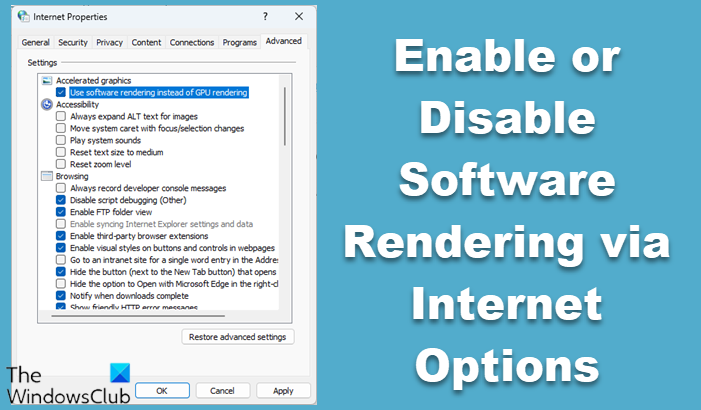
Enable or Disable Software Rendering via Internet Options
In this post we will see what hardware acceleration is, what is software rendering, and the problems which may arise when Internet Explorer tries to render a web page. Rendering is the process of using computer code to display the text and graphics that you see on your screen.
In some cases, your browser may show performance issues when rendering the webpage and you could end up facing one or more of these symptoms:
- Slow scrolling of webpages
- Diffused Fonts
- Webpage appears blank
- Colors on the webpage may be displayed incorrectly
- Webpages do not display correctly randomly
At times, you also receive an error message:
This can happen on low-end computers or if your current video card or driver does not support GPU hardware acceleration.
In such a case you should try and disable Hardware Acceleration and use Software Rendering and see if it helps you.
To do so, open Internet Options > Advanced Tab > Accelerated graphics.

Check the option Use software rendering instead of GPU rendering, and restart your PC. This will disable the Hardware Acceleration functionality.
Related: How to enable or disable Hardware Acceleration in Windows 11
Measure browser performance
To see how your browser performs, you can take any Browser Speed-reading test. Graphically rich demos like this one and the FishIE Test, are designed to use your computer’s GPU power instead of the CPU.
Does video card & driver support hardware acceleration
There are times when your browser will automatically use Software instead of GPU rendering. When the system detects that your video card or video driver does not support GPU hardware acceleration, the Use software rendering instead of GPU rendering may appear checked and grayed out. This usually happens in the following scenarios:
- The user has manually selected this option in the Advanced Internet options
- The GPU and driver is: Slower at rendering common Web content than software rendering; Has severe stability or security issues; Has severe rendering quality issues when rendering Web content like HTML5, CSS3, SVG, etc, or popular ActiveX controls such as Adobe Flash.
Hope this helps.

