
If you’ve installed one of the latter versions of Windows Live Mail, you will notice that there is no Send / Receive button on the menu bar. It will not be available even from the Customize Toolbar options.
Send Receive button missing in Windows Live Mail
The fact is that the Send / Receive button has been replaced with the Sync button.
Based on the mode Windows Live Mail is running in, the Sync button shows different options.
When in Mail mode, it shows, Sync particular email account/s, Sync all email accounts and Sync everything.
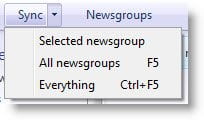
In Newsgroup mode, you will see it performing a different set of functions. And so on for Feeds. Hope this clarifies the issue.

