
Chrome, Edge, and Firefox have a feature that lets you pin the shortcuts to your favorite websites easily to your Windows Taskbar or Start Menu. Whether you are using Windows 11, Windows 10, or any other version, you can use the following method to pin any website to the Taskbar and Start Menu.
Depending on the browser you choose, the steps are quite different. However, in every case, you need to create a desktop shortcut to your desired website. Therefore, this article has two sections, and you need to follow both of them. The first section will let you create a desktop shortcut to your favorite website, and the second section will allow you to pin the shortcut to the Taskbar or Start Menu.
Create desktop shortcut to any website using Google Chrome
![[U] Pin website shortcuts to Windows Taskbar & Start Menu using Edge, Chrome, Firefox](https://www.thewindowsclub.com/wp-content/uploads/2021/11/pin-website-shortcut-taskbar-start-menu.png)
To create a desktop shortcut to any website using Google Chrome, follow these steps:
- Open the website in Google Chrome you want to pin.
- Click on the Menu button in the top right corner.
- Select the More tools > Create shortcut option.
- Enter the name of your shortcut.
- Click on the Create button.
After that, you can find the website shortcut on your desktop.
Create desktop shortcut to any website using Microsoft Edge
![[U] Pin website shortcuts to Windows Taskbar & Start Menu using Edge, Chrome, Firefox](https://www.thewindowsclub.com/wp-content/uploads/2021/11/pin-website-shortcut-taskbar-start-menu-1.jpg)
To create a desktop shortcut to any website using Microsoft Edge, follow these steps:
- Open the website you want to pin on the Microsoft Edge browser.
- Click on the three-dotted icon visible in the top right corner.
- Select Apps and choose the Install this site as an app option.
- Enter the name of the website.
- Click on the Install button.
It will create a desktop shortcut for your desired website.
Create desktop shortcut to any website using Firefox
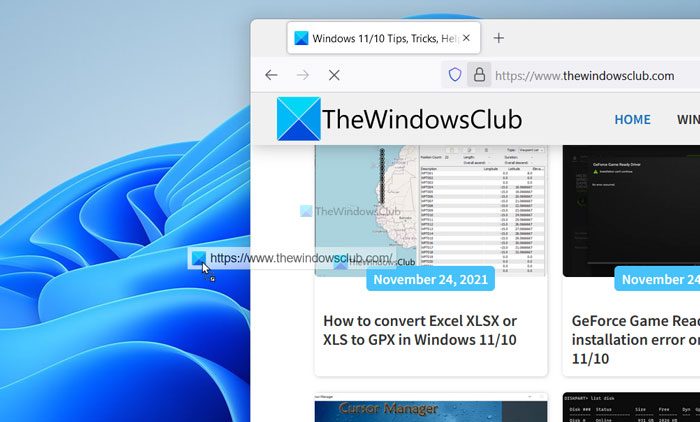
To create a desktop shortcut to any website using Firefox, follow these steps:
- Open the desired website in the Mozilla Firefox browser.
- Click on the padlock icon visible in the address bar.
- Drag and drop it to the desktop.
As there is no other option to create a desktop shortcut using the Firefox browser, you can use the drag-and-drop method to get the job done.
Once you finish these steps, it is time to move on to the second section of this guide, where you will learn the steps to pin the desktop shortcut to your favorite website to the Taskbar or Start Menu. You can follow the same steps to get the job done, no matter which browser you select. For this example, we are about to use the Google Chrome browser.
Pin website shortcuts to Windows Taskbar & Start Menu
To pin website shortcuts to Windows Taskbar and Start Menu, follow these steps:
- Right-click on the desktop shortcut.
- Select the Pin to Start option.
- Select the Show more options.
- Choose the Pin to taskbar option.
At first, you need to right-click on the desktop shortcut to your favorite website, which you created in the first step. In the context menu, you can find several options. You need to choose the Pin to Start option to pin the shortcut to your Start Menu.
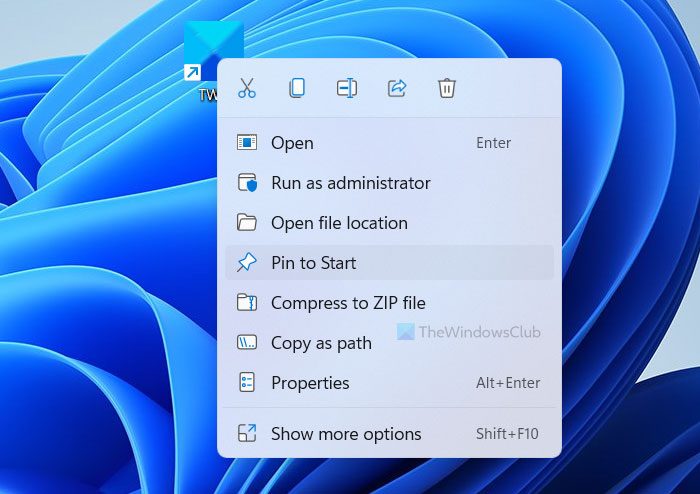
However, if you want to pin the desktop shortcut to the website to the Taskbar, you need to select the Show more options and choose the Pin to taskbar option.
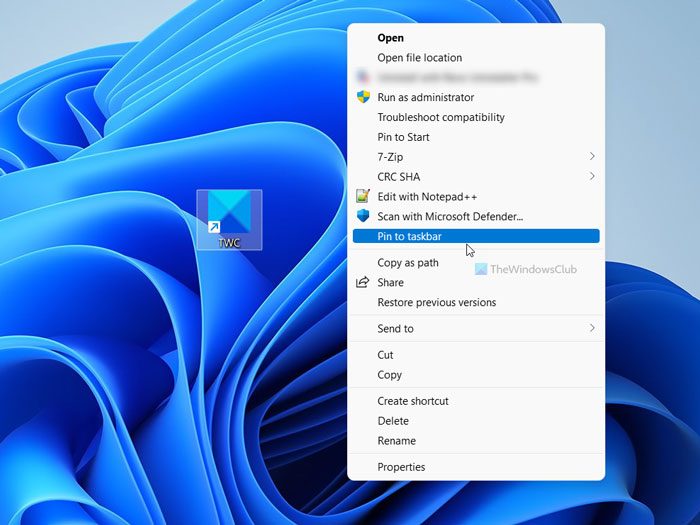
After that, the website shortcut will be pinned to the desired location.
For your information, if you use Microsoft Edge, you might not need to go through all the hassles since it offers a direct option. To follow that method, you need to open the website on the Microsoft Edge browser > click on the three-dotted button, and select the More tools option.
Here you can find two options – Pin to taskbar and Pin to Start.
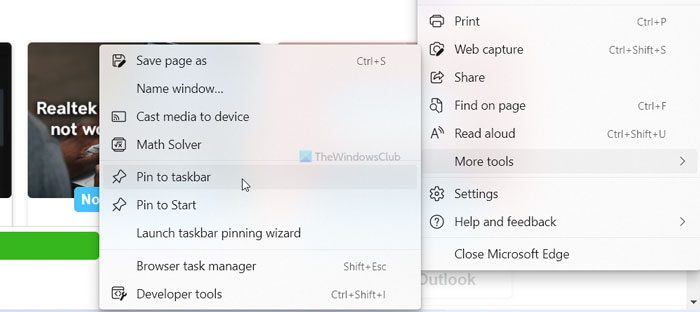
You can choose the option based on where you want to pin the website.
How do I pin a website shortcut to the Taskbar?
To pin a website shortcut to the Taskbar on Windows 11, you need to create it first. For that, you can use Google Chrome. At first, open the website in the Google Chrome browser, open the menu, and select the More tools > Create shortcut. Then, name the shortcut and right-click on it on the Desktop. Following that, select the Show more options and click on the Pin to taskbar option.
How do I add a website to my Start Menu?
To add a website to your Start Menu, you need to follow the aforementioned guide. At first, you need to create a desktop shortcut to the website you want to pin. Following that, you can right-click on the desktop shortcut and select the Pin to Start or Pin to taskbar option. However, if you use the Microsoft Edge browser, you can go to More tools > Pin to taskbar or Pin to Start option.

