
Google’s change in its Privacy terms has been a cause of concern for many. Google has also responded to the widespread outcry about this with the suggestion that you not log into your Google account if you have privacy concerns:
You don’t need to log in to use many of our services, including Search, Maps and YouTube. If you are logged in, you can still edit or turn off your Search history, switch Gmail chat to “off the record,” control the way Google tailors ads to your interests, use Incognito mode on Chrome, or use any of the other privacy tools we offer, says Google. You can use as much or as little of Google as you want. For example, you can have a Google Account and choose to use Gmail, but not use Google+. Or you could keep your data separate with different accounts, for example, one for YouTube and another for Gmail.
Prevent Google from tracking your activities or gathering your data
While you can always use a browser like Browzar to surf the web privately, there are also a few steps you can take, if you want to continue using your existing browsers and yet stay private, as far as is possible. To do so, you will have to log in to your Google account and change a few settings.
Read: Find out what Google knows about you.
Turn off search personalization
Google tries to personalize your search results based on your past searches, using Cookies. This search history personalization includes searches you’ve performed and links you’ve clicked. If you have clicked links of a particular site more often, it may show you links from that site more often.
To turn off search personalization, visit this page which lets you pause and remove your Web History from your Google account. Here you will also see a list of all your earlier searches.
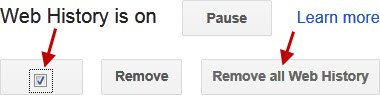
If you click on Pause, your web tracking will be paused, but your web history will not be erased. So check the check-box and click on Remove all Web History.

Confirm with an OK. This will Pause and remove your web history.
Tip: Use Google Privacy Settings Wizard to harden your settings.
Turn off personal results
You can also turn off personal results. This will also disable other personalization features. If this does not matter much to you, you might want to turn it off. To do so, open your Search Settings.
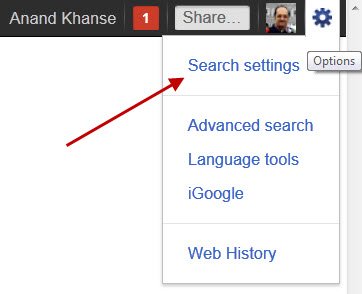
In the “Search plus Your World” section, select “Do not use personal results.” Click Save.

Searches that are part of the Search plus Your World, like results from Google+ shared by your friends, Picasa albums, Google products, Search History, will no longer appear in your search results.
UPDATE: Google makes accessing Privacy Controls easier.
Opt-out of ad personalization
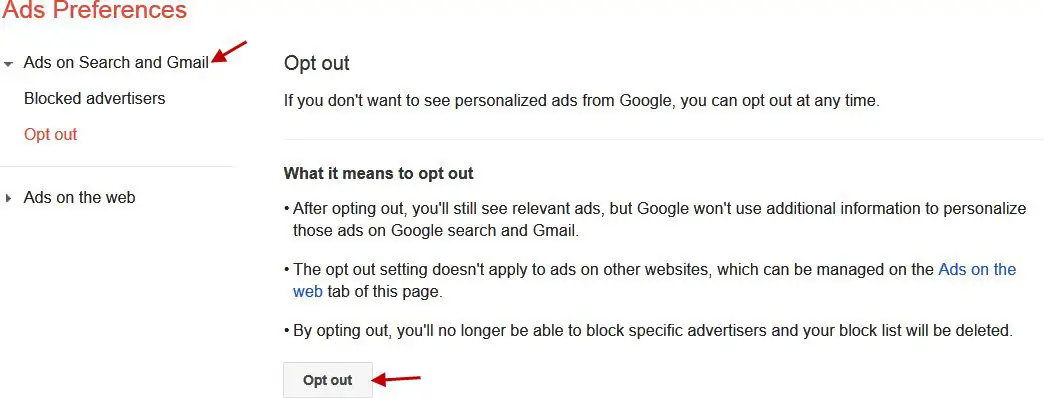
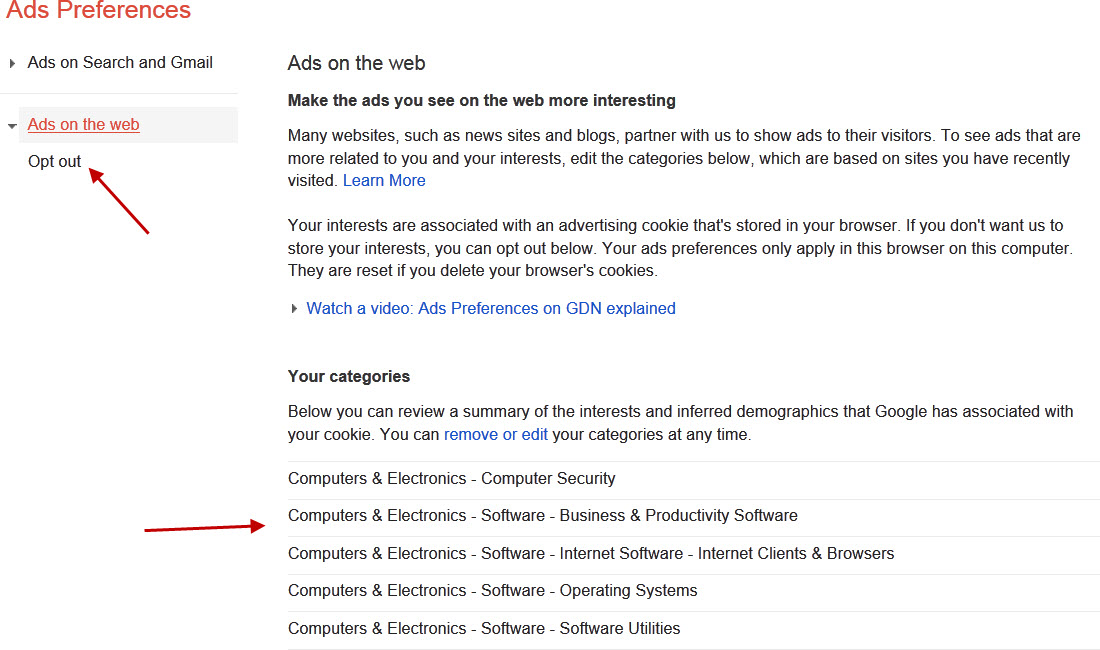
Google actually crawls your email to serve targeted advertising to you, depending on what you write in your mail. You can opt out of ad personalization using Preferences page. Visit this page to opt-out of Interest-based ads. Do note that you have to opt out of two types of ads.
Opt-out of Ads on Search and Gmail:
Opt out of Ads on the web:
After opting out, you’ll still see relevant ads, but Google won’t use additional information to personalize those ads on Google search and Gmail.
Watch the video on Ads preference manager.
Tip: Google Privacy Checkup Tool will harden your Privacy and make your online accounts safer.
Opt out of Gmail Chat History
Google stores all your chat logs. But you can opt of Gmail chat history. Such chats that have been taken off the record aren’t stored in your Gmail chat history, or in the Gmail chat history of your contact.
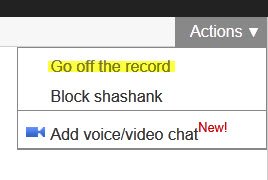
To take a chat off the record in Gmail and iGoogle, and prevent Google from saving their logs, click the Options link in the bottom of the chat window and select Go off the record.
Read: How to opt out of Google targeted advertising
Opt out of Google Analytics
Many websites including this one use Google Analytics to track web traffic and related statistics. But if you wish, you can opt out of websites logging your visits. For this, you can use the Google Analytics Opt-out Browser Add-on released by Google.

This plug-in works on Internet Explorer, Firefox, and Chrome. The add-on communicates with the Google Analytics JavaScript to indicate that information about the website visit should not be sent to Google Analytics.
Opt out of YouTube
You can also opt of Google tracking your YouTube video searches, targeted advertising, and viewing patterns. To do so, log in to your YouTube account and click on the Videos tab. Next, click History, select the checkbox, and click Clear all viewing history.
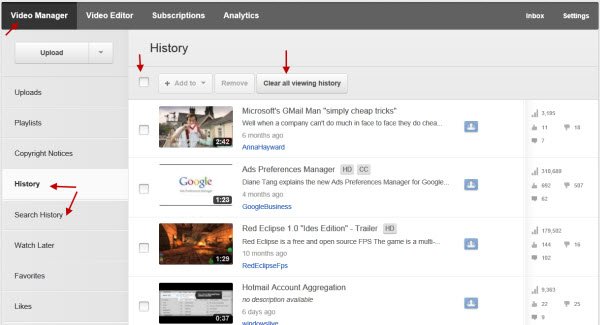
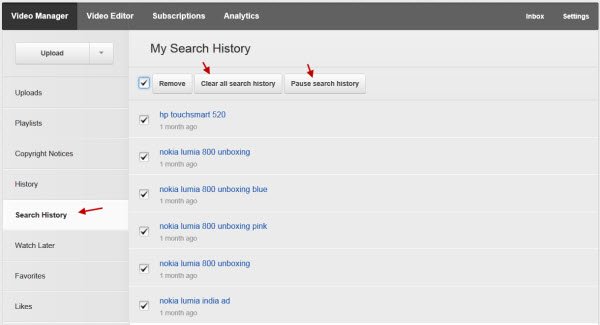
Next, click on Search History. Here, select Pause History. You can also select the checkbox and click on Clear all search history.
You can also click on your Settings and click on Privacy.
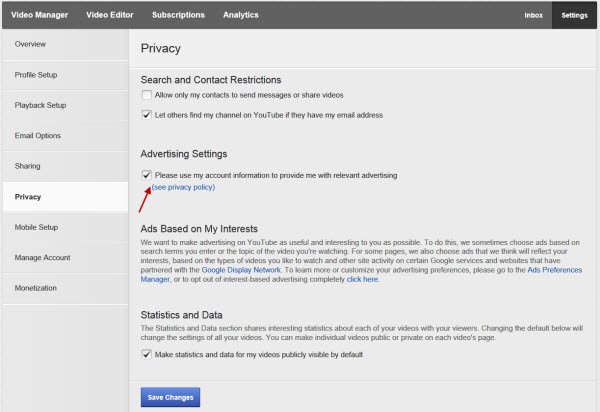
Next un-check the Please use my account to provide me with a relevant advertising check box and click on Save Changes. This will prevent Google from tracking you and providing you with relevant advertising.
To opt out of YouTube messages and video sharing go here.
Google Shared Endorsements
Shared endorsements pull your G+1s, YouTube Likes, and reviews from Google Maps & GooglePlay, and then turn them into advertisements for your connections. To opt out go here and uncheck the “Based upon my activity, Google may show my name and profile photo in shared endorsements that appear in ads” box.
If you need to reverse any of the changes made in your Google account anytime, you can do so, by opting back into the feature/s.
You can use Internet Explorer in InPrivate mode, Chrome in Incognito, etc. clearing your, to avoid your browser saving Cookies and browsing history. In any case, you could also maybe try clearing your Cookies more often, especially before using Google.
Google offers several privacy and opt-out tools, and you can check them all out, here. You could also check out some Online Safety and Privacy Tips from Google’s Good To Know website.
I am sure there may be more settings where you could opt out to try and maintain your privacy while using Google services. If you do know of any more, please do share them here for the benefit of others.
This post will show you how to completely Opt-out of Data Tracking & Targeted ads on the Internet.
