
In this post, we will see some of the new registry keys in Windows Desktop Window Manager. There are some new registry keys in the DWM registry key which can be found in the following location that can be used to customize the Visual Appearance of Aero in Windows.
HKEY_CURRENT_USER\Software\Microsoft\Windows\DWM
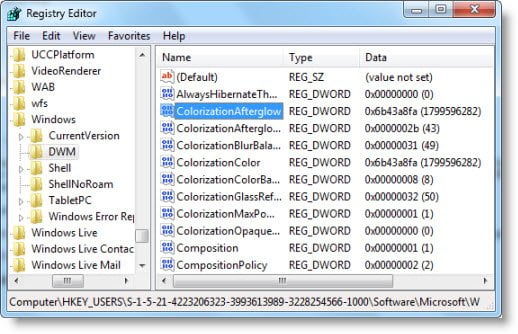
Change Visual Appearance using these Registry keys
They are :
- ColorizationAfterglow
- ColorizationAfterglowBalance
- ColorizationBlurBalance
- ColorizationColorBalance
- ColorizationGlassReflectionIntensity
- ColorizationOpaqueBlend
- Composition
- CompositionPolicy
- EnableAeroPeek.
Using the ColorizationColor Value Generator at Tweaks.com.
Just enter in the decimal a value that you want to use in the various boxes and the registry string will automatically be generated.
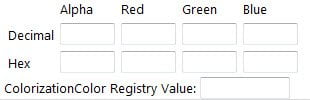
All values have a range between 0 and 255
- The Alpha value of 0 is completely transparent, 255 is completely solid.
- Setting red, green, and blue all to 255 will result in black.
- Setting red, green, and blue all to 0 will result in white.
- If you want a semi-transparent green interface, enter 128 for the alpha, 0 for red, 255 for green and 0 for blue.
I hope you find the article useful.
Read next: Optimize Performance by tweaking Visual Effects in Windows 11.

