
Windows 11/10 does not have an inbuilt Registry monitoring tool. But what you can do is, harness the Windows command-line program File Compare or fc.exe to compare two registry export files, and thus monitor Windows Registry changes. You can also use some freeware to monitor changes to the Registry on your Windows 11/10/8/7 system.
How to monitor and track Registry changes in Windows
You can monitor changes to Registry by using the command-line File Compare fc.exe tool or freeware like WhatChanged, RegShot, Sysinternals Process Monitor, etc. Let us take a look at the options available:
- File Compare fc.exe
- WhatChanged tool
- Sysinternals Process Monitor
- RegShot
- MJ Registry Watcher
- Nirsoft RegistryChangesView
Some other tools have been linked here too!
1] File Compare fc.exe
To use this File Compare or fc.exe program, first, export a .reg file, & name it as say rega.
After the change takes place, export the changed .reg file & name it as say, regb.
Now, open a command prompt and type:
fc /u rega.reg regb.reg > regcompare.txt
Since .reg files use Unicode, the /u switch, tells fc.exe to use Unicode.
You can now inspect the output regcompare in Notepad.
2] WhatChanged
You can also try this 3rd party utility WhatChanged to monitor the changes in your Windows 10/8/7 registry, easily.
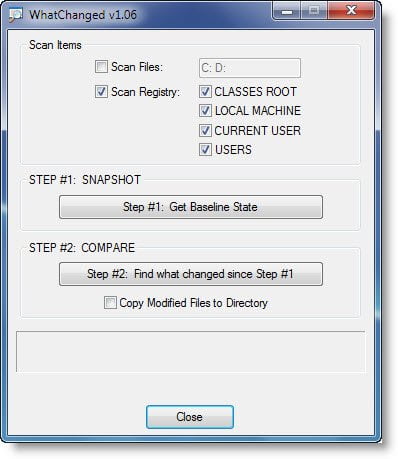
Simply download this portable app WhatChanged and run it before and after the change.
3] Sysinternals Process Monitor
Sysinternals Process Monitor is a great freeware, to monitor registry changes in real-time. Process Monitor is an advanced monitoring tool for Windows that shows real-time file system, Registry and process/thread activity. It combines the features of two legacy Sysinternals utilities, Filemon and Regmon, and adds an extensive list of enhancements including rich and non-destructive filtering, comprehensive event properties such as Session IDs and user names, reliable process information, full thread stacks with integrated symbol support for each operation, simultaneous logging to a file, and much more.
4] RegShot
RegShot is another small registry compare utility that allows you to quickly take a snapshot of your Registry and then compares it with a second one; done after doing system changes or installing a new software product. The changes report can be produced in text or HTML format and contains a list of all modifications that have taken place between snapshot1 and snapshot2. Get it here.
5] MJ Registry Watcher
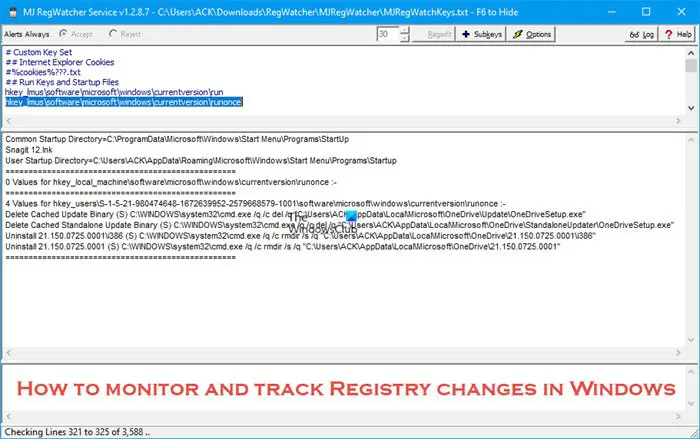
MJ Registry Watcher is a simple registry, file, and directory hooker, that safeguards the important startup files, registry keys and values that are commonly attacked by malware. It has very low resource usage, and is set to poll every 30 seconds by default, although you can adjust this to anywhere between 0 and 9999. Download it here.
6] RegistryChangesView
RegistryChangesView from Nirsoft lets you to take a snapshot of the Registry and later compare it with another Registry snapshot. When comparing 2 Registry snapshots, you can see the exact changes made in the Registry between the 2 snapshots. You can also export the Registry changes.
Should I use Registry Cleaners in Windows 11?
Some Registry Cleaners claim that they remove redundant items from Windows Registry, thus, making your computer faster. However, this is not true. Registry Cleaners do not make a Windows computer faster. Instead, they only delete the broken registry keys in your Registry. Microsoft does not support Registry Cleaners. According to Microsoft, you should not use Registry Cleaners, as they can delete the wrong keys due to which serious errors can occur on your system.
How do I fix Windows 11 registry errors?
Registry errors can occur due to corrupted or damaged registry keys, duplicate registry keys, virus or malware infection, fragmented registry, etc. You can fix the registry errors by repairing your system files, performing an Automatic Repair, etc. If these fixes do not work, perform a System Restore or In-place Upgrade.
BONUS TIPS:
- You can use a PowerShell script to monitor changes to a registry key. You can read the details here on devblogs.microsoft.com.
- You can also use PowerShell commands to track Registry changes. You can get the details here @Lee_Holmes.
There are other tools that can help you monitor the changes in the Windows Registry; they are:
- Registry Live Watch
- LeeLu Monitors AIO System Monitor
- FRSSystemWatch
- RegFromApp
- Registrar Registry Manager Lite.
These may also interest you:

